I
I
I
I
-
-
4
4
-
-
3
3
D
D
N
N
S
S
S
S
e
e
c
c
u
u
r
r
i
i
t
t
y
y
DNS security is able to ensure that the incoming data is not falsified and the source of the
data is secure and correct to prevent from DNS attack by someone.
I
I
I
I
-
-
4
4
-
-
3
3
-
-
1
1
G
G
e
e
n
n
e
e
r
r
a
a
l
l
S
S
e
e
t
t
u
u
p
p
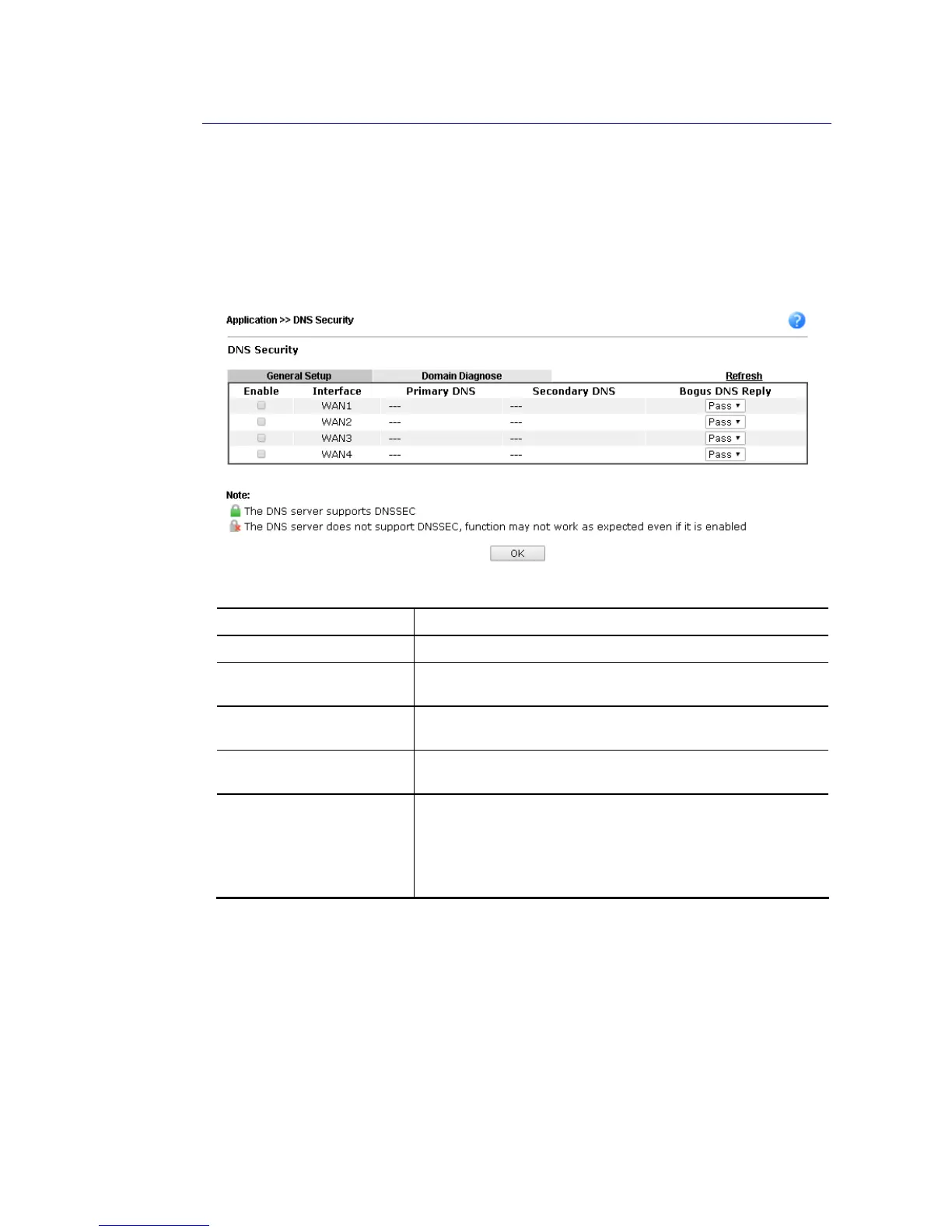
All of WAN interfaces of Vigor router can be configured with DNS Security enabled
respectively.
Available settings are explained as follows:
Item Description
Enable Check the box to enable the DNS security management.
Interface There are four WAN interfaces allowed to be set with DNS
security enabled.
Primary DNS Display the IP address of primary DNS obtained from DHCP
server or specified by Static WAN.
Secondary DNS Display the IP address of secondary DNS obtained from DHCP
server or specified by Static WAN.
Bogus DNS Reply Sometime, Vigor router might encounter packets from bogus
DNS inquiry. There are two ways to reply such DNS inquiry.
Drop – Discard the packets.
Pass – Accept the packets and let them pass through Vigor
router.














 To Next Page