H
H
o
o
w
w
c
c
a
a
n
n
y
y
o
o
u
u
s
s
e
e
t
t
a
a
G
G
R
R
E
E
o
o
v
v
e
e
r
r
I
I
P
P
s
s
e
e
c
c
p
p
r
r
o
o
f
f
i
i
l
l
e
e
?
?
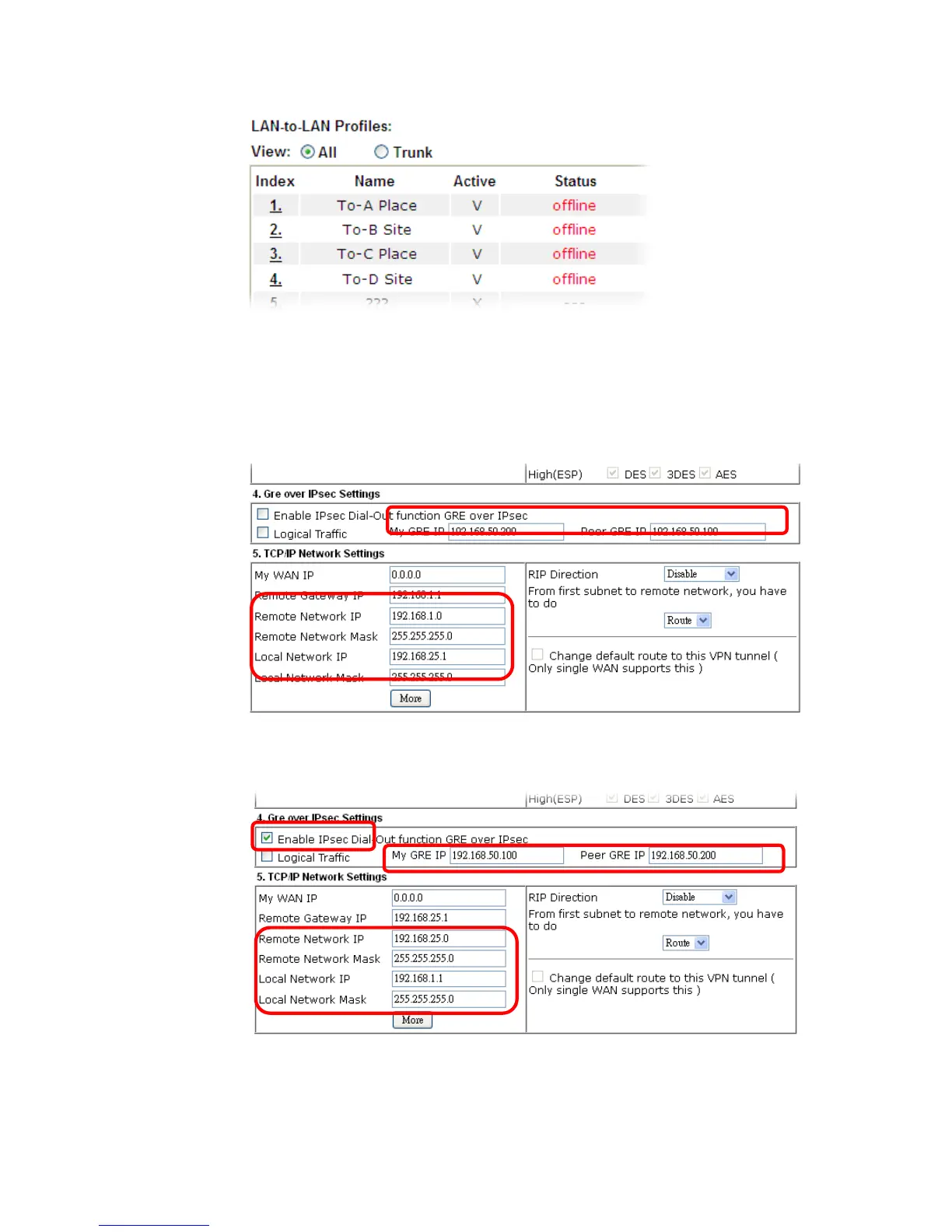
1. Please go to LAN to LAN to set a profile with IPsec.
2. If the router will be used as the VPN Server (i.e., with virtual address 192.168.50.200).
Please type 192.168.50.200 in the field of My GRE IP. Type IP address (192.168.50.100) of
the client in the field of Peer GRE IP. See the following graphic for an example.
3. Later, on peer side (as VPN Client): please type 192.168.50.100 in the field of My GRE IP
and type IP address of the server (192.168.50.200) in the field of Peer GRE IP.














 To Next Page