Vigor2860 Series User’s Guide
413
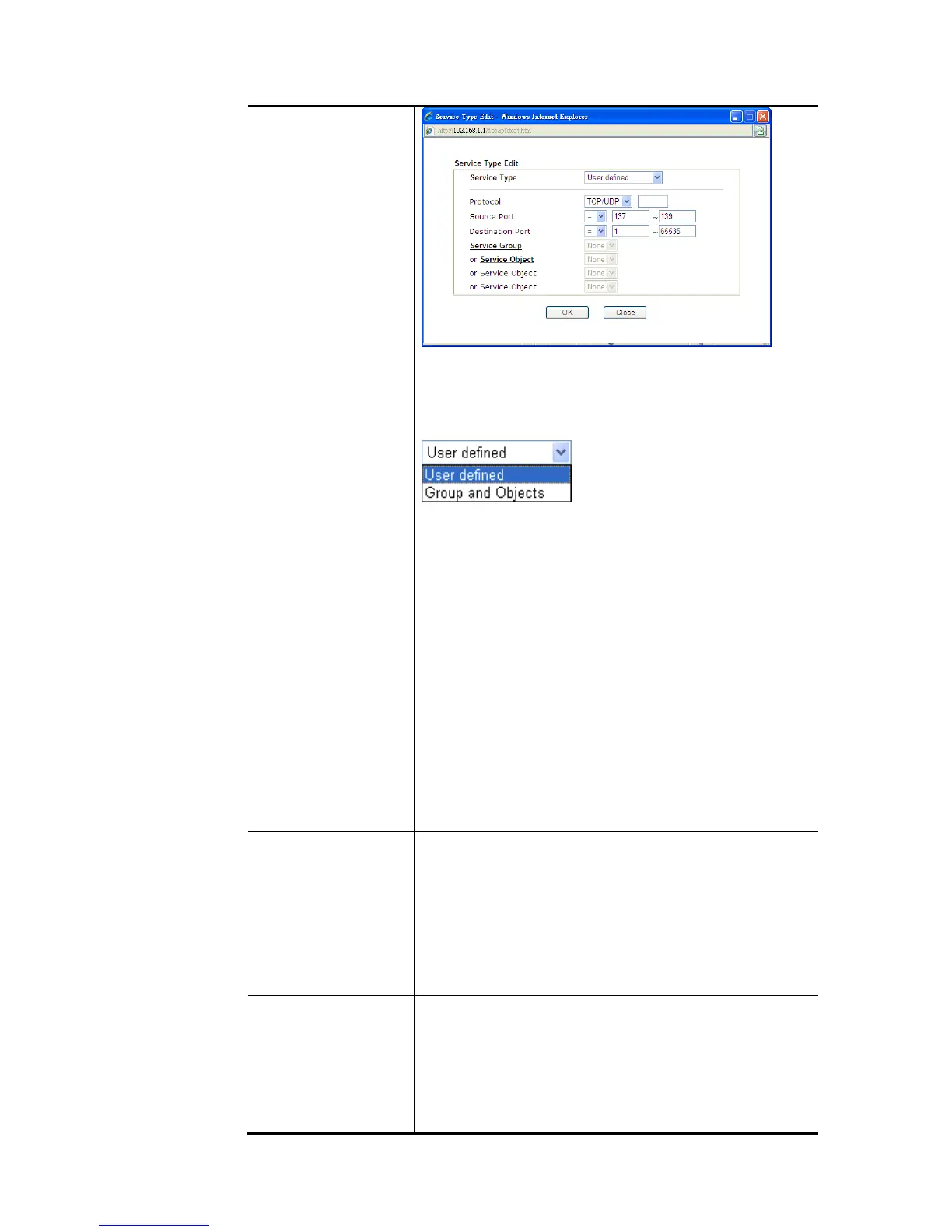
To set the service type manually, please choose User
defined as the Service Type and type them in this dialog. In
addition, if you want to use the service type from defined
groups or objects, please choose Group and Objects as the
Service Type.
Protocol - Specify the protocol(s) which this filter rule will
apply to.
Source/Destination Port –
(=) – when the first and last value are the same, it indicates
one port; when the first and last values are different, it
indicates a range for the port and available for this service
type.
(!=) – when the first and last value are the same,
it
indicates all the ports except the port defined
here; when the first and last values are different, it
indicates that all the ports except the range defined here
are available for this service type.
(>) – the port number greater than this value is available.
(<) – the port number less than this value is available for
this profile.
Service Group/Object - Use the drop down list to choose
the one that you want.
Fragments Specify the action for fragmented packets. And it is used
for Data Filter only.
Don’t care -No action will be taken towards fragmented
packets.
Unfragmented -Apply the rule to unfragmented packets.
Fragmented - Apply the rule to fragmented packets.
Too Short - Apply the rule only to packets that are too short
to contain a complete header.
Filter Specifies the action to be taken when packets match the
rule.
Block Immediately - Packets matching the rule will be
dropped immediately.
Pass Immediately - Packets matching the rule will be
passed immediately.
Block If No Further Match - A packet matching the rule,














 To Next Page