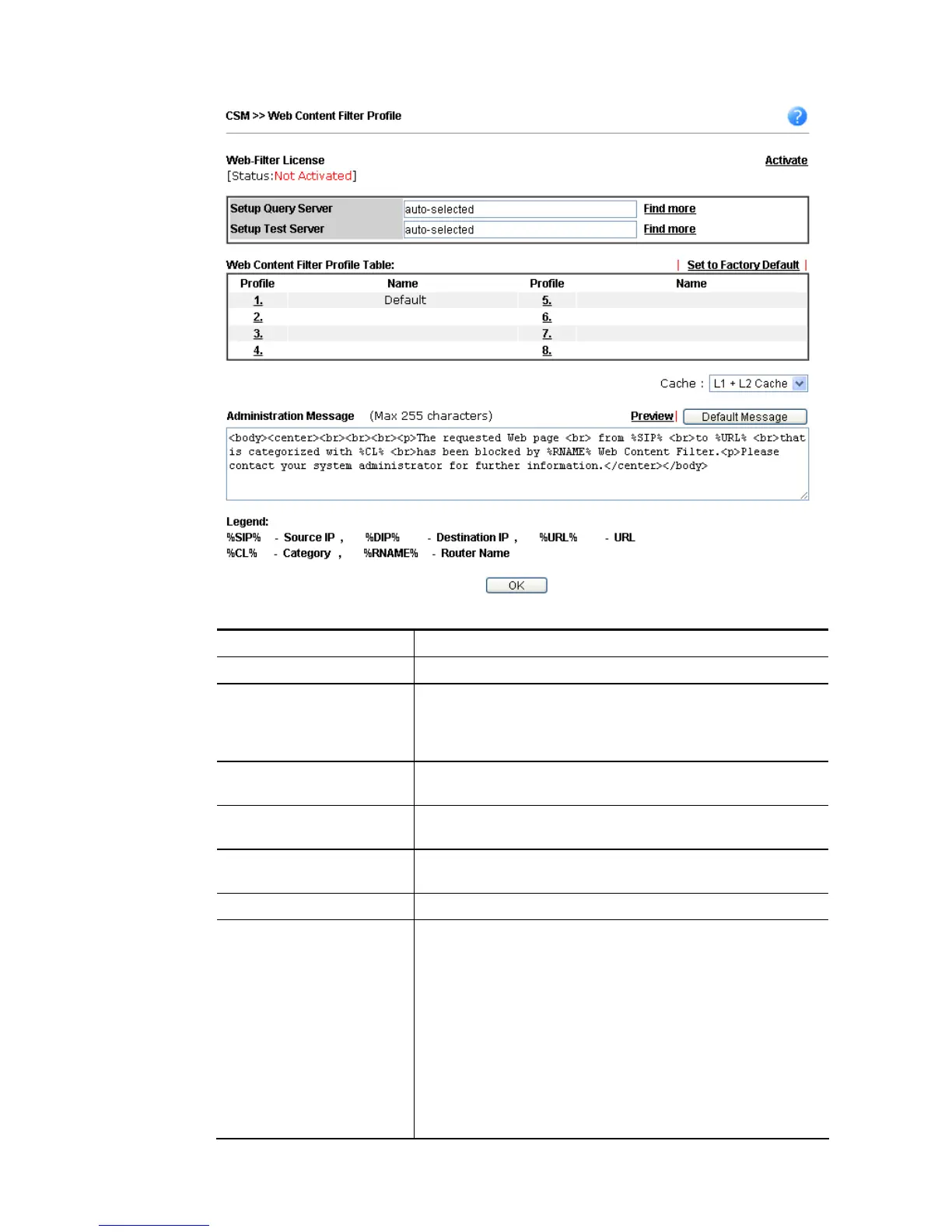
Available settings are explained as follows:
Item Description
Activate Click it to access into MyVigor for activating WCF service.
Setup Query Server It is recommended for you to use the default setting,
auto-selected. You need to specify a server for categorize
searching when you type URL in browser based on the web
content filter profile.
Setup Test Server It is recommended for you to use the default setting,
auto-selected.
Find more Click it to open http://myvigor.draytek.com for searching
another qualified and suitable server.
Test a site to verify
whether it is categorized
Click this link to do the verification.
Set to Factory Default Click this link to retrieve the factory settings.
Cache None – the router will check the URL that the user wants to
access via WCF precisely, however, the processing rate is
normal. Such item can provide the most accurate URL
matching.
L1 – the router will check the URL that the user wants to
access via WCF. If the URL has been accessed previously, it
will be stored in the router to be accessed quickly if
required. Such item can provide accurate URL matching with
faster rate.
L2 – the router will check the URL that the user wants to
access via WCF. If the data has been accessed previously, the
IP addresses of source and destination IDs will be memorized














 To Next Page