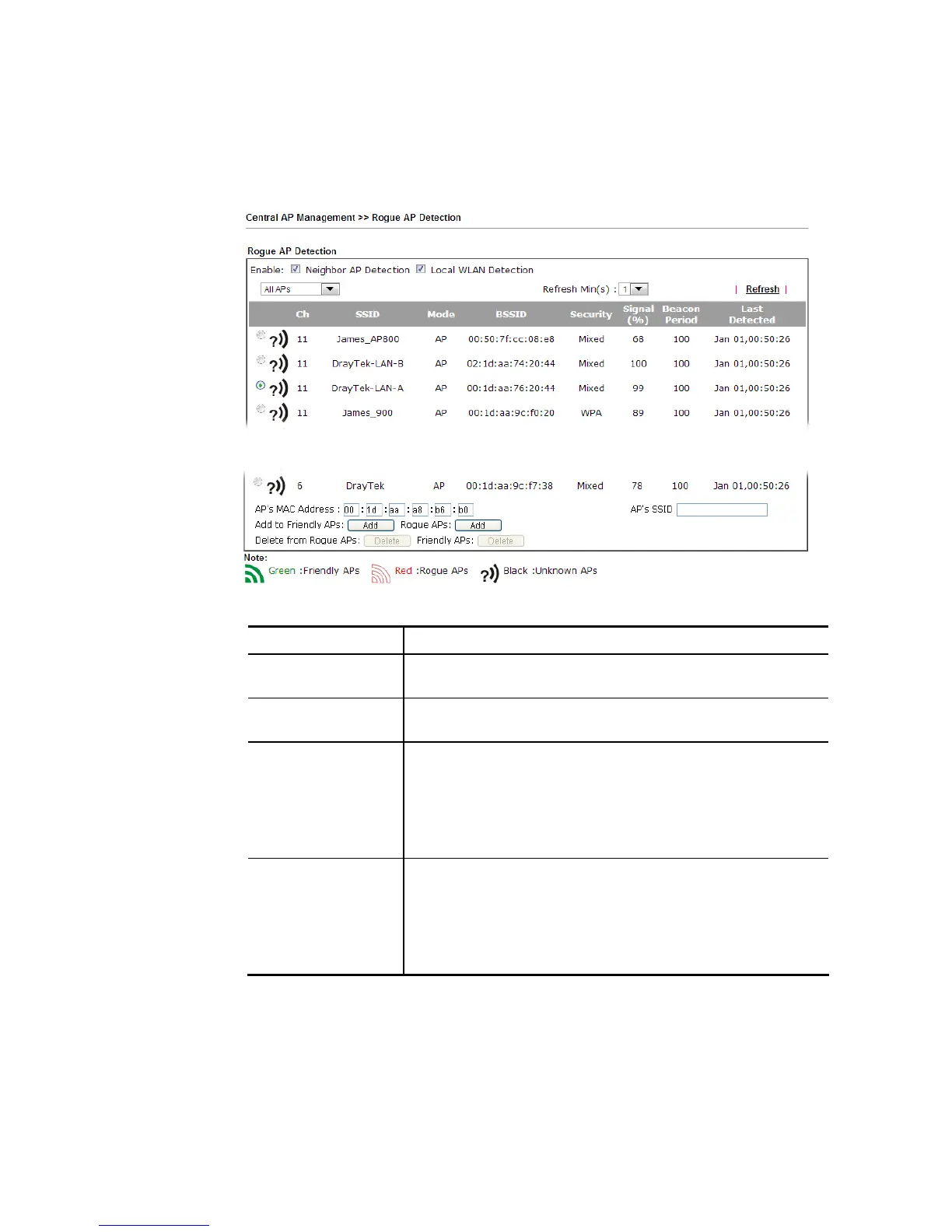
All the APs detected by Vigor router will be treated as unknown APs. You have to specify
which AP is friendly and which one is Rogue respectively. Follow the steps below to perform
the classification of access points.
1. Click the radio button on one of the access points. In this case, DrayTek-LAN-A is
selected.
2. Later, some options will appear on the bottom of the page.
Available settings are explained as follows:
Item Description
AP’s MAC Address The MAC address of the selected AP will be displayed here
automatically.
AP’s SSID The SSID of the selected AP will be displayed here
automatically.
Add to Friendly APs - If the selected AP shall be treated as Friendly
AP, simply click Add to change its classification from unknown
to Friendly.
Rogue APs - If the selected AP shall be treated as rogue AP,
simply click Add to change its classification from unknown to
Rogue.
Delete From Rogue APs - If you want to change the classification of the
rogue AP, simply choose the one and click Delete. Later, the
page will refresh and the one will be classified as Unknown.
Friendly APs - If you want to change the classification of the
friendly AP, simply choose the one and click Delete. Later, the
page will refresh and the one will be classified as Unknown.
3. Click OK to save the settings.
The following figure shows the APs classified and displayed in different colors.














 To Next Page