6 PKE-SWD-CP, Connection for circuit-breaker PKE
6.5 Commissioning
SmartWire-DT module IP20 01/20 MN05006001Z-EN www.eaton.com 143
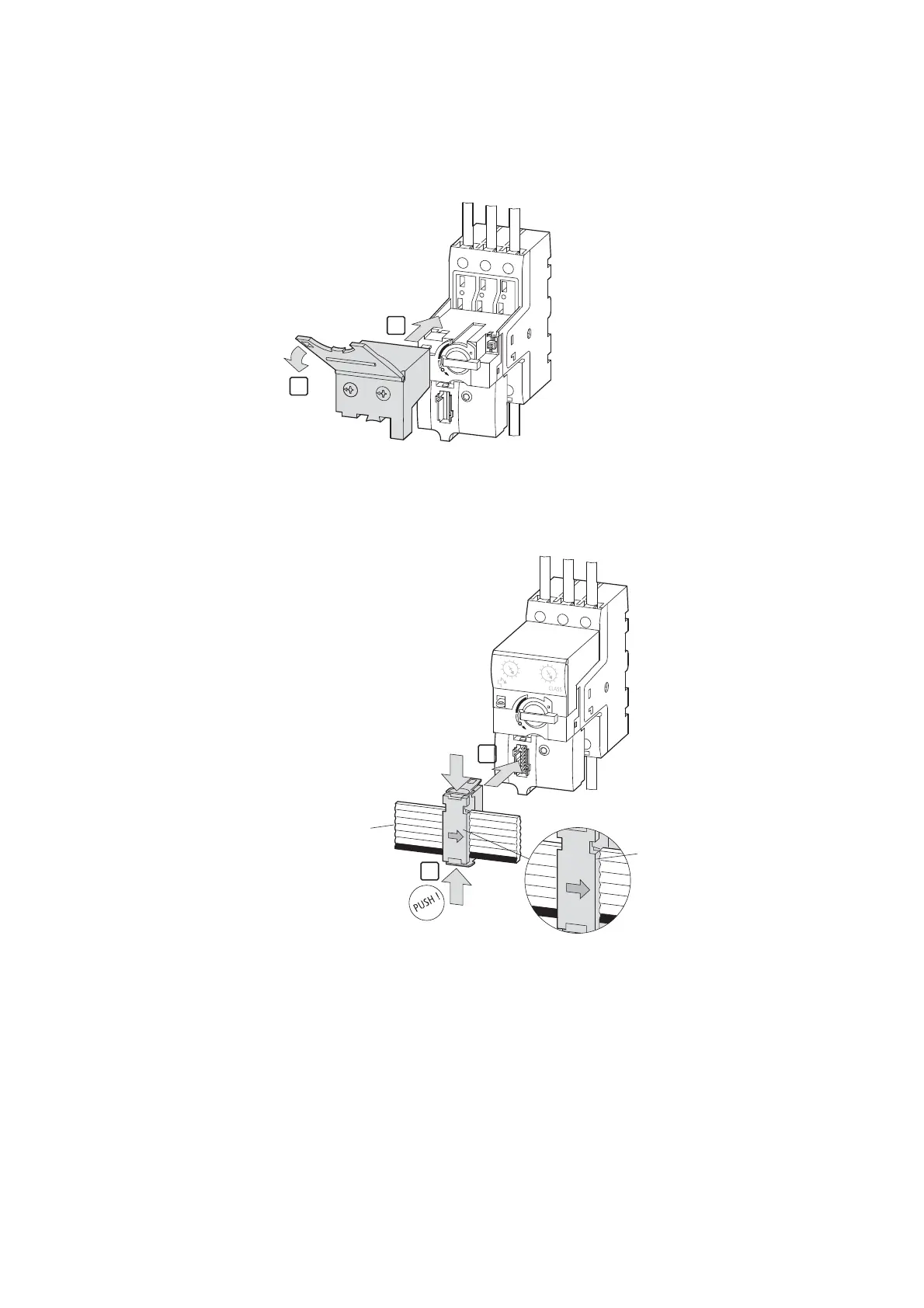
▶ Fit the PKE trip block of the part no. PKE-XTU(W)ACP-…
▶ Set the appropriate overload release or short-circuit release values, as the
case may be, on the PKE trip block.
▶ Plug the SmartWire-DT external device plug,with the
SmartWire-DT ribbon cable in place already, into the device.
6.5 Commissioning
During commissioning, all modules on SmartWire-DT will be automatically
assigned addresses via the gateway. To start this process, press the configu-
ration button on front of the gateway. The SmartWire-DT diagnostics LED
will flash while addresses are being assigned. Once all addresses have been
assigned, the diagnostics LED will light up with a solid green light.
1
2
1
2
SWD4-8SF2-5
+ 15V
SWD4-8SF2-5
+ 15V
SWD4-8SF2-5
SWD4-100LF8-24
SWD4-3LF8-24-2S
SWD4-5LF8-24-2S
SWD4-10LF8-24-2S


 To Next Page
 Loading...