EasyManua.ls Logo

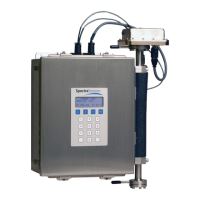
Endress+Hauser SpectraSensors J22 TDLAS - User Manual

Endress+Hauser SpectraSensors J22 TDLAS
158 pages
Print Icon
To Next Page IconTo Next Page
Loading...
Products Solutions Services
4900002277/EN/01.21
Valid as of version
1.00.zz (Device firmware)
Operating Instructions
J22 TDLAS Gas Analyzer

Table of Contents

Questions and Answers

  • G
    Gwendolyn WilliamsAug 18, 2025
    What to do if the Endress+Hauser SpectraSensors J22 TDLAS device measures incorrectly?
    • D
      davilajamesAug 18, 2025
      If your Endress+Hauser Measuring Instruments device is measuring incorrectly, first check and correct the parameter configuration. Also, observe the limit values specified in the Technical Data.
  • D
    Deborah TurnerAug 21, 2025
    How to fix a dark local display and no output signals on Endress+Hauser Measuring Instruments?
    • D
      Deborah PriceAug 21, 2025
      If the local display is dark and there are no output signals on your Endress+Hauser Measuring Instruments, consider these potential causes and solutions: * Ensure the supply voltage matches the value indicated on the nameplate and apply the correct supply voltage. * Correct the polarity if the supply voltage polarity is wrong. * Check the cable connections and correct if necessary to ensure proper contact between connecting cables and terminals. * Verify that the terminals are correctly plugged into the I/O electronics module and the main electronics module. * If the I/O or main electronics module is defective, order a spare part.
  • A
    Anthony MccormickAug 23, 2025
    What to do if the Endress+Hauser Measuring Instruments device shows the correct value on the local display, but the signal output is incorrect?
    • L
      Lynn MurphyAug 23, 2025
      If your Endress+Hauser Measuring Instruments device shows the correct value on the local display but the signal output is incorrect, check and correct the parameter configuration, as this could be due to a configuration error.
  • J
    John MartinAug 26, 2025
    Why is the local display dark on my Endress+Hauser SpectraSensors J22 TDLAS, but the signal output is within the valid range?
    • B
      braynathanielAug 26, 2025
      If the local display on your Endress+Hauser Measuring Instruments is dark, but the signal output is within the valid range, it could be due to the following reasons: * The display might be set too bright or too dark. To adjust, simultaneously press the indicated buttons to set the display brighter or darker. * The display module cable may not be plugged in correctly; ensure the plug is correctly inserted into the main electronics module and display module. * The display module itself might be defective; in which case, you would need to order a spare part.
  • Z
    Zachary FriedmanAug 28, 2025
    How to troubleshoot 'Communication Error' on Endress+Hauser Measuring Instruments?
    • A
      Alexander PayneAug 28, 2025
      If you see a 'Communication Error' message on the local display of your Endress+Hauser Measuring Instruments, it means the communication between the display module and the electronics is interrupted. Check the cable and the connector between the main electronics module and display module. If the problem persists, consider ordering a replacement part.
  • J
    Julie RobertsAug 30, 2025
    How to resolve no write access to parameters on Endress+Hauser SpectraSensors J22 TDLAS Measuring Instruments?
    • M
      Melissa BennettAug 31, 2025
      If you have no write access to parameters on your Endress+Hauser Measuring Instruments, it could be due to: 1. Hardware write protection being enabled: Set the write protection switch on the main electronics module to the Off position. 2. The current user role having limited access authorization: Check the user role and enter the correct customer-specific access code.
  • M
    Mary RomeroSep 2, 2025
    What causes the signal output to be outside the valid range on Endress+Hauser SpectraSensors J22 TDLAS?
    • L
      Linda RodriguezSep 2, 2025
      If the signal output is outside the valid range on your Endress+Hauser Measuring Instruments, the main electronics module may be defective. In this case, you should order a spare part.
  • M
    Matthew SimpsonSep 4, 2025
    Why is there no connection via Modbus RS485 on Endress+Hauser Measuring Instruments?
    • J
      Jonathan StewartSep 4, 2025
      If there is no connection via Modbus RS485 on your Endress+Hauser Measuring Instruments, it could be due to: * The Modbus RS485 cable being incorrectly terminated: Check the terminating resistor. * Incorrect settings for the communication interface: Check the Modbus RS485 configuration.
  • N
    Noah AdamsSep 7, 2025
    Why is my Endress+Hauser SpectraSensors J22 TDLAS not connecting to the Web server?
    • V
      Vincent PetersenSep 7, 2025
      If your Endress+Hauser Measuring Instruments is not connecting to the Web server, it could be due to: * The Web server being disabled. * Incorrect settings for the Ethernet interface of the computer: Check the properties of the Internet protocol (TCP/IP) and the network settings with the IT manager.
  • D
    Desiree BrennanSep 10, 2025
    What to do if Web browser is frozen while using Endress+Hauser SpectraSensors J22 TDLAS Measuring Instruments?
    • O
      ohendersonSep 10, 2025
      If the web browser is frozen and operation is no longer possible while using Endress+Hauser Measuring Instruments, it could be due to: * Active data transfer: Wait until the data transfer or current action is finished. * Lost connection: Check the cable connection and power supply. Refresh the web byte and restart if necessary.

Summary

Introduction

Symbols Used

Explains symbols for safe and effective operation and maintenance.

Standard Documentation

Lists all available documentation, including safety manuals and parameter descriptions.

Safety

Personnel Qualifications

Required training and qualifications for personnel handling the analyzer.

Potential Risks Affecting Personnel

Hazards during operation and service, including electrocution and laser exposure.

Product Safety

General safety guidelines, compliance, and handling precautions for the analyzer.

IT Security

Measures to protect the analyzer system from unauthorized access and modifications.

Product Description

Product Identification

How to identify the measuring device and its main components.

Symbols on the Equipment

Explains electrical, informational, and warning symbols found on the analyzer's hardware.

Installation

Tools and Lifting;Carrying

Necessary tools and safe handling procedures for physical installation.

Mounting the Analyzer

Procedures and hardware requirements for physically mounting the analyzer.

Electrical Connections

Field wiring and connection steps for the analyzer controller and enclosures.

Hardware Settings

Configuration of device address, terminating resistors, and protection degrees.

Operation Options

Structure and Function of the Operating Menu

Explains the menu hierarchy, user roles, and operating philosophy.

Access to the Operating Menu via the Local Display

Navigating and operating the analyzer using its physical interface.

User roles and related access authorization

Defines user roles and their access privileges to parameters.

Access to the Operating Menu Via the Web Browser

Operating and configuring the analyzer through a web interface.

System Integration

Modbus RS485 Information

Details Modbus protocol, function codes, register information, and data mapping.

Scan list configuration

Requirements and procedures for configuring the Modbus RS485 scan list.

Commissioning

Configuring the Measuring Device

Initial setup of parameters like tag name, analyte type, calibration, and units.

Configuring the communication interface

Setting up communication parameters like bus address, baud rate, and parity.

Configuring the output modules

Setup for current, switch, and relay outputs including signal modes and limits.

Using parameters for device administration

Managing access codes, device reset, and configuration backups.

Operation

Reading Measured Values

Accessing and displaying current process measurements from various outputs.

Showing Data Logging

Configuring and viewing historical measured value trends via charts.

Adapting the Measuring Device to the Process Conditions

Fine-tuning device settings for specific process requirements.

Diagnostics and Troubleshooting

General Troubleshooting

Common issues and solutions for local display, output signals, and access problems.

Diagnostic Information via Light Emitting Diodes

Interpreting controller LED status indicators for device status.

Pending Diagnostic Events

Viewing and rectifying current and past diagnostic events.

Event Logbook

Reviewing chronological event messages and filtering them by category.

Device information

Retrieving device identification parameters like serial number and firmware version.

Signal Alarms

Understanding device alarms and failure modes for different interfaces.

Maintenance;Service

Cleaning and Decontamination

Procedures for cleaning sampling lines and the analyzer exterior.

Troubleshooting;Repairs

Guidance on common repairs, including filter replacement procedures.

Packing, Shipping and Storage

Guidelines for safely handling the analyzer during transport and storage.

Service Contact

Information on how to contact technical support and prepare inquiries.

Spare Parts

Controller Spare Parts

List of replacement parts for the analyzer controller module.

Analyzer Spare Parts

List of replacement parts for the main J22 TDLAS Gas Analyzer unit.

Technical Data

Electrical & Communications

Specifications for power input, output types, and communication protocols.

Application Data

Environmental conditions, pressure, flow, and measurement range specifications.

Physical Specifications

Weight, dimensions, and area classification details for different configurations.

Data backup

Procedures for backing up, transferring, and managing device configurations.

System Drawings

System Wiring (ATEX;CSA)

Electrical wiring diagrams for ATEX/CSA installations.

System Connections

Diagrams illustrating physical connections and key components.

Mounting dimensions

Dimensional drawings for analyzer mounting configurations.

Endress+Hauser SpectraSensors J22 TDLAS Specifications

General IconGeneral
ManufacturerEndress+Hauser
TechnologyTDLAS (Tunable Diode Laser Absorption Spectroscopy)
EnclosureIP66 / NEMA 4X
Measurement PrincipleLaser absorption spectroscopy
MountingInline or extractive
Measurement RangeDependent on target gas and application
Operating Temperature-20 to +50°C
Process TemperatureUp to 200°C (depending on application)
Response TimeLess than 2 seconds
Communication ProtocolsModbus, Ethernet
Power Supply24 VDC
Target GasNH3 (Ammonia)

Related product manuals