12-32 Troubleshooting
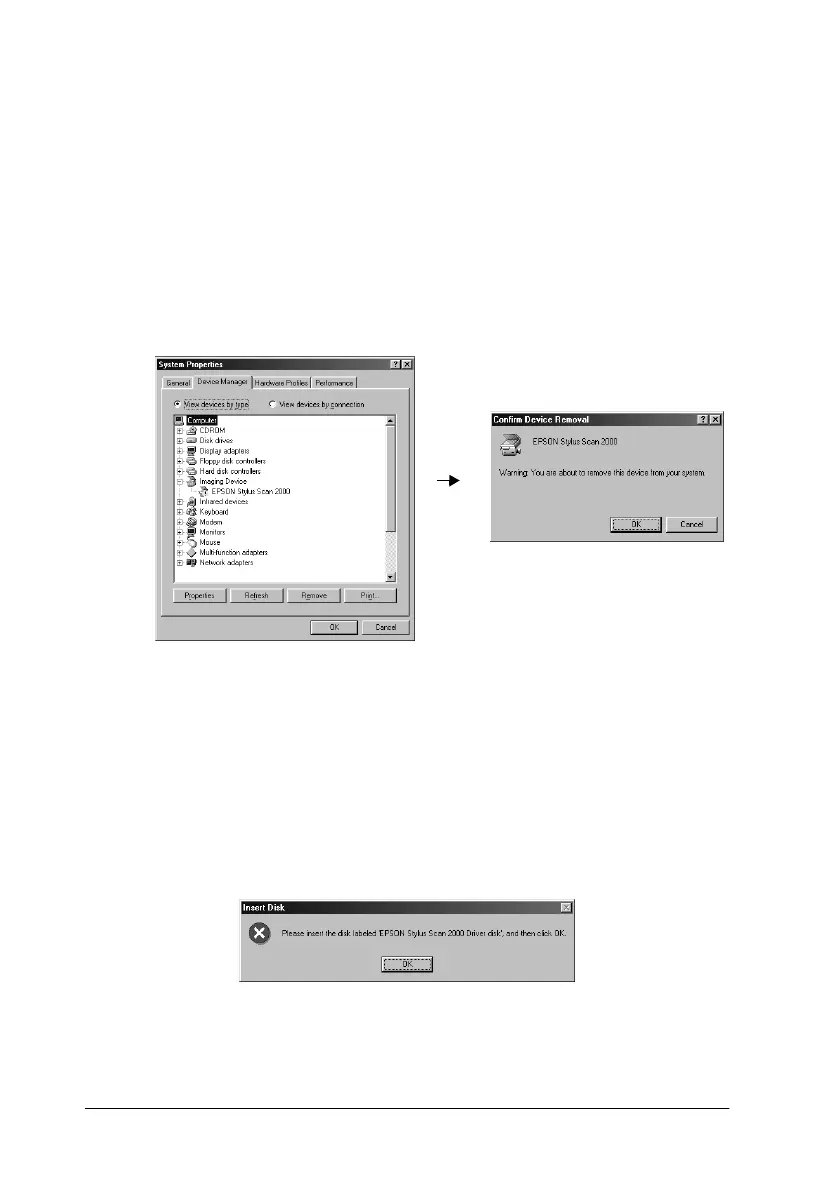
If EPSON Stylus Scan 2000 appears under Imaging Device
Note:
Make sure the Stylus Scan is on and connected to your computer. If the
Stylus Scan is off or not connected to your computer, you cannot
reinstall the driver properly.
1. If ! EPSON Stylus Scan 2000 appears under Imaging Device,
click ! EPSON Stylus Scan 2000. Then click Remove and
OK.
2. Click Close to close the System Properties Window.
3. Make sure the Stylus Scan is on and restart your computer.
4. When the following dialog appears, insert the EPSON Stylus
Scan 2000 Software for Windows CD-ROM in the CD-ROM
drive, then click OK.



















 To Next Page