Home
Epson
All in One Printer
Stylus Scan 2000
Page 45
Epson Stylus Scan 2000 - Page 45
225 pages
Manual
Save Page as PDF
To Next Page
To Next Page
To Previous Page
To Previous Page
Loading...
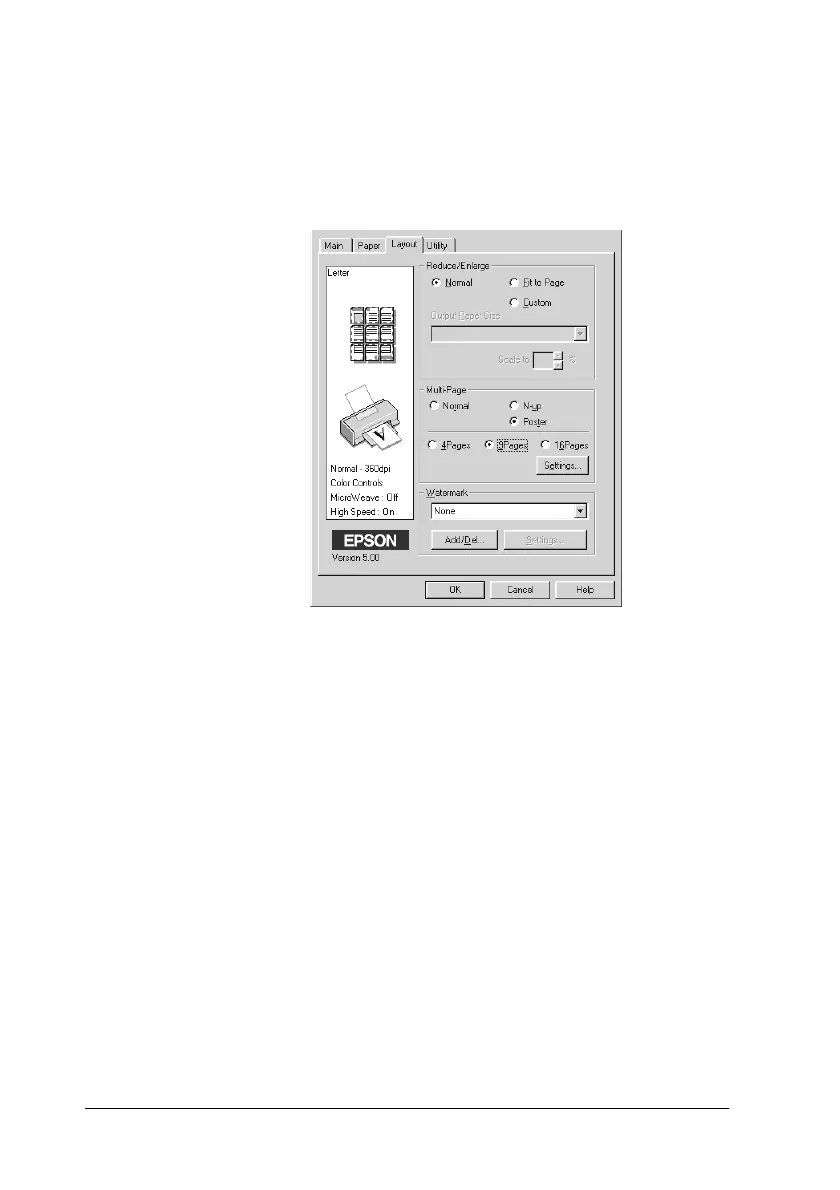
4-14
Using the Printer Sof
tware for Windows
Using the Pape
r menu set
tings
Use the
Pa
per
menu to c
hange the p
aper size, set
the number of
copies and other
copy paramet
ers, speci
fy the pape
r orientat
ion,
and adju
st the print
able area.
44
46
Table of Contents
Main Page
Default Chapter
3
Table of Contents
3
Chapter 1 EPSON Stylus Scan Parts and Functions
9
Stylus Scan Parts and Control Panel Functions
10
Control Panel
11
Chapter 2 Safety Instructions
16
Important Safety Instructions
16
A few Precautions
17
When Using the Stylus Scan
17
When Handling the Ink Cartridges
17
When Choosing a Place for the Stylus Scan
18
ENERGY STAR Compliance
19
Warnings, Cautions, and Notes
19
Chapter 3 Loading the Paper
21
Loading Plain Paper
21
Loading the Paper
21
Loading Special Paper and Other Media
22
About Special Media Cleaning Sheets
26
Loading Envelopes
26
Using EPSON Photo Paper
27
Loading
28
Removing the Perforated Margins
29
Storing EPSON Photo Paper
31
Chapter 4 Using the Printer Software for Windows
33
Printer Software Introduction
33
Getting more Information
33
Accessing the Printer Software
33
Making Changes to Printer Driver Settings
35
Making the Media Type Setting
36
Using the Automatic Setting
38
Using the Photo Enhance Setting
39
Using the Custom Settings
40
Using the Advanced Settings
41
Previewing Your Print out
43
Modifying the Printout Style
44
Using the Printer Utilities
52
Status Monitor 3
53
Nozzle Check
53
Head Cleaning
53
Print Head Alignment
53
Printer and Option Information
54
Speed & Progress
55
Getting Information through Online Help
57
Accessing Help from Your Application
57
Accessing Help from the Start Menu
57
Increasing the Print Speed
58
Making General Speed Adjustments
58
Using the High Speed Copies Feature
60
Chapter 5 Checking Printer Status and Managing Print Jobs for
62
Using the Progress Meter
62
Using the EPSON Spool Manager
64
Accessing EPSON Status Monitor 3
65
Chapter 6 Using the Printer Software for Macintosh
67
Printer Software Introduction
67
Making Changes to Printer Driver Settings
67
Making the Media Type Settings
69
Using the Automatic Settings
71
Using the Photo Enhance Setting
71
Using the Custom Settings
72
Using the Advanced Settings
73
Saving and Deleting Your Advanced Settings
75
Using Your Saved Settings
76
Changing the Page Setup
76
Defining a Custom Paper Size
77
Modifying the Layout
79
Setting the Print Time
84
Previewing Your Printout
85
Saving Print Data in Files
87
Using the Printer Utilities for Macintosh
88
EPSON Statusmonitor
89
Nozzle Check
89
Head Cleaning
89
Print Head Alignment
89
Configuration
90
Chapter 7 Checking Printer Status and Managing the Print Jobs
92
Using the EPSON Statusmonitor
92
Making Configuration Settings
93
Controlling Background Printing
94
Using EPSON Monitor3
95
Changing the Priority of Print Jobs
97
Chapter 8 Scanner
99
Loading the Document
99
Loading Thin or Fragile Media
100
For Windows
102
Using the EPSON SMART PANEL
102
Scanning from Software Applications
108
For Macintosh
109
Scanning with Pagemanager
109
Scanning with Applications Other than Pagemanager
110
Understanding the Configuration Settings
113
Chapter 9 Copier
116
Loading the Paper
116
Using the Copy Utility (from EPSON SMART PANEL)
117
Accessing the Copy Utility
117
Making Copy Settings in the Copy Utility
118
Copying Using Stylus Scan's Control Panel
121
Selecting the Ratio and the Mode
121
Setting the Magnification
121
Selecting the Copy Mode
122
Checking the Current Paper Size for Copying
123
Changing the Paper Size for Copying
124
Chapter 10 Replacing Ink Cartridges
126
Replacing Empty Ink Cartridges
126
Using the Control Panel
126
Replacing a Color Ink Cartridge
127
Replacing a Black Ink Cartridge
131
Using the Status Monitor 3
135
Replacing an Old or Damaged Ink Cartridge
135
Chapter 11 Maintenance
142
Checking the Print Head Nozzles
142
Using the Nozzle Check Utility
142
Using the Control Panel Buttons
143
Cleaning the Print Head
145
Using the Head Cleaning Utility
145
Using the Control Panel Buttons
149
Aligning the Print Head
150
Calibrating Your System
151
Calibrating Your Screen
152
Cleaning the EPSON Stylus Scan
154
Transporting the EPSON Stylus Scan
155
Chapter 12 Troubleshooting
158
Diagnosing the Problem
158
Error Indicators
159
Status Monitor 3
161
Running a Printer Operation Check
161
Printing and Copying Problems
164
Print and Copy Quality Could be Better
164
The Stylus Scan Does Not Print or Copy
168
Paper Does Not Feed Correctly
171
Printout Is Not What You Expected
173
Scanning Problems
176
Troubleshooting Scanning Problems
176
Something Is Missing or Incorrect in the Scanned Image
177
The Placement of Text and Graphics on the Page Is Incorrect
178
Scanned Quality Is Poor
178
Paper Does Not Properly Feed into or Eject from the Stylus Scan
179
Stylus Scan
179
Improving Scan Speed
180
Troubleshooting the Parallel Port (Windows 98/95)
180
Printing or Scanning Speed Is Slow
180
A Communication Error Occurs During Printing or
181
Scanning
181
Or Scanning
181
USB (Windows 98) Installation Problems
182
USB Printer Device Driver or Stylus Scan Driver (Printer)
182
Problems
182
Stylus Scan Driver (Scanner) Problems
185
Where to Get Help
190
Chapter 13 Options and Consumable Products
191
Options
192
Consumable Products
192
Appendix A Tips for Color Printing
194
Basics of Color
195
Image Resolution and Image Size
199
Guidelines for Using Color
200
Appendix B Product Specifications
203
Printing
204
Paper
204
Printable Area
207
Mechanical
209
Ink Cartridges
209
Scanning
211
Electrical
212
Environmental
212
Initialization Methods
213
Safety Approvals
213
Interface Specifications
214
Parallel Interface
214
USB Interface
215
System Requirements
216
For Pcs
216
For Macintosh Computers
217
Glossary
218
Other manuals for Epson Stylus Scan 2000
Online Guide
10 pages
Product Information Sheet
4 pages
Service Manual
264 pages
Quick Start
4 pages
User Manual
24 pages
Product Support Bulletin
12 pages
Product Information Guide
12 pages
Specification
2 pages
Manual
95 pages
Related product manuals
Epson Stylus NX420
52 pages
Epson STYLUS SX218
52 pages
Epson Stylus NX230
191 pages
Epson Stylus SX215
184 pages
Epson Stylus SX420W
52 pages
Epson STYLUS SX515W
2 pages
Epson STYLUS SX425W
52 pages
Epson Stylus SX410 Series
2 pages
Epson Stylus SX210 Series
40 pages
Epson Stylus SX200 series
44 pages
Epson Stylus SX420W Series
2 pages
Epson Stylus SX510W series
52 pages



















 To Next Page