Human Machine Interface HMI
Paraquda Startup & Safety © Essemtec AG
3-15
0000003/11 / November 4, 2014
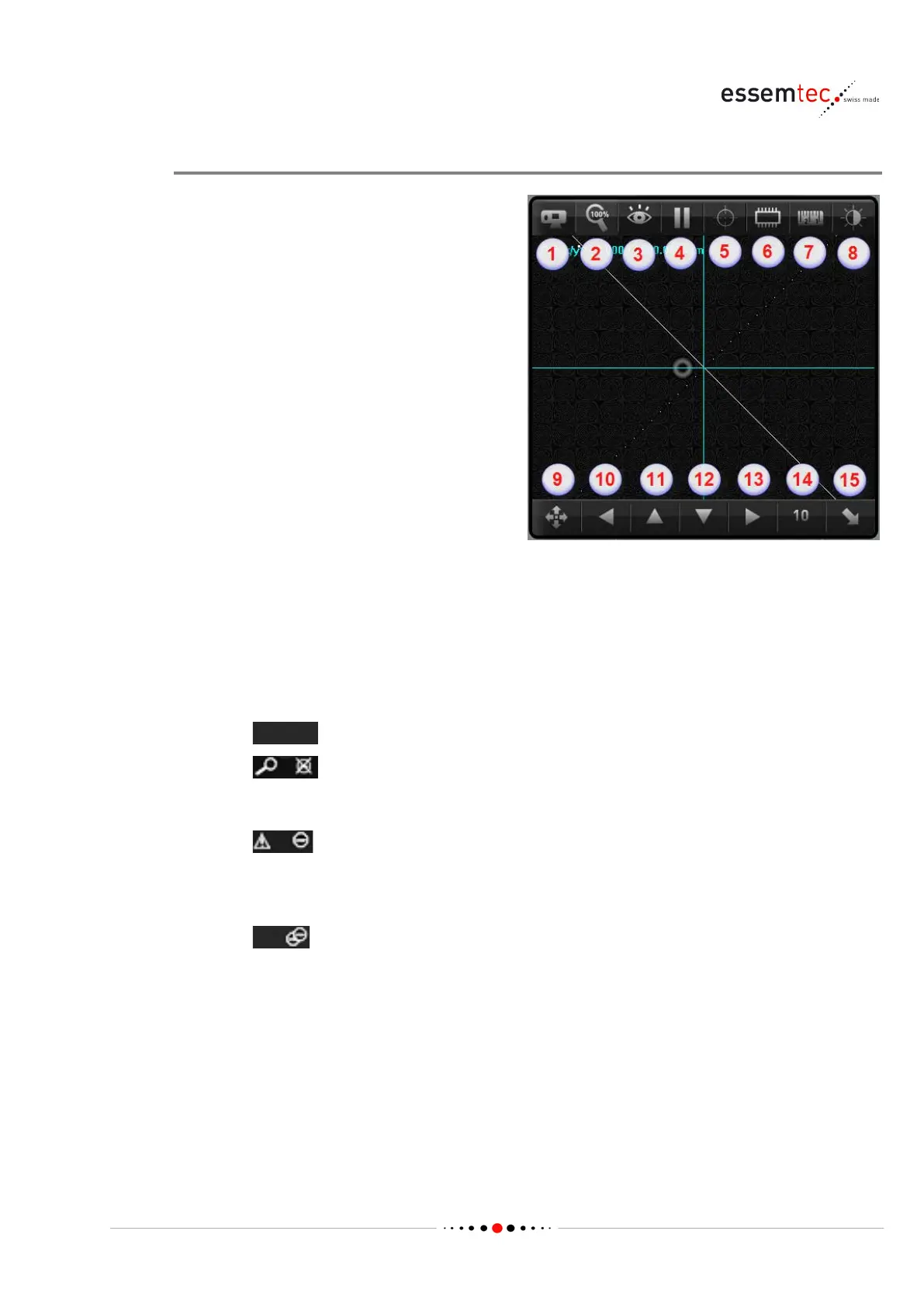
Camera Window
in camera window zooms
with factor 2x, 4x, 8x etc.
moves the head to the
for the drag mode.
Description of Buttons
Pos.
Description
1 Toggles between top and bottom camera
2 Zoom resize to 100% (fits full camera picture to the camera window)
3 Toggles through 4 different display modes:
•
Regular image, no indications.
•
Detailed image, no production stop. The image shows the crosshairs.
Green crosshair = component ok.
Red crosshair = component not ok.
•
Extension of the preceding mode for easy debuging.
Green component outline = component ok.
Red component outline = component not ok, a dialog pops-up with more information.
Production stops if red outline.
•
Same as the preceding mode, but production stops after each single picture.
This mode is for an intensive tracing.
4 Live-video freeze with start and save as ... function (after stopping the live-video, the stop
key changes to the play key and a save as key pops-up next to it.
5 Toggles through 8 auxiliary lines (none, crosshairs, small square, medium square, big
square, small circle, medium circle, big circle).
6 Virtual component / recipe overlay.
7 Measurement function.



 To Next Page