177
FIS Viewer
1.
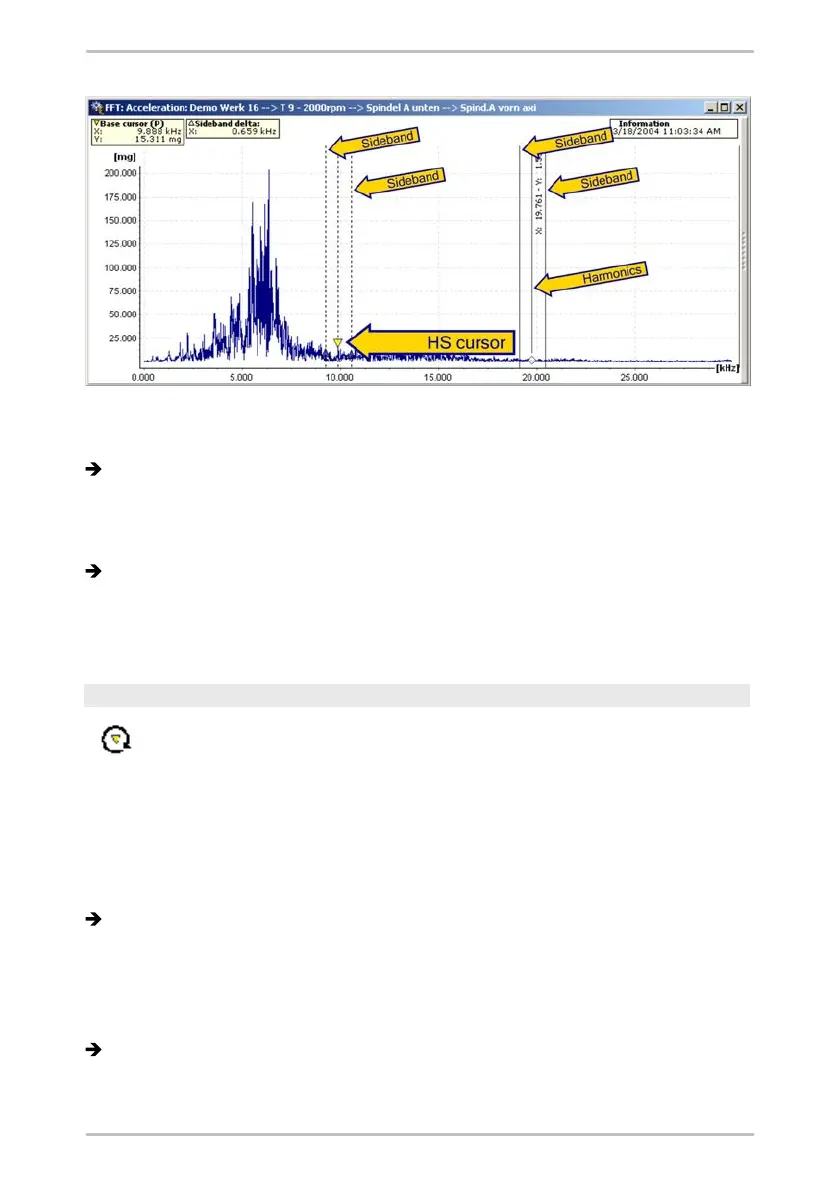
Select the HS cursor option from the cursor selection list or press the F7
button.
The base cursor and vertical lines are displayed at each harmonic of the base
cursor frequency as well as its sidebands.
2.
You can use the left-hand mouse button to shift the base cursor to any desired
measuring point in the diagram and also modify the position of the sidebands.
The cursor information above the diagram displays the measured values for
the base cursor as well as the differential delta of the sideband frequencies.
The measured values of the harmonics are each displayed as vertical text next
to the corresponding vertical line.
Revolutions cursor
The revolutions cursor marks the frequency that is assigned to a
specific speed with a line.
The revolutions value is calculated as follows: Revolutions n [Rpm] =
60 * Frequency f [Hz]
1.
Select the revolutions cursor option from the cursor selection list or press the
F8 button.
The "revolutions cursor" dialogue opens.
2.
Activate or deactivate the options for the cursor settings in the "revolutions
cursor" dialogue.
3.
Enter any desired speed in the rpm field and click OK. The revolutions cursor is
displayed differently, depending on the type of diagram (FFT or time signal):
In an FFT diagram, a single revolutions cursor is displayed at the point
previously specified for the speed in the dialogue. The cursor information
above the diagram shows the base cursor value as well as the speed setting.



 To Next Page