257
Detector III
continue with balancing process as usual.
Free Amplitude/Phase measurement
Position the sensor at the desired measuring point.
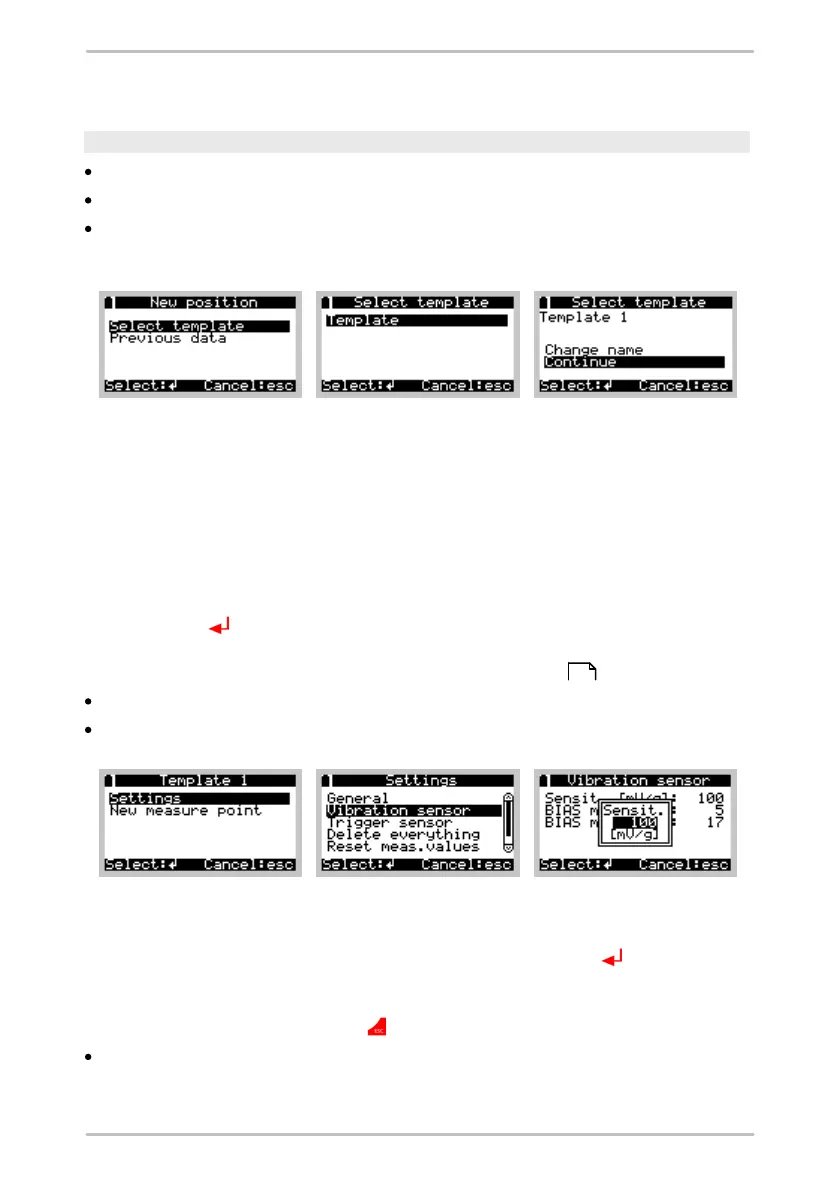
Select Amplitude/Phase > New position.
Then go to Select template to choose a suitable template. You can select the
template of a previous measurement, alternatively.
In the next menu you can change the template name so that the free
measurement can later be assigned to the measuring point at which it was
recorded.
o
If you accept the name without changing it, the free measurement is assigned
the template name and also a reference number that increases by one each
time a new measurement is taken using this template (<Name> 1, <Name> 2,
...).
o
To change the name select Change name and confirm your choice with the
Enter button . On the next screen, the name of the template selected and the
current order number are displayed, and a cursor is positioned under the first
letter. Change the name as described in Key pad entries .
After changing the name select Continue.
Select Settings to adopt the configuration of the template.
When carrying out a free measurement all other values can be changed in
addition to the template name. To do this, select the Settings item in the menu.
You can now select the relevant values using the Enter button . Depending on
the type of setting, you can now type in a new value directly, make a selection from
a drop-down menu or modify an item of text as described above. Leave the
settings menu with the Esc button .
Select New measure point to begin the measuring procedure.
From this point onwards the sequence of the measuring process is identical to
213



 To Next Page