FlyThisSim TouchTrainer® Set-up Guide
Copyright FlyThisSim LLC 2013 Page 49
Loading a Scenario (NEW!!!)
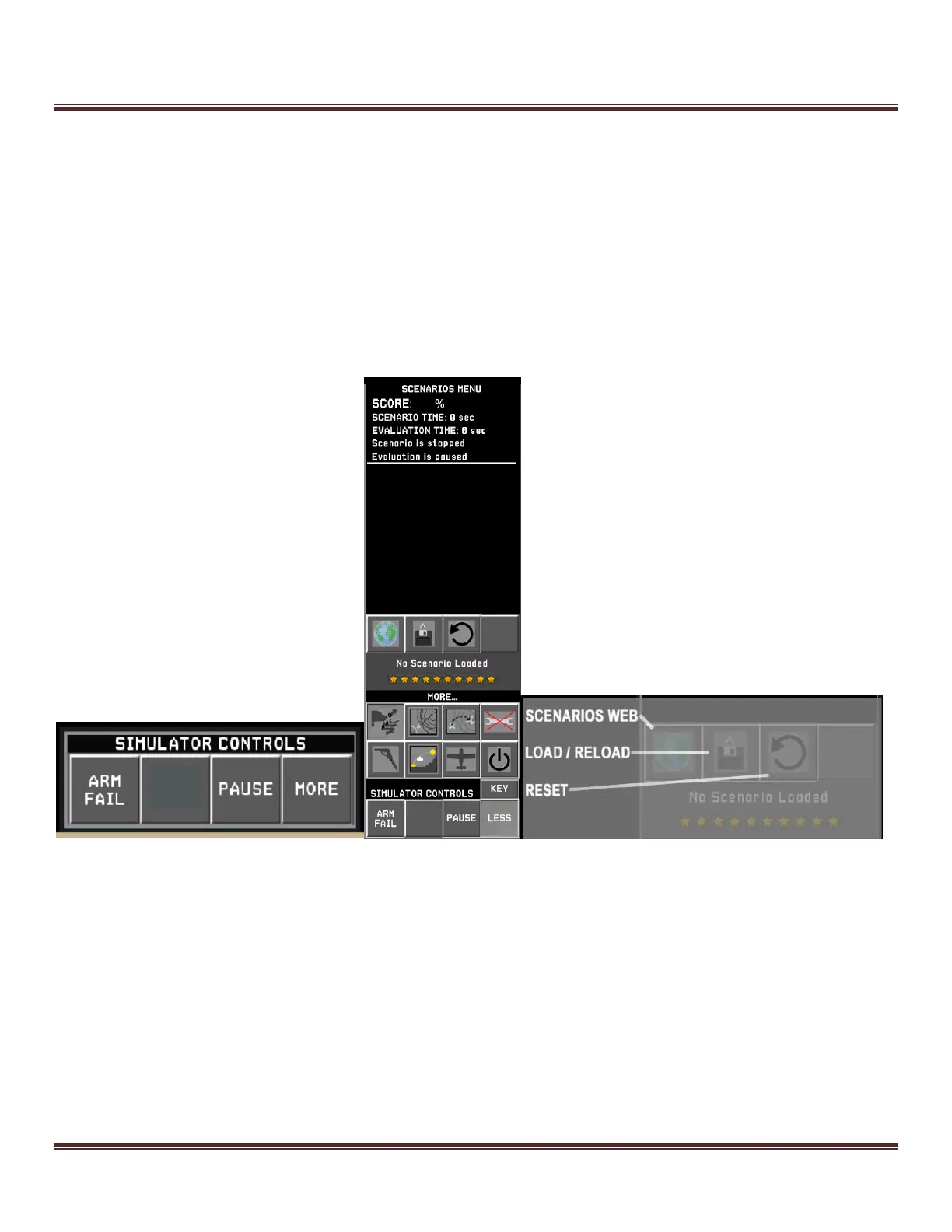
Scenarios are a great way to train when you don’t have an instructor at your side. The scenarios status page can be
accessed from the SIMULATOR CONTROLS. Press MORE SCENARIOS SCENARIOS WEB to invoke the
web page listing all the available scenarios. Follow the on-screen procedures to load a scenario. Once loaded, the name
of the scenario will be displayed at the bottom of the status page. Scenario files are automatically saved to the Scenarios
folder on your local machine when they are loaded from the scenario web pages. You can reload the previously
downloaded scenario files by pressing the LOAD button. Your score will start at 100%. and may drop as low as 0% if
mistakes are made while the evaluation is running. Each gold star equates to 10%. 10 gold stars equals 100%. When
you are done flying the scenario, press the RESET button. This will stop the scenario, clear the score, and silence the
instructions from the virtual instructor.



 To Next Page