Ordering consumables
119
15 Ordering consumables
You can easily order selected consumables (such as ink cartridges) at any time di-
rectly on the mailing system with the online ordering function. This requires that pro-
visions are set up accordingly in a contract relating to invoicing, delivery address, etc.
15.1 Placing an order
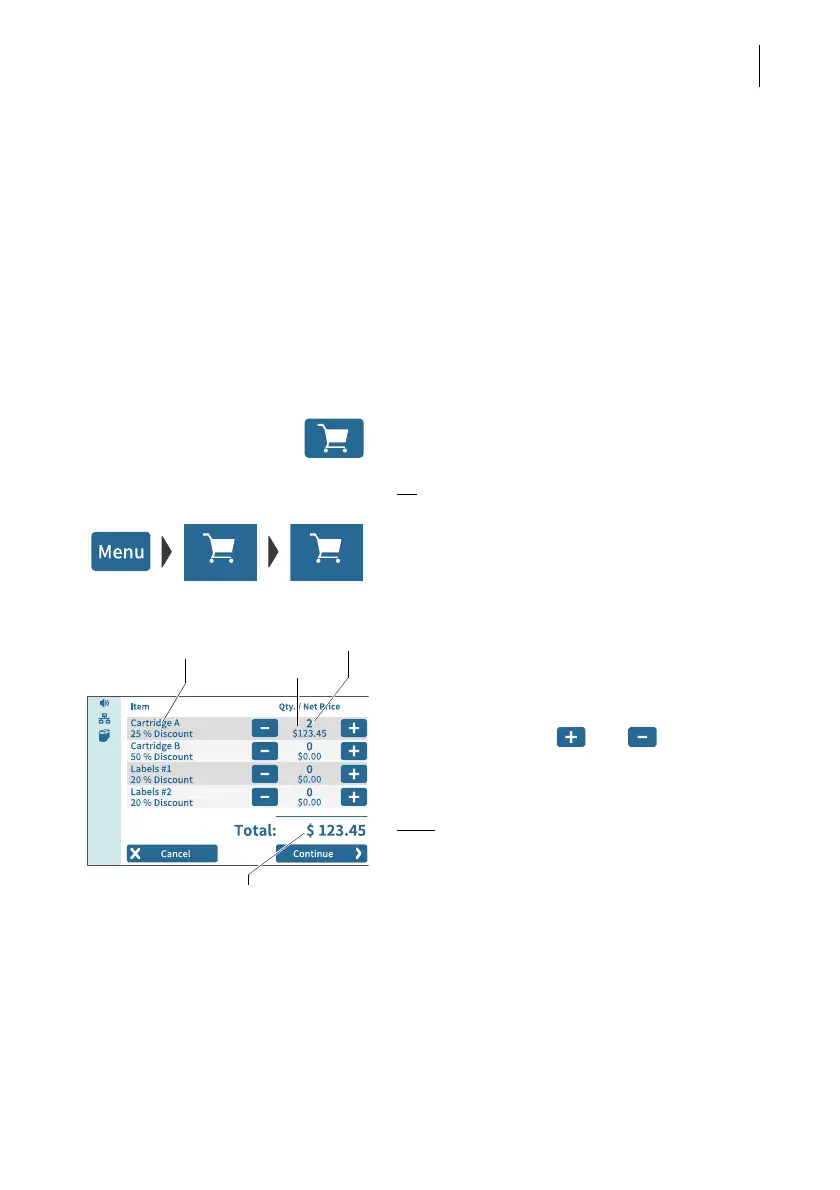
Up to four items are offered to you in the online ordering system. You will find the
complete range of consumables and accessories for your mailing system on the
customer portal.
• In the menu bar, tap on the button showing
the shopping cart.
Or
• Open the M
ENU.
• Choose ORDERING.
• Choose N
EW ORDER.
PostBase Vision establishes a connection to
the online ordering system and then shows
the available items and any discounts.
• Set the desired order quantity per item
using the buttons and .
You will see the relevant net price directly
below the order quantity.
Note
: The figure on the left shows fictitious
items and prices.
Once the desired order quantity has been set
for all four items:
• Press C
ONTINUE to send the order.
The order is verified. The total amount pay-
able for your order, broken down by order
value and shipping costs (showing net values,
taxes, gross value) are shown as confirma-
tion.
Order quantity
Item name
Price (net)
Order value (net)



 To Next Page