PostBase Vision
84
9.2 Print Numbers
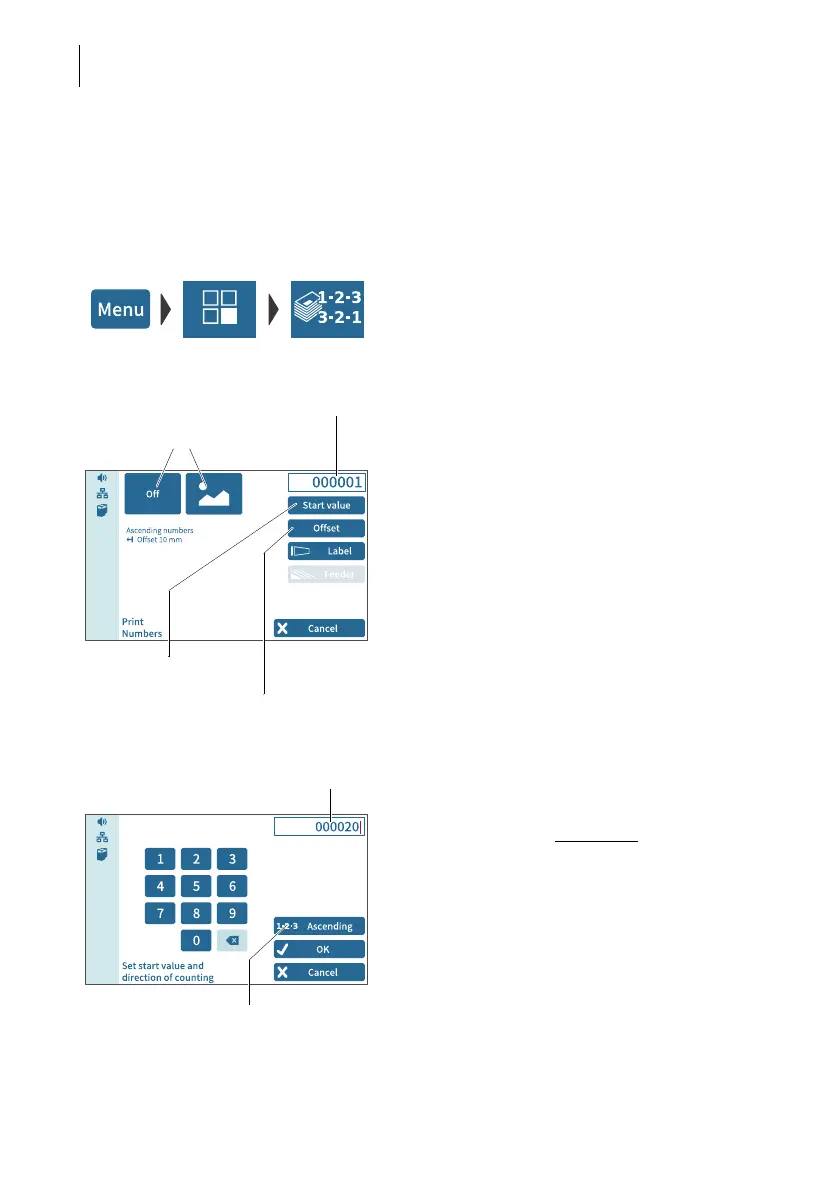
With the special function “Print Numbers”, you can print a 6-digit consecutive number
vertically on your mail. You can set any start value and choose the direction of count-
ing (ascending or descending). Additional advertising imprints are possible.
• Open the M
ENU.
• Choose SPECIAL FUNCTIONS.
• Choose P
RINT NUMBERS.
PostBase Vision opens the “Print Numbers”
menu.
The current settings for printing numbers are
displayed:
– the next number to be printed
(= start value)
– direction of counting
– advertising imprints
– imprint offset.
By default, the start value is set to “000001”
and the direction of counting to “Ascending”.
Setting the start value and direction of
counting
•Tap the S
TART VALUE button.
PostBase Vision opens the menu for setting
the start value and direction of counting.
• Enter the desired start value
.
You can choose any number between
1 and 999999.
To change the direction of counting:
• Tap the “direction of counting” button.
The indication on the button toggles between
1-2-3 ASCENDING and 3-2-1 DESCENDING.
• Confirm the displayed settings (start value
and direction of counting) with OK.
Display field (next
number to be printed)
Set start value / direc-
tion of counting
Set imprint
offset
Set advertising imprints
Start value
“Direction of counting” button
(shows the current setting)



 To Next Page