PostBase Vision
42
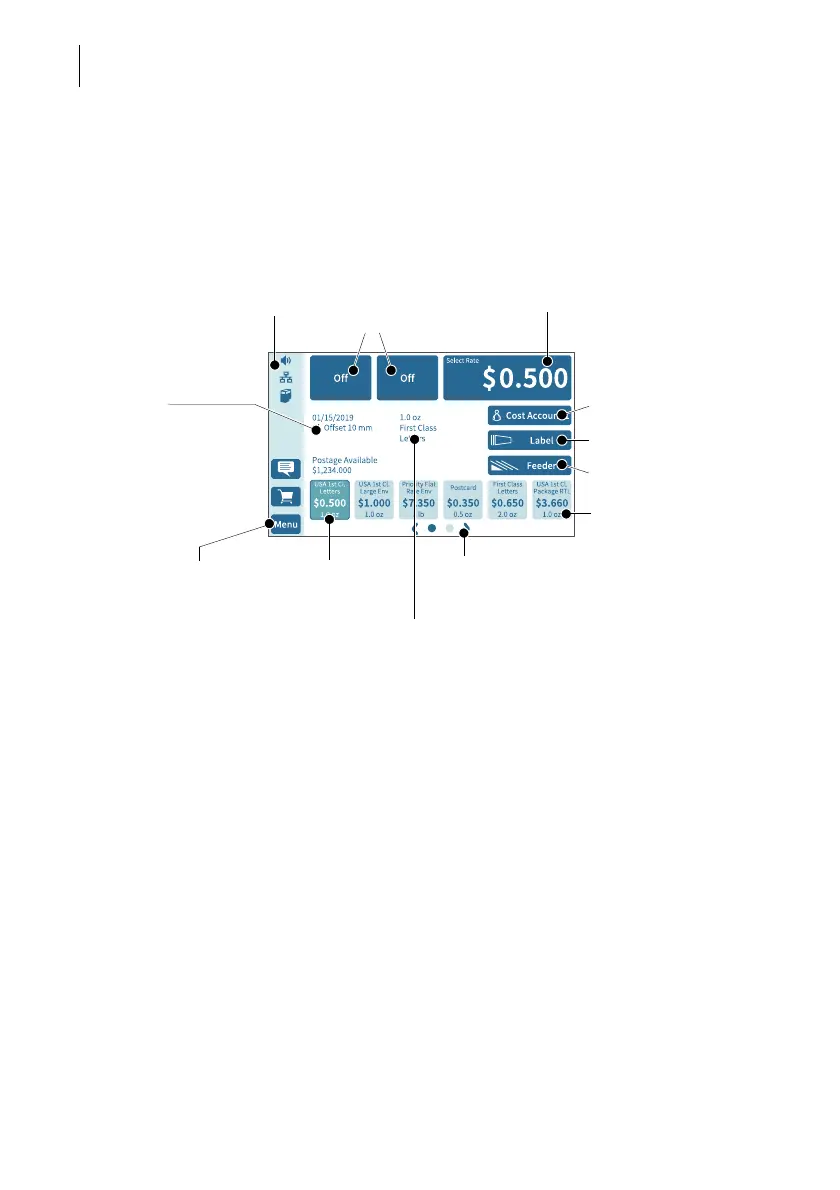
4.3.2 The Home screen
After turning on the unit and successfully completing the start routine, the Home
screen appears on the display. It shows the current meter settings. The color-coded
menu bar on the left of the window shows status information, e.g. volume, network
connection and ink level, and provides access to additional functions.
Functions In the Home screen:
– current settings are displayed
– you have access to all settings relating to
the meter imprint
– you meter your mail pieces
– you can weigh your mail pieces
– you have access to additional functions
using the buttons in the menu bar
Operation philosophy To select a function / setting, tap the button.
Depending on the function selected,
PostBase Vision then opens a selection list,
a setting menu or a menu with additional
selection options.
You can also simply “swipe” the selection list
with the shortcuts.
Postage / select product
Info panel:
– Date
– e.g. Imprint Offset
– Current postage credit
Advertising imprint
(advert / text / QR code)
Current product setting
(weight and mailing data)
Shortcut 1
(selected)
Menu bar
Use feeder (optional)
Shortcuts
(swiping selection list)
Cost account
Open menu, access to
– System settings
– Special functions
– Administrative functions
– Maintenance and service
functions
Display additional
shortcuts
Label printing



 To Next Page