Local cost account administration
97
12 Local cost account administration
The PostBase Vision mailing system offers you the option to record and analyze mail-
ings separately by cost account. To do so, cost accounts must be set up in the dis-
coverFP customer portal. After synchronizing with the customer portal (refer to
chapter 13 for more information), the cost account function will have been added to
your mailing system.
The usage data are stored both in the mailing system’s local cost account counters
as well as sent to the customer portal regularly for recording and analysis. The local
cost account counter and data storage in the portal run independently from one
another.
The reporting and administration functions available on the PostBase Vision mailing
system for cost accounts are described below.
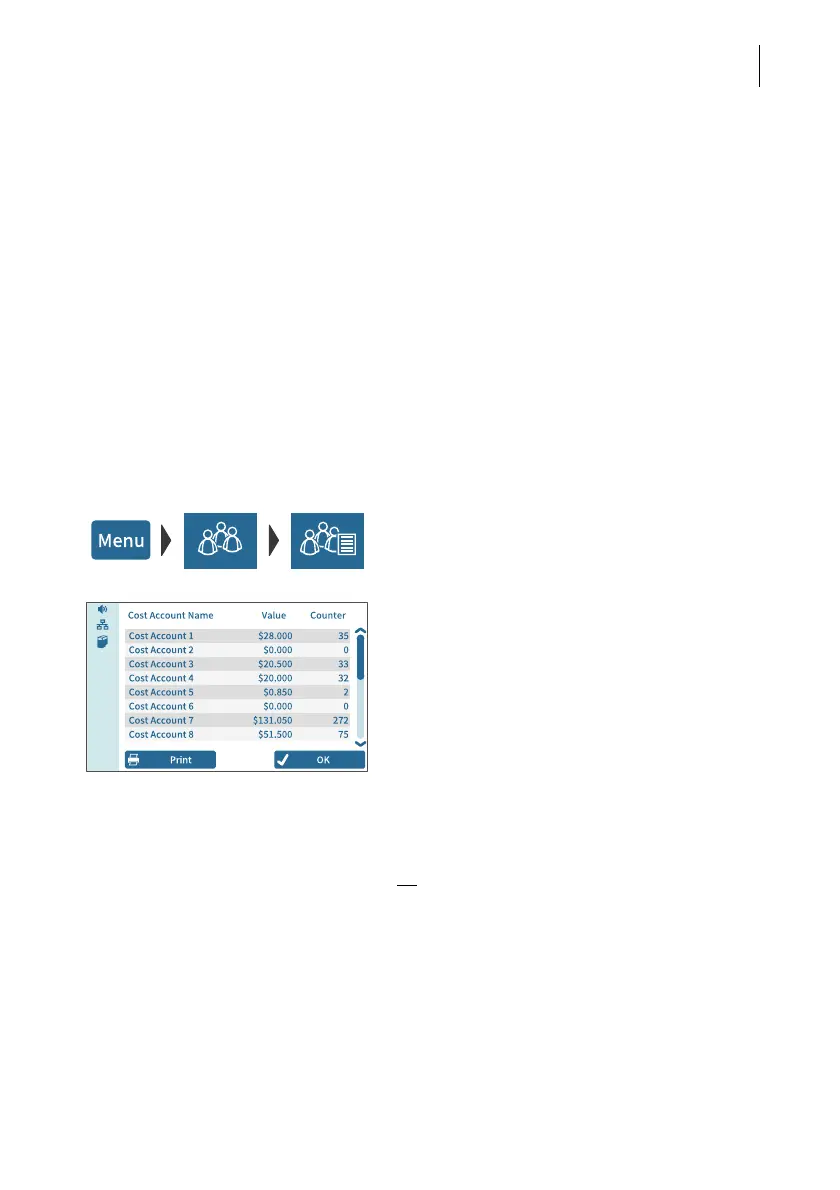
12.1 Display / print cost account report
• Open the MENU.
• Choose LOCAL ACCOUNTS.
• Choose S
HOW REPORT.
PostBase Vision shows the list of all cost
accounts with the current usage data (value
and number of mailings).
Print report
• Tap the P
RINT button.
The pop-up for printing labels appears and
shows the number of labels to be printed
(= number of cost account report pages).
• Tap the S
TART button to print the cost
account report on labels.
Or:
• Insert an empty envelope / postcard onto
the hand feed tray or the feeder.
PostBase Vision prints the first page of the
cost account report.
If necessary:
• Insert another envelope / postcard to print
the following pages.



 To Next Page