Installation and commissioning
21
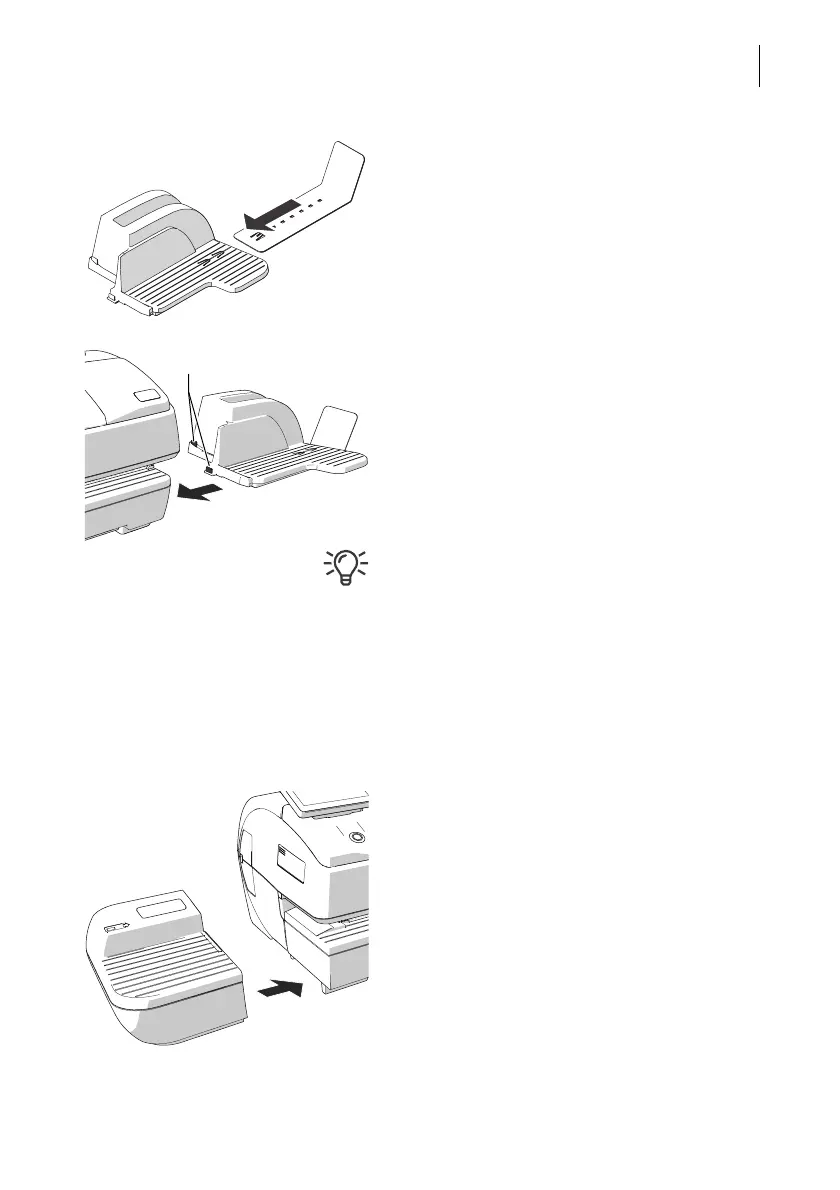
Assembling the catch tray
• Attach the catch bracket to the catch tray:
To do this, insert the catch bracket into the
guides on the underside of the catch tray.
• Place the catch tray to the right of the
postage meter.
• Slightly lift the postage meter on the right
side. The bottom side of the housing
features slots where the catch trays are
fastened.
• Slide the catch tray under the postage
meter so that the catches engage in the
slots.
• Carefully place the postage meter on the
catch tray.
Assembling the Drop Stacker
Instead of the catch tray, the optionally avail-
able Francotyp-Postalia Drop Stacker can be
placed to the right of the postage meter.
For details on setting up the Drop Stacker,
refer to the installation instructions supplied
with the Drop Stacker.
Attaching the hand feed tray
(only on the basic model)
• Place the hand feed tray for manually feed-
ing the items to the left of the postage
meter.
• Slightly lift the postage meter on the left side
and push the hand feed tray towards the
postage meter so that the front sides are
flush.
• Carefully lower the postage meter so that
the catches of the hand feed tray engage in
the slots on the bottom side of the postage
meter.



 To Next Page