Rev 4/2018
21
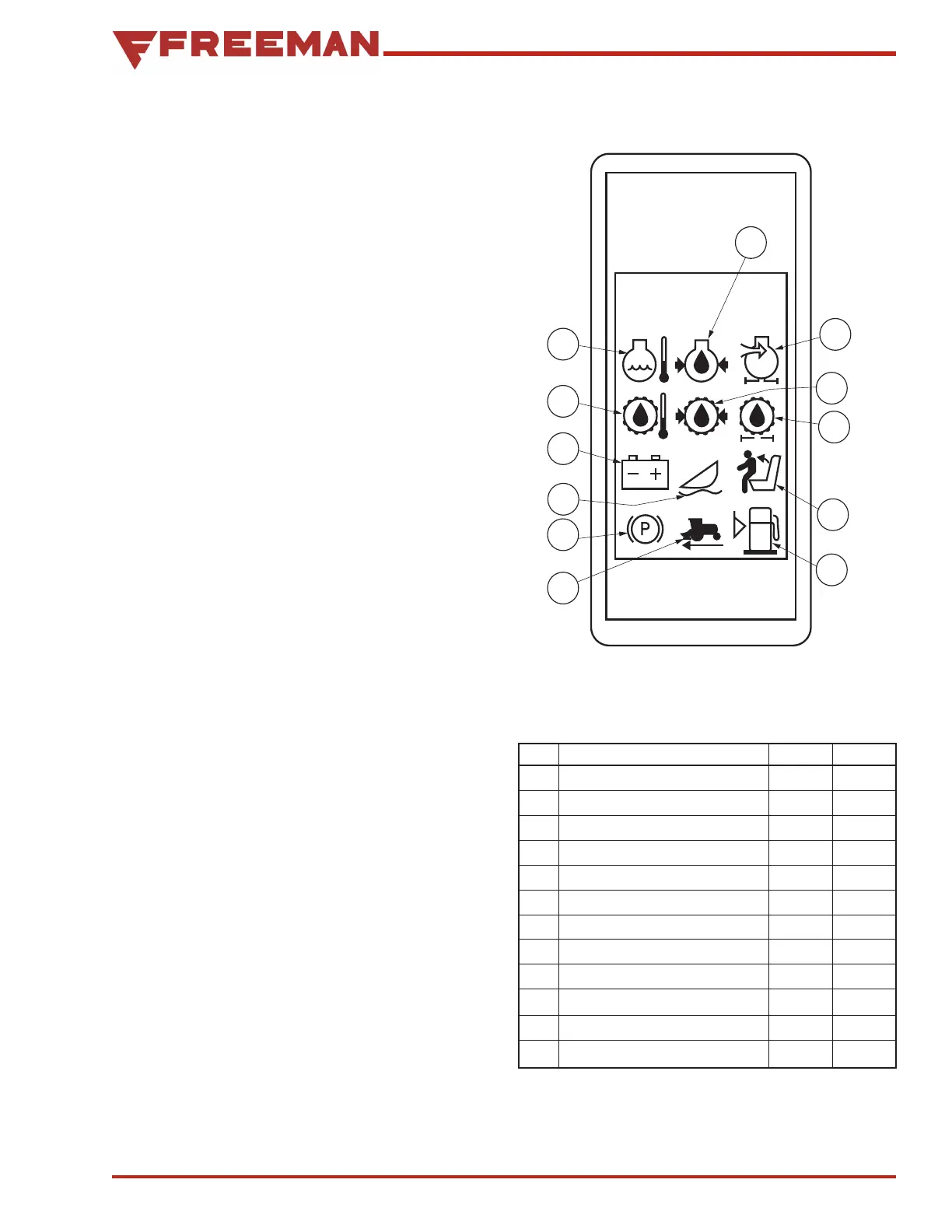
Warning Display Panel
(See Figure 12)
NOTE: To perform a bulb check, see
"Checking Warning Lights" on page 50.
The display shows a red, yellow or blue light and
may sound an audible alarm for the specific condi-
tion
• RED LIGHT Stop engine at once and correct
problem
• YELLOW LIGHT Service or correct problem. Stop
engine as required.
• BLUE LIGHT Be aware of condition. Listed below
is the keyed designation of the warning lamp
color displayed and if an audible alarm is present.
NOTE: Decal on the inside storage lid of the
right-hand armrest identifies symbols used on
the panel (see "Cab Storage Box & Decal"
on page 29).
INSTRUMENTS AND CONTROLS
Figure 12. Warning Display Panel
KEY FUNCTION COLOR ALARM
A Engine Temperature Red Ye s
B Engine Oil Pressure Red Ye s
C Engine Air Filter Yellow No
D Hydrostatic Charge Pressure Red Ye s
E Hydrostatic Oil Filter Yellow No
F Operator Presence Yellow No
G Low Fuel Yellow No
H Road Shift Engage Blue No
I Park Brake Applied Blue No
J*
K Alternator Red Ye s
L Hydrostatic Oil Temperature Red Ye s
* Not applicable


 To Next Page