34
Rev 4/2018
Baling Screen
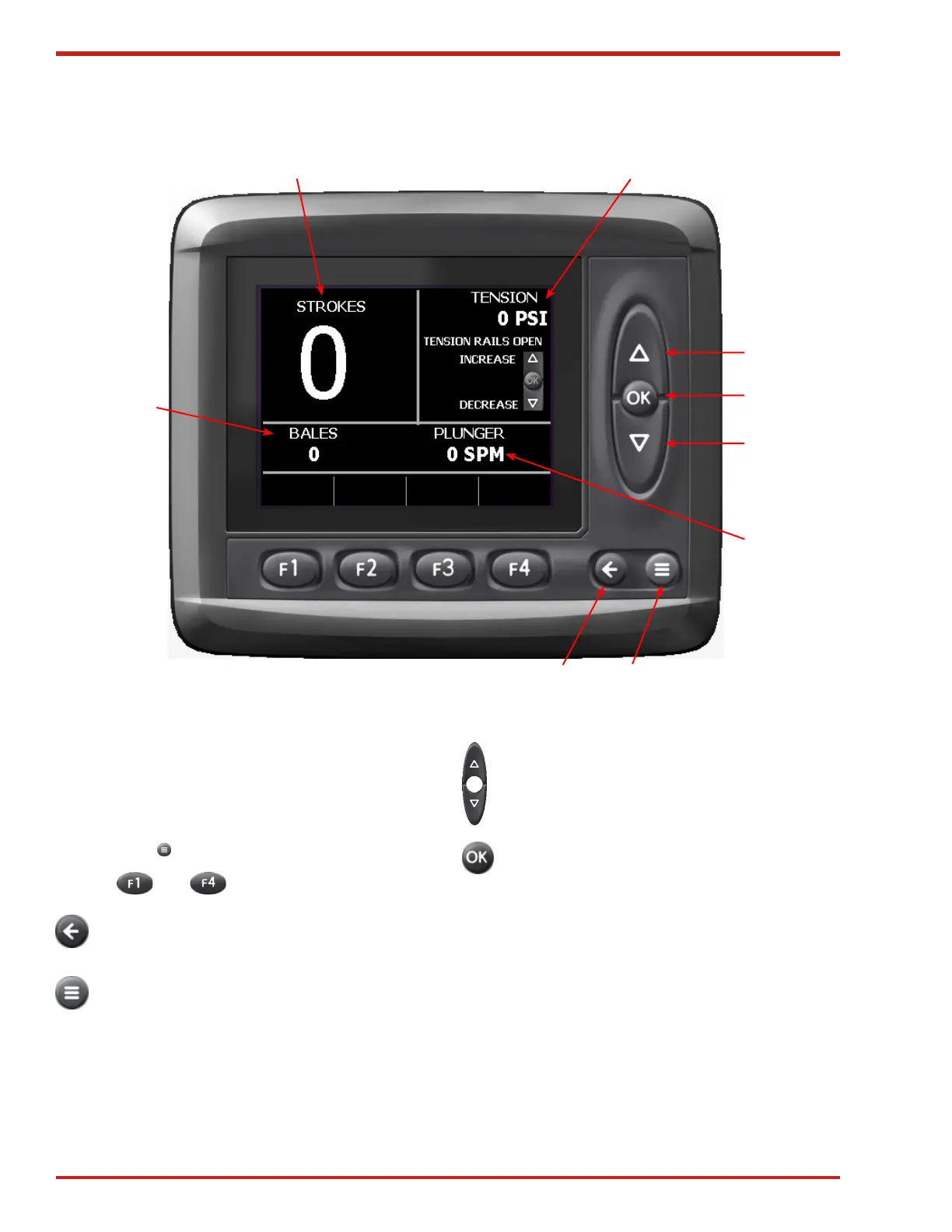
Figure 39. Baling Screen
1 (Back)
2 (Menu)
4 (Down)
5
4 (Up)
3
6
8
7
The ICM is powered when the baler key switch is
turned to the ON position. When powered on, the
ICM will display the Baling screen. The main bale
screens may always be accessed by pressing the
Menu button .
Buttons thru are not used on this screen.
1. BACK ARROW Press to switch between
the Bale Count screen, and the Baling screen.
2. MENU Press to display the Main screen.
From the Main screen, you can access the;
Adjust, Measure, Preferences, and Info
screens.
3. PLUNGER Displays the plunger speed in strokes
per minute. Adjust the plunger speed with the Baler
Speed Switch on the Hydrostatic Control Lever.
4. UP/DOWN ARROWS Used to adjust the
Tension Pressure (Item #6).
5. OK This button is not used on this screen.
6. ENSION Displays the amount of tension applied to
the bale chamber. This can be set to read in either
psi or % (see Tension Value Display Format on page
38 for how to change between psi & %).
7. STROKES Displays the number of plunger strokes
that were used to make the last bale.
8. BALES Displays the number of bales made since
the bale counter was last reset (see page 35 for
how to reset the counter).



 To Next Page