164 165
IIDTool
GAP Diagnostic 2019-07-15 All Rights Reserved
User Manual : Version 33, Firmware V3.0
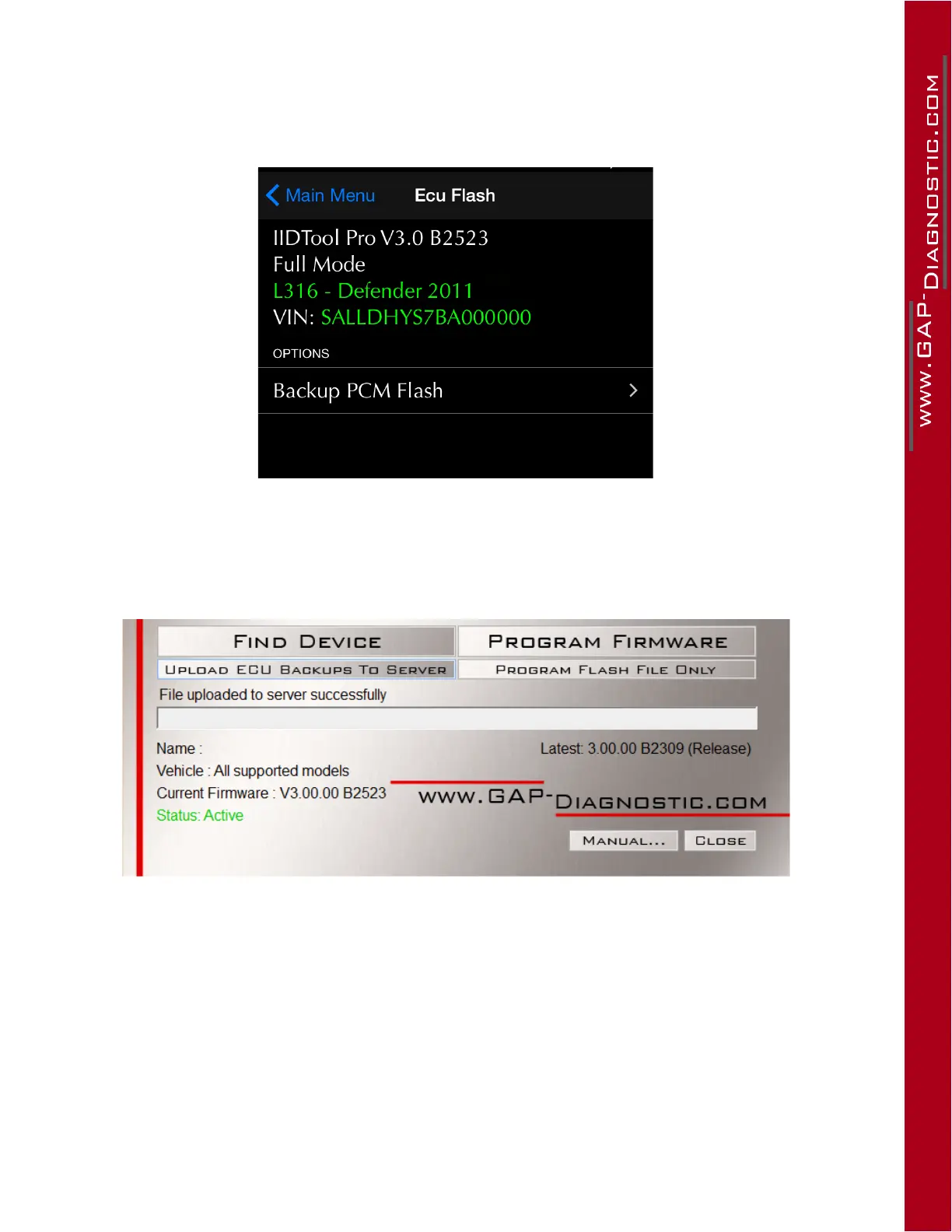
2. UsethePCMEngineECUbackupfunctiontosaveanoriginalcopyoftheECUrmwareinthe
IIDTool’s memory: IIDTool Menu-
>
ECU Flash-
>
Backup PCM Flash and wait until completion.
Once done, disconnect the IIDTool from the vehicle.
Figure 101. App:Backupcopyoftheoriginalrmware(engineECU)
3. Start the update software, connect the IIDTool to the computer’s USB Port and click Find De-
vice. The Upload ECU Backup To Serverbuttonwillappear.Clickthisbuttontouploadthele
saved to the server. It can thus be analyzed by Bell Auto Services.
Figure 102. UploadoftheengineECUoriginalrmware
Step 3: Updating your IIDTool with the custom remap, EGR blank or other
OnceBASRemapsconrmsthatapersonalisedleisready,simplyproceedwiththefollowing:
1. Connect the IIDTool on your computer and start the updater software.
2. Clickon“FindDevice”andwaituntiltheupdatersoftwarendstheIIDTool.



 To Next Page