page | 92
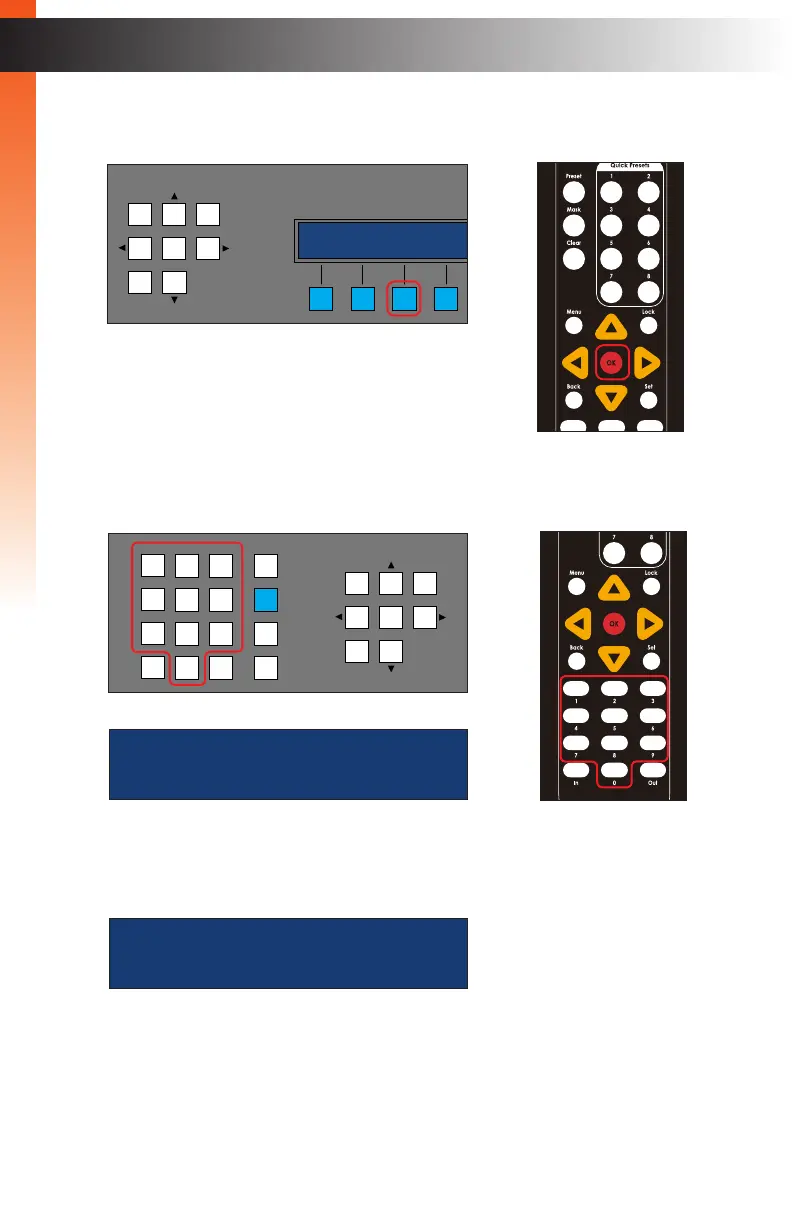
4. Press the SEL soft button on the front panel or press the OK button on the IR remote
control.
5. Use the numeric buttons to enter the desired output to be masked. In the example
below, we will mask output 2, by entering the number 2.
6. Press the OK button to execute the masking process. The masking process will be
completed once the following screen is displayed:
7. To mask additional outputs, repeat steps 1 - 6. To unmask an output,
repeat steps 1 - 6 and enter the number of the output that is currently masked.
Basic Operation
Basic Operation
Menu System
enter output id
2_ browse
OR
LAN
POE
5V DC
1 2
Matrix Controller
Status
IR
Power
Menu
1 2 3
4 5 6
7 8 9
In 0 Out Set
Clear
Mask
Preset
Back
OK
Lock
masking output
2
OR
LAN
POE
5V DC
1 2
Matrix Controller
Status
Menu
1 2 3
4 5 6
7 8 9
In 0 Out Set
Clear
Mask
Preset
Back
OK
Lock
engineering
(( back sel ))



 To Next Page