EasyManua.ls Logo

Gefen EXT-CU-LAN - Page 110

Gefen EXT-CU-LAN
250 pages
Print Icon
To Next Page IconTo Next Page
To Previous Page IconTo Previous Page
Loading...
page | 98
network MODE: (EDIT)
SEPARATE
network MODE: (EDIT)
combined
Basic Operation
Menu System
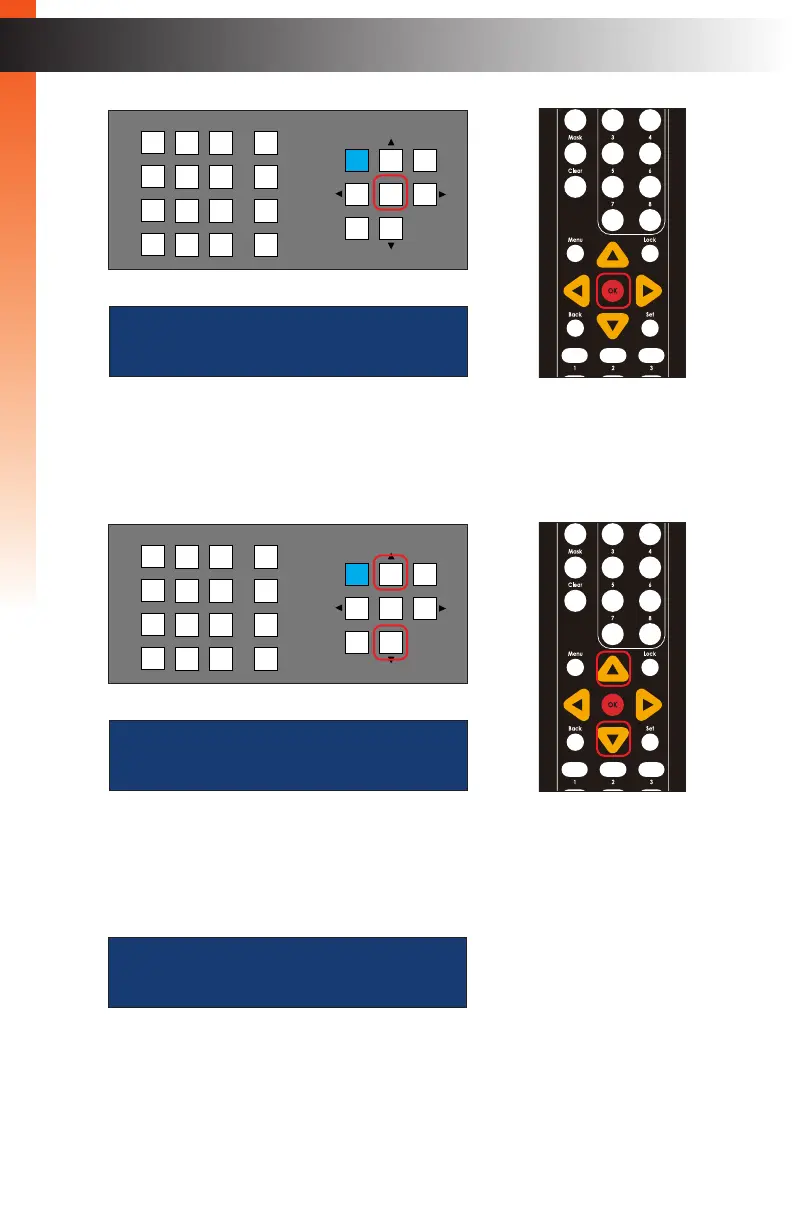
5. Press the or buttons to select either Separate or Combined. In the example,
below, we have selected Combined.
6. Press the OK button to save the change.
7. The following screen will be displayed:
please reboot unit
to apply changes
OR
LAN
POE
5V DC
1 2
Matrix Controller
Status
IR
Power
Menu
1 2 3
4 5 6
7 8 9
In 0 Out Set
Clear
Mask
Preset
Back
OK
Lock
®
OR
LAN
POE
5V DC
1 2
Matrix Controller
Status
IR
Power
Menu
1 2 3
4 5 6
7 8 9
In 0 Out Set
Clear
Mask
Preset
Back
OK
Lock
®
Basic Operation

Table of Contents

Other manuals for Gefen EXT-CU-LAN