page | 76
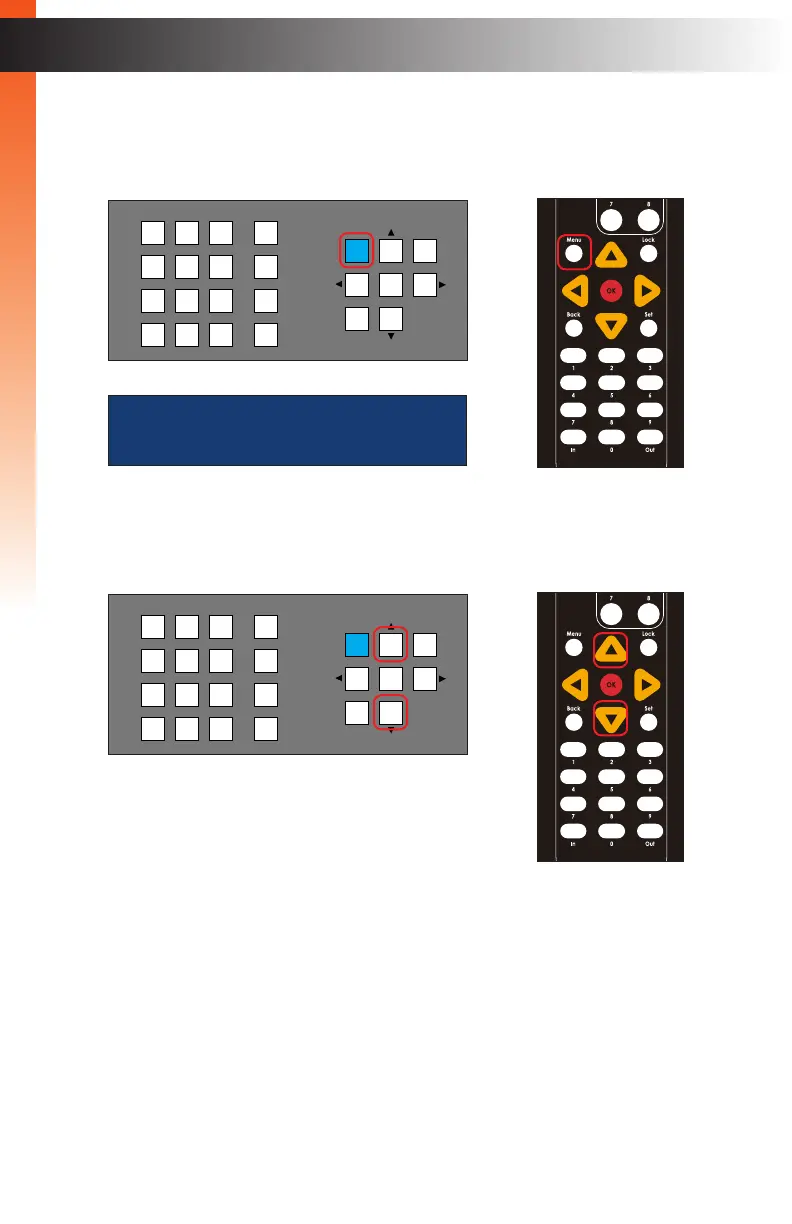
6. Press the Menu button.
7. The Menu button, on the front panel, will glow solid blue and the Network menu will
be displayed.
8. The menu system contains two menus: Network and System. Press the ▲ or ▼
buttons to select either menu system.
9. Once the desired menu is selected, press the OK button to enter the menu system.
Refer to the following pages for details on each menu system option.
Basic OperationBasic Operation
Menu System
LAN
POE
5V DC
1 2
Matrix Controller
Status
IR
Power
Menu
1 2 3
4 5 6
7 8 9
In 0 Out Set
Clear
Mask
Preset
Back
OK
Lock
OR
NETWORK
LAN
POE
5V DC
1 2
Matrix Controller
Status
IR
Power
Menu
1 2 3
4 5 6
7 8 9
In 0 Out Set
Clear
Mask
Preset
Back
OK
Lock
OR
Basic OperationBasic Operation



 To Next Page