USER & INSTALLER ACCESS CODES
To enter both codes use the arrow keys
and when finished press Enter/OK.
User Access Code, press Enter/OK, then
and then press Enter/OK to confirm entry
Installer Access Code, press Enter/OK, then
and then press Enter/OK to confirm entry.
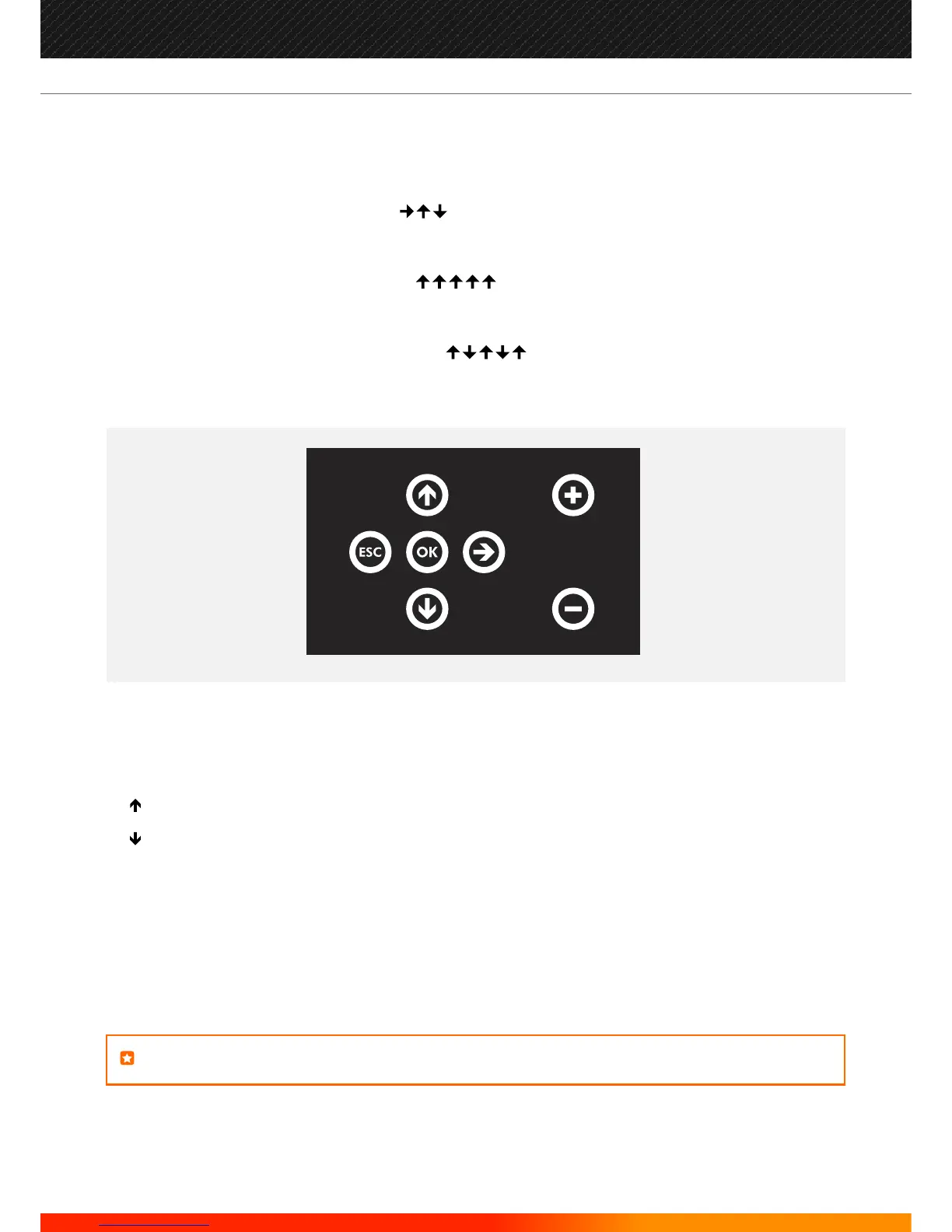
FRONT PANEL KEYPAD KEY'S FUNCTIONS
Used to confirm entry of any data or selection. Same function as the ENTER key on IR remote control.
Used to increase selection or number. Equivalent function as UP arrow key on IR remote control.
Used to decrease selection or number. Equivalent function as UP arrow key on IR remote control.
Escape key. Used to exit a particular function. Equivalent function as ESC arrow key on IR remote control.
Used to increase loop number. Equivalent function as + arrow key on IR remote control.
Used to decrease loop number. Equivalent function as - arrow key on IR remote control.
NOTE: It is not possible to introduce text for labels using the front panel keypad.
OK
ESC
+
-
52
Manufacturers of Fire Detection Equipment
INSTALLATION & COMMISSIONING MANUAL REVISION 4.0 05/2013
JUNO NET - NETWORKABLE ADRESSABLE PANEL
globalfire.pt


 To Next Page