1-4
■ Front panel (continued)
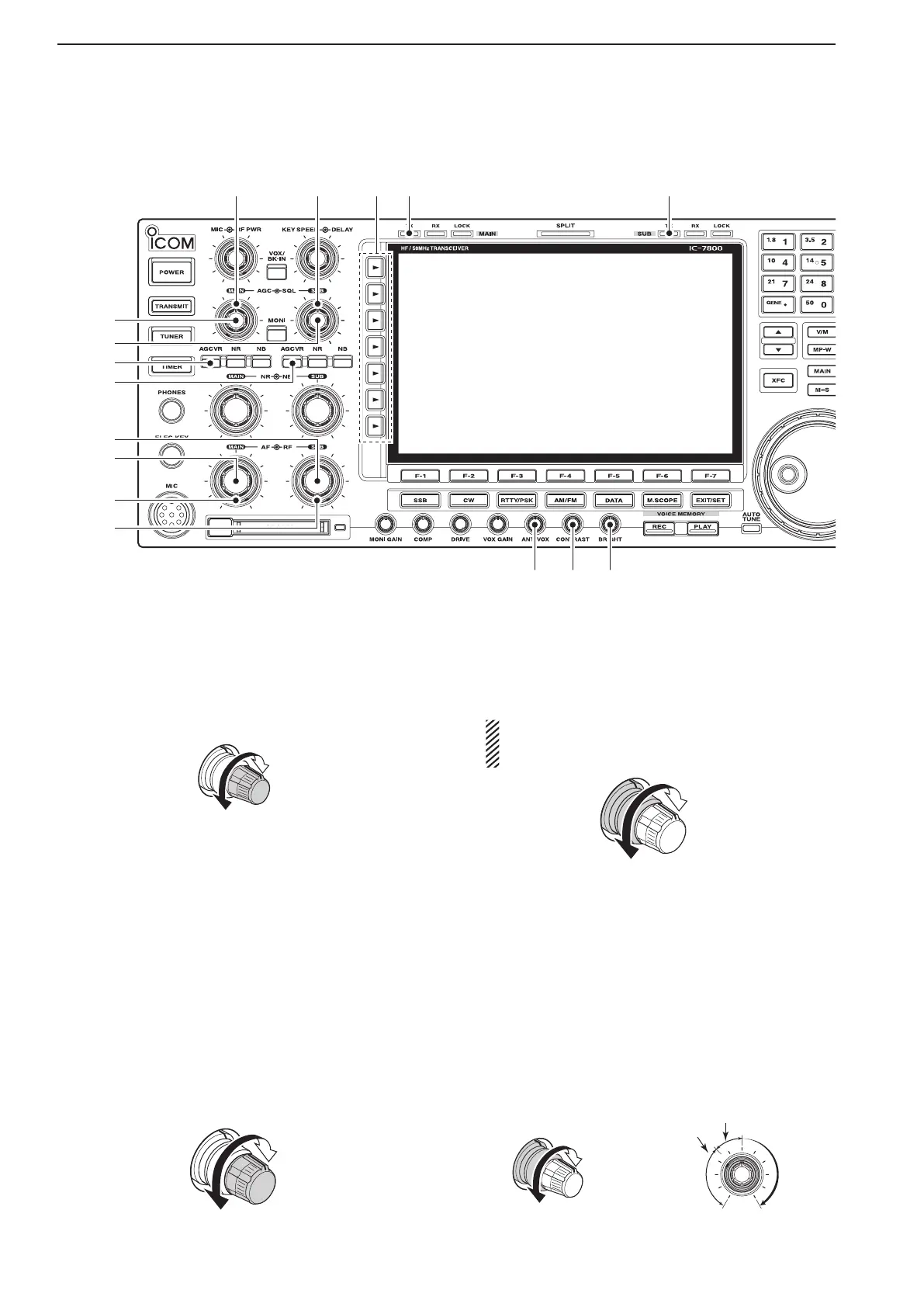
!9 AGC CONTROL [AGC] (for MAIN band; p. 5-12)
@0 AGC CONTROL [AGC] (for SUB band; p. 5-12)
Adjusts the continuously-variable AGC circuit time
constant.
•To use [AGC] control, push the appropriate band’s
[AGCVR]([AGCVR]indicatorlights).
@1 AGC VOLUME SWITCH [AGC VR]
(for MAIN band; p. 5-12)
@2 AGC VOLUME SWITCH [AGC VR]
(for SUB band; p. 5-12)
➥
Push to toggle [AGC] control usage ON or OFF.
•Use [AGC] control to set the AGC time constant
when switched ON.
•The [AGC VR] indicator above this switch lights
green when the control is ON.
➥ Turns the AGC function OFF when held down for
1 second.
@3 AF CONTROL [AF] (inner control; for SUB band)
@4 AF CONTROL [AF] (inner control; for MAIN band)
Varies the audio output level of the speaker or
headphones.
Audio output
increases
Audio output
decreases
@5 RF GAIN CONTROL [RF]
(outer control; for MAIN band; p. 3-9)
@6 RF GAIN CONTROL [RF]
(outer control; for SUB band; p. 3-9)
Adjusts the RF gain level.
While rotating the RF gain control, you may hear
noise. This comes from the DSP unit and does
not indicate a malfunction.
Sensitivity
increases
Sensitivity
decreases
@7 SQUELCH CONTROL [SQL]
(outer control; for MAIN band; p. 3-9)
@8 SQUELCH CONTROL [SQL]
(outer control; for SUB band; p. 3-9)
Adjusts the squelch threshold level. The squelch re-
moves noise output from the speaker (closed con-
dition) when no signal is received.
•ThesquelchisparticularlyeffectiveforFM.Itisalso
available for other modes.
•11to12o’clockpositionisrecommendedforanyset-
ting of the [SQL] control.
Deep
Deep
S-meter
squelch
Noise squelch
Squelch
is open.
Squelch
threshold
Shallow
Shallow
1
PANEL DESCRIPTION



 To Next Page