1-5
@9 MULTI-FUNCTION SWITCHES
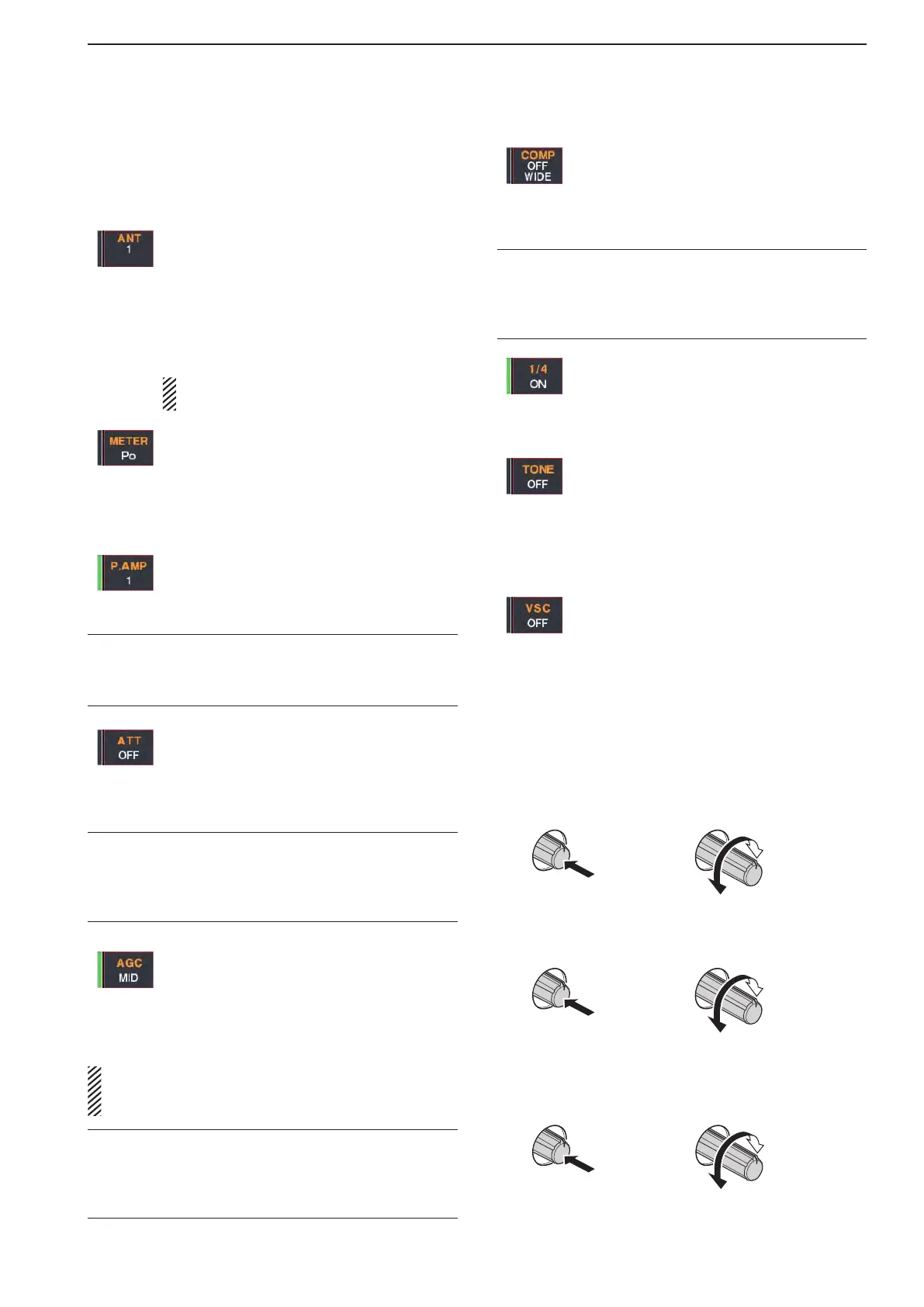
Push to select the functions indicated in the LCD
display to the right of these switches.
•Functionsvarydependingontheoperatingcondition.
➥ Selects the antenna connector from
ANT1, ANT2, ANT3 or ANT4 when
pushed. (p. 10-2)
➥ Displays antenna selection memory
when held down for 1 second.
•Whenthereceiveantennaisactivated,the
antenna which is connected to [ANT4] is
used for receive only.
When a transverter is in use, this [ANT]
doesnotfunctionand‘TRV’appears.
➥ Selects RF power (Po), SWR, ALC,
COMP,Vd or Id metering during trans-
mit. (p. 3-10)
➥ Switches the multi-function digital meter
ON or OFF when held down for 1 sec-
ond. (p. 3-10)
➥ Selects one of 2 receive RF preamps or
bypasses them. (p. 5-10)
•“P.AMP1”activates10dBpreamp.
•
“P. AMP2” activates 16 dB high-gain preamp.
✔ What is the preamp?
The preamp amplifies received signals in the front end cir-
cuit to improve S/N ratio and sensitivity. Select “P. AMP1” or
“P. AMP2” when receiving weak signals.
➥ Selects 6 dB, 12 dB or 18 dB attenuator
when pushed. (p. 5-10)
➥ Selects 3 dB, 6 dB, 9 dB, 12 dB, 18 dB,
or 21 dB attenuator when held down for
1 second. (p. 5-10)
✔ What is the attenuator?
The attenuator prevents a desired signal from distorting
when very strong signals are near the desired frequency, or
when very strong electric fields, such as from a broadcasting
station, are near your location.
➥ Activates and selects fast, middle or slow
AGC time constant when pushed. (p.
5-12)
•InFMmode,only“FAST”isavailable.
➥ Enters the AGC set mode when held
down for 1 second. (p. 5-12)
AGC time constant can be set between 0.1 to 8.0
second (depends on mode), or turned OFF. When
AGC is “OFF,” the S-meter does not function.
✔ What is the AGC?
The AGC controls receiver gain to produce a constant audio
output level, even when the received signal strength varies
dramatically. Select “FAST” for tuning and then select “MID”
or “SLOW” depending on the receiving condition.
➥ Turns the speech compressor ON or
OFF in SSB mode. (p. 6-5)
➥ Switches the narrow, middle or wide
compression when held down for 1 sec-
ond.
✔ What is the speech compressor?
The speech compressor compresses the transmitter audio
input to increase the average audio output level, to increase
talk power. This function is effective for long-distance com-
munication or when propagation conditions are poor.
➥ Turns the
1
⁄4-speed tuning function ON
or OFF in SSB data, CW, RTTY and
PSK modes. (p. 3-6)
•
1
⁄4 function sets dial rotation to
1
⁄4 of normal
speed for fine tuning.
➥ Switches between the tone encoder,
tone squelch function and no-tone oper-
ation when pushed in FM mode. (pp.
4-32, 4-33)
➥ Enters the tone set mode when held
down for 1 second in FM mode. (pp.
4-32, 4-33)
➥ Switches the voice squelch control func-
tion ON or OFF; useful for scanning. (p.
9-3)
#0 TRANSMIT INDICATOR [TX] (for MAIN band)
#1 TRANSMIT INDICATOR [TX] (for SUB band)
Lights red while transmitting.
•SUBband’s[TX]indicatorlightsonlywheninsplitoper-
ation.
#2 ANTI VOX CONTROL [ANTI VOX] (p. 6-2)
AdjuststheVOXdeactivateleveltopreventun-
wantedVOXactivationfromthespeakeraudio.
Decreases
cut-off level
Increases
cut-off level
Push
#3 LCD CONTRAST CONTROL [CONTRAST]
Adjusts the LCD contrast.
Low
contrast
High
contrast
Push
#4 LCD BRIGHTNESS CONTROL [BRIGHT]
Adjusts the LCD brightness.
1
PANEL DESCRIPTION



 To Next Page