1-8
■ Front panel (continued)
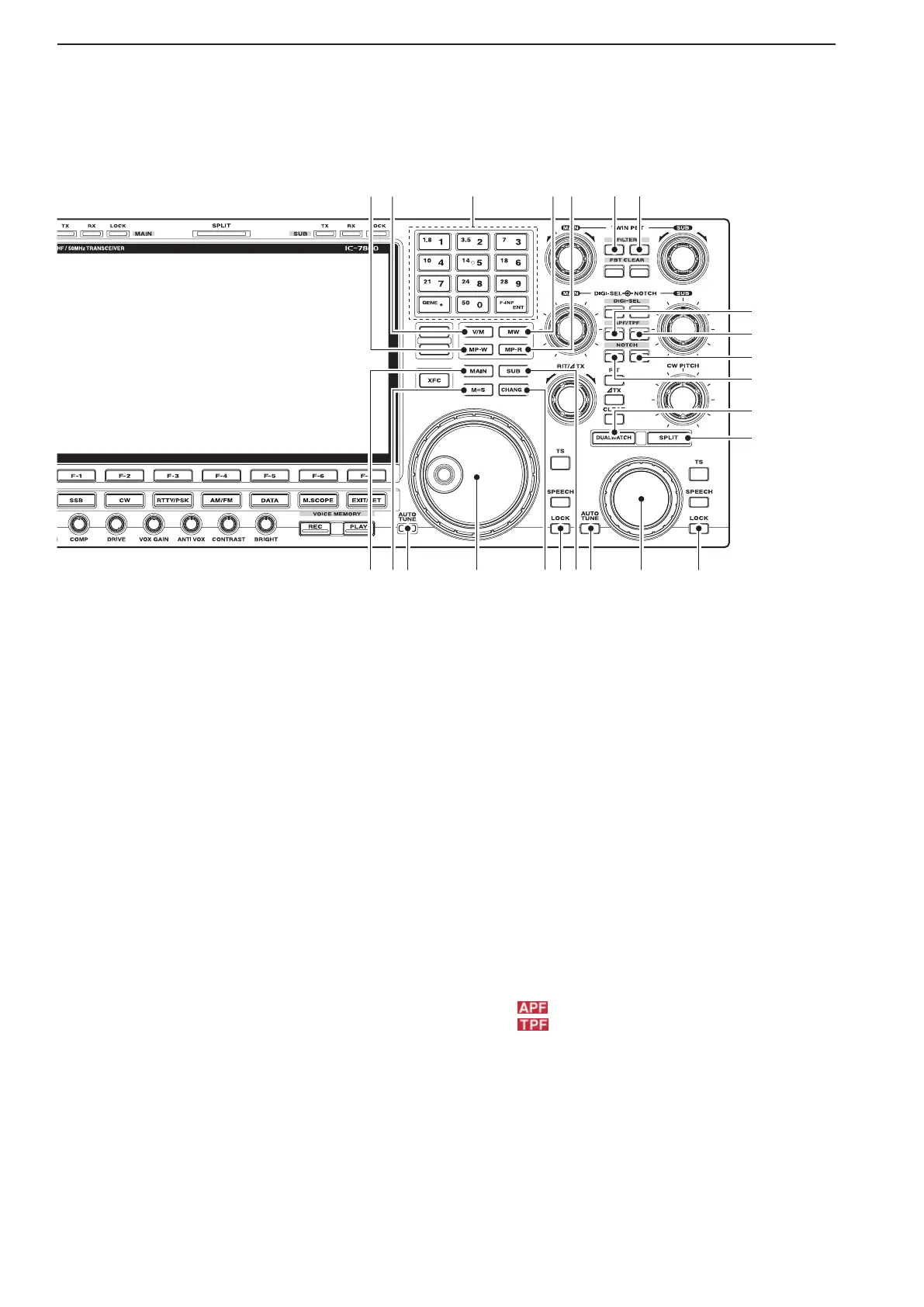
%7 MEMO PAD-WRITE SWITCH [MP-W] (p. 8-7)
Programs the selected readout frequency and oper-
ating mode into a memo pad.
•The5mostrecententriesremaininmemopads.
•Thememopadcapacitycanbeexpandedfrom5to10
in set mode. (p. 12-18)
%8 VFO/MEMORY SWITCH [V/M]
➥ Switches the selected readout operating mode
between the VFOandmemorywhenpushed.
(pp. 3-3, 8-2)
➥Transfers the memorycontents to VFOwhen
held down for 1 second. (p. 5-5)
%9 KEYPAD
➥ Pushing a key selects the operating band.
•[GENE•.]selectsthegeneralcoverageband.
➥ Pushing the same key 2 or 3 times calls up other
stacked frequencies in the band. (p. 3-4)
•Icom’striplebandstackingregistermemorizes3fre-
quencies in each band.
➥Afterpushing[F-INP•e n t ], enters a frequency or
memorychannel.Pushing[F-INP•e n t ] or [Y/[Z]
is necessary to end. (pp. 3-5, 8-2)
•e.g.toenter14.195MHz,push[F-INP][1.8•1][10•4]
[GENE•][1.8•1][28•9][14•5][F-INP•
e n t ].
^0 MEMORY WRITE SWITCH [MW] (p. 8-4)
Stores the selected readout frequency and operat-
ing mode into the displayed memory channel when
held down for 1 second.
•This function is available both in VFO and memory
modes.
^1 MEMO PAD-READ SWITCH [MP-R] (p. 8-7)
Each push calls up a frequency and operating
mode in a memo pad. The 5 (or 10) most recently
programmed frequencies and operating modes can
be recalled, starting from the most recent.
•Thememopadcapacitycanbeexpandedfrom5to10
in set mode. (p. 12-18)
^2
FILTER SWITCH [FILTER] (for MAIN band; p. 5-14)
^3
FILTER SWITCH [FILTER] (for SUB band; p. 5-14)
➥ Selects one of 3 IF filter settings.
➥ Enters the filter set screen when held down for 1
second.
^4 AUDIO PEAK FILTER/TWIN PEAK FILTER
SWITCH [APF/TPF] (for MAIN band)
^5 AUDIO PEAK FILTER/TWIN PEAK FILTER
SWITCH [APF/TPF] (for SUB band)
➥ Push to turn the audio peak filter ON or OFF dur-
ing CW mode operation. (p. 4-6)
➥ Push to turn the twin peak filter ON or OFF dur-
ing RTTY mode operation. (p. 4-14)
•“ ” appears when audio peak filter is in use.
•“
” appears when twin peak filter is in use.
➥ During CW mode operation, hold down for 1 sec-
ond to select the APF passband width from 80,
160 and 320 Hz. (p. 4-6)
1
PANEL DESCRIPTION



 To Next Page