38
7
8
9
10
11
12
13
14
15
16
17
1
2
3
4
5
6
Quick Reference
7
DSC OPERATION
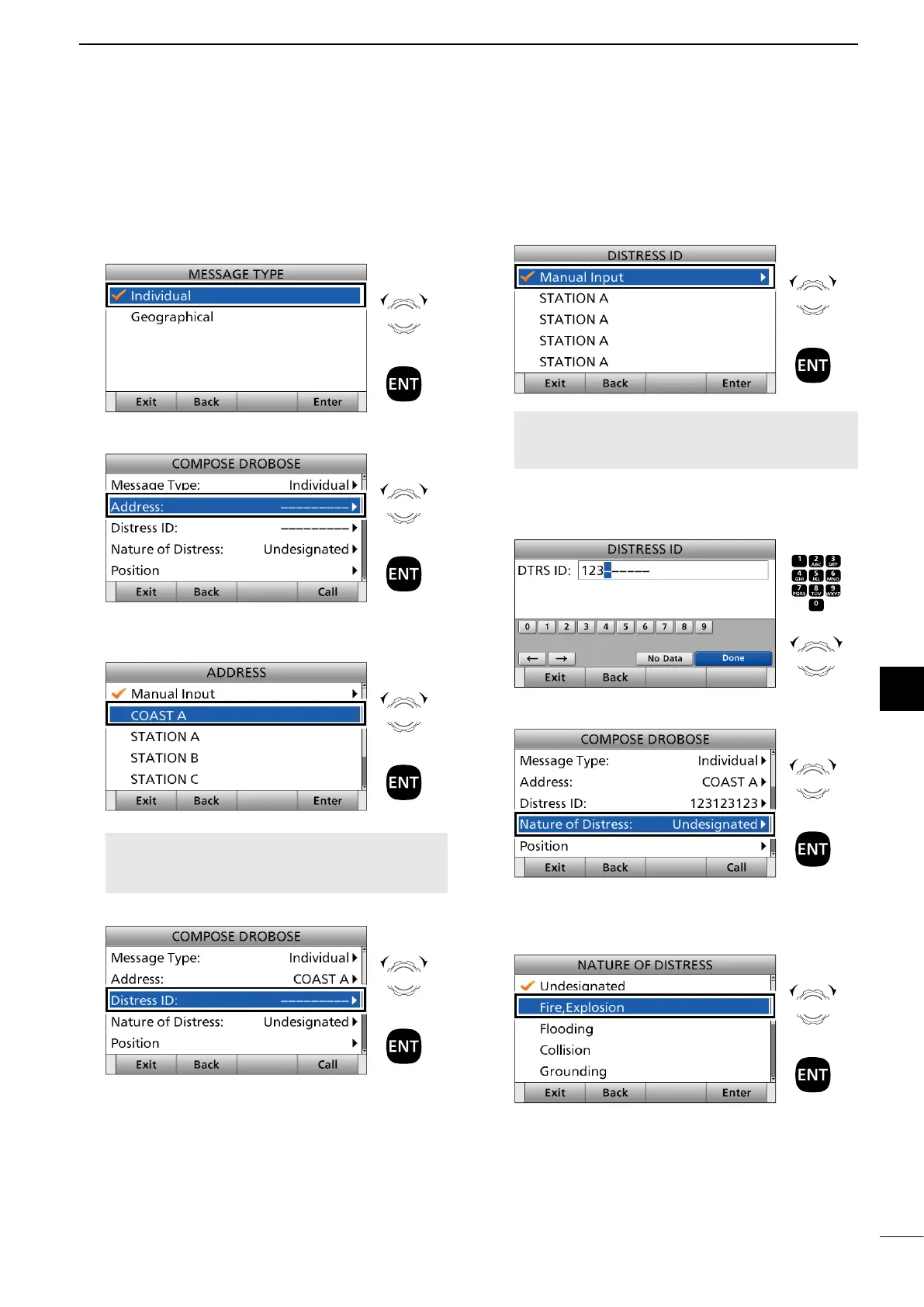
3. Select a message type.
(Example: Individual)
4. Select “Address.”
5. Select a coast station address or “Manual Input.”
(Example: COAST A)
NOTE: When you select “Manual Input” in
this step, push the keypad to manually enter an
Individual ID.
6. Select “Distress ID.”
7. Select “Manual Input.”
NOTE: Distress Call Log is displayed after receiving
the Distress call.
DO NOT select displayed Individual
IDs for DROBOSE.
8. Enter the 9 digit Distress ID (MMSI ID) code of
the ship in distress that you want to help.
After entering, select “Done” and push [ENT].
9. Select “Nature of Distress.”
10. Select an option.
(Example: Fire, Explosion)
The transceiver stores this setting for 30 seconds.
► Continued on the next page.
Rotate
+
Push
Rotate
+
Push
Rotate
+
Push
Rotate
+
Push
Rotate
+
Push
Push
+
Rotate
to select
a character
CH/GRP
Rotate
+
Push
Rotate
+
Push



 To Next Page