49
DSC OPERATION
7
■ Sending a Non-Distress calls
D Sending a Geographical call (continued)
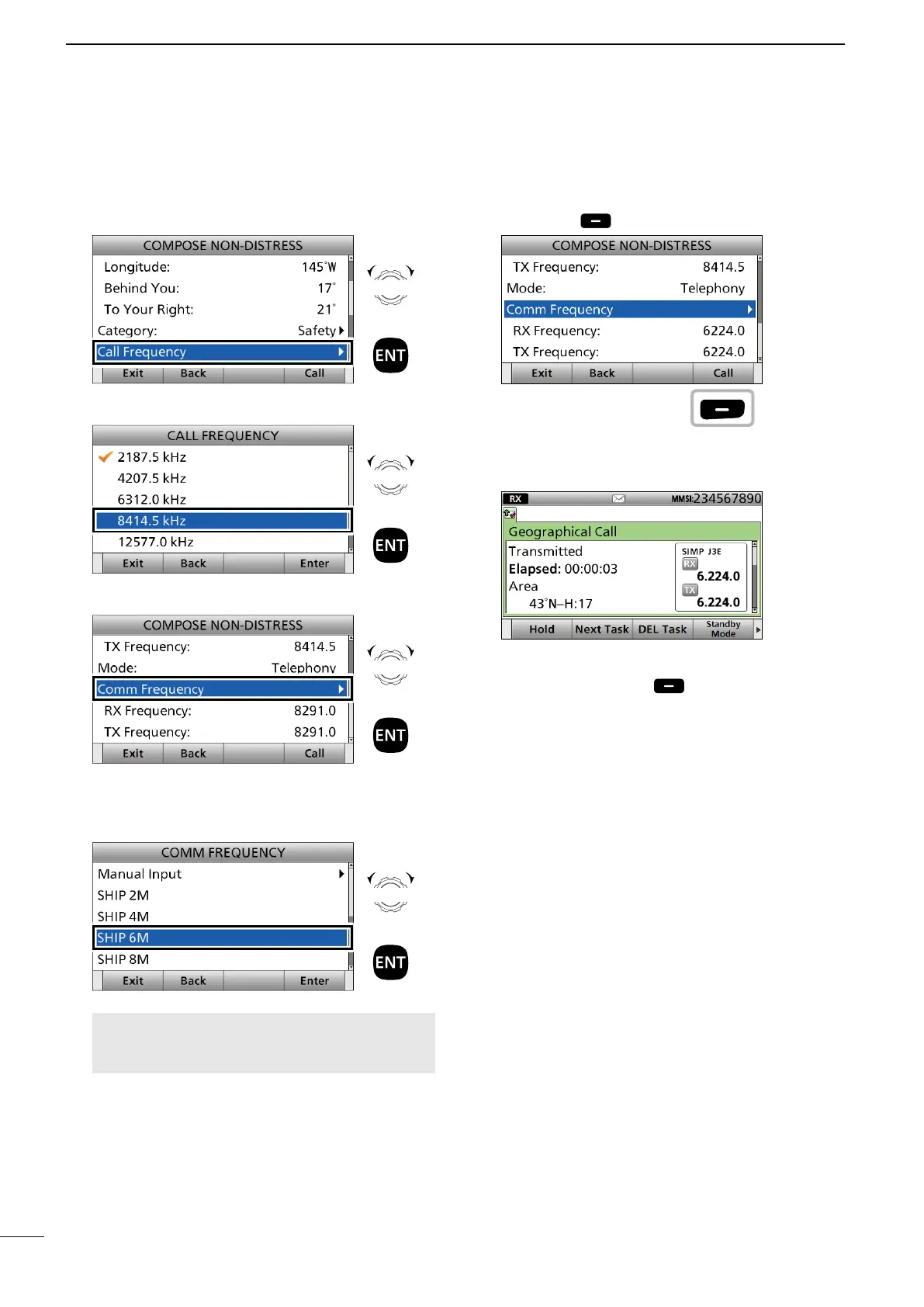
9. Select “Call Frequency.”
10.
Select an option. (Example: 8414.5 kHz)
11. Select “Comm Frequency.”
12. Select a communication frequency, or “Manual
Input.”
(Example: SHIP 6M)
NOTE: When you select “Manual Input” in this step,
push the keypad to manually enter a communication
frequency.
13. Push [Call] to send the Geographical call.
14. After sending, the following screen is displayed.
See page 29 for details of the software key functions
in the DSC Task mode.
15. Hold down [PTT] to communicate.
16. Push [Standby Mode] to return to the
Standby mode.
Rotate
+
Push
Rotate
+
Push
Rotate
+
Push
Rotate
+
Push
Push


 To Next Page