Model 250
Printer Applicator
Operators/Technical Manual Section 3A
Section 3A Page 4 of 9
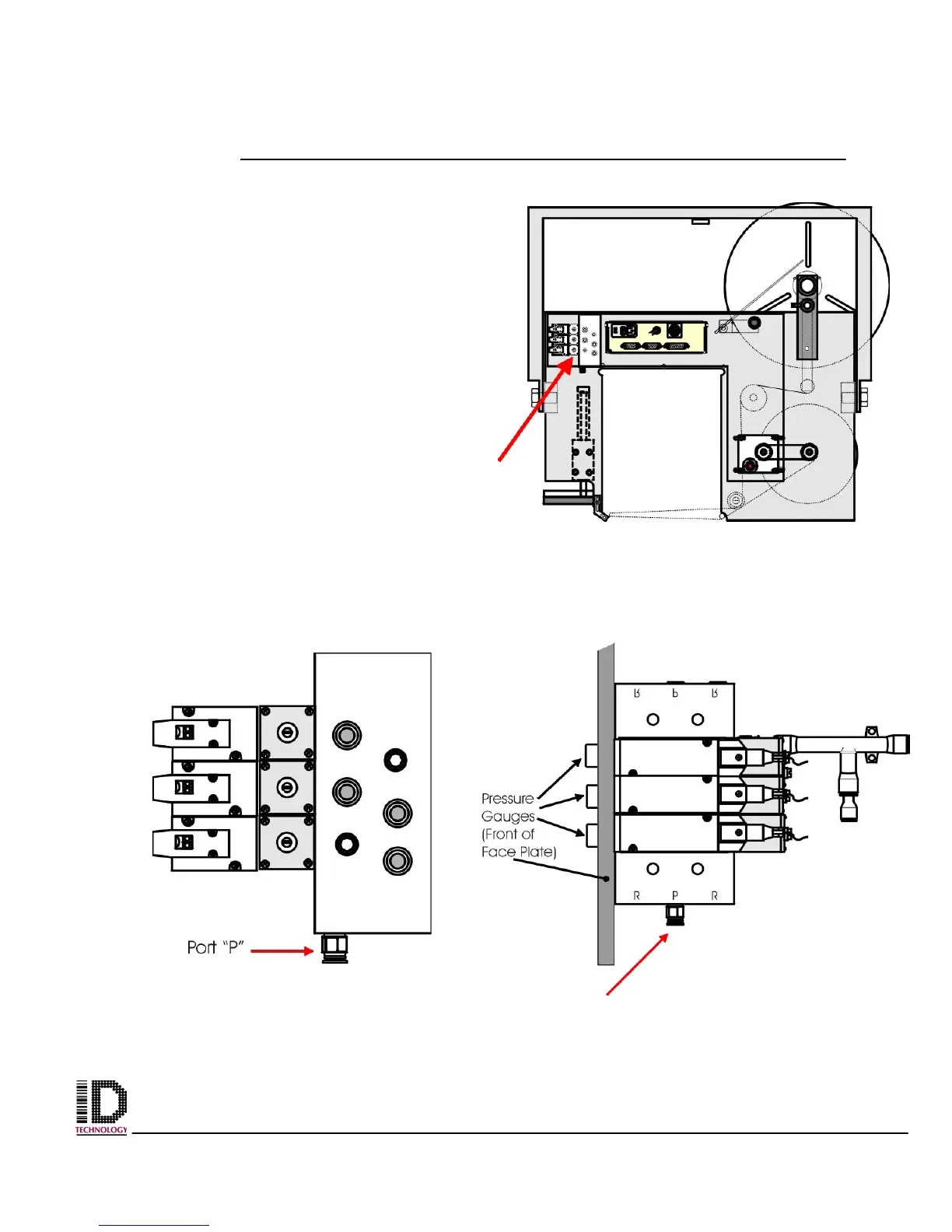
Figure 3A-6 Location of pneumatics module.
Figure 3A-7 Location of one
Touch brass fitting. Back View.
Figure 3A-8 Location of one
Touch brass fitting. Side View.
Locate the pneumatics module. After
removal of the back cover the module is
located to the left side as you are facing the
back. Fig. 3A-6 shows the location of the
pneumatics module with the arrow.
Remove the air tubing that goes from the
applicators plant air filter on the u-arm to the
pnuematics block. The one touch brass
fitting on the bottom of the pneumatics block
(in center marked “P” pressure) can be
removed using a small adjustable crescent
wrench. Remove the fitting located in port
“P” on the bottom of the pneumatics block.
See figures 3A-7 and 3A-8 for the location of
the fitting.



 To Next Page