Model 250
Printer Applicator
Operators/Technical Manual Section 3B
Section 3B Page 4 of 9
-
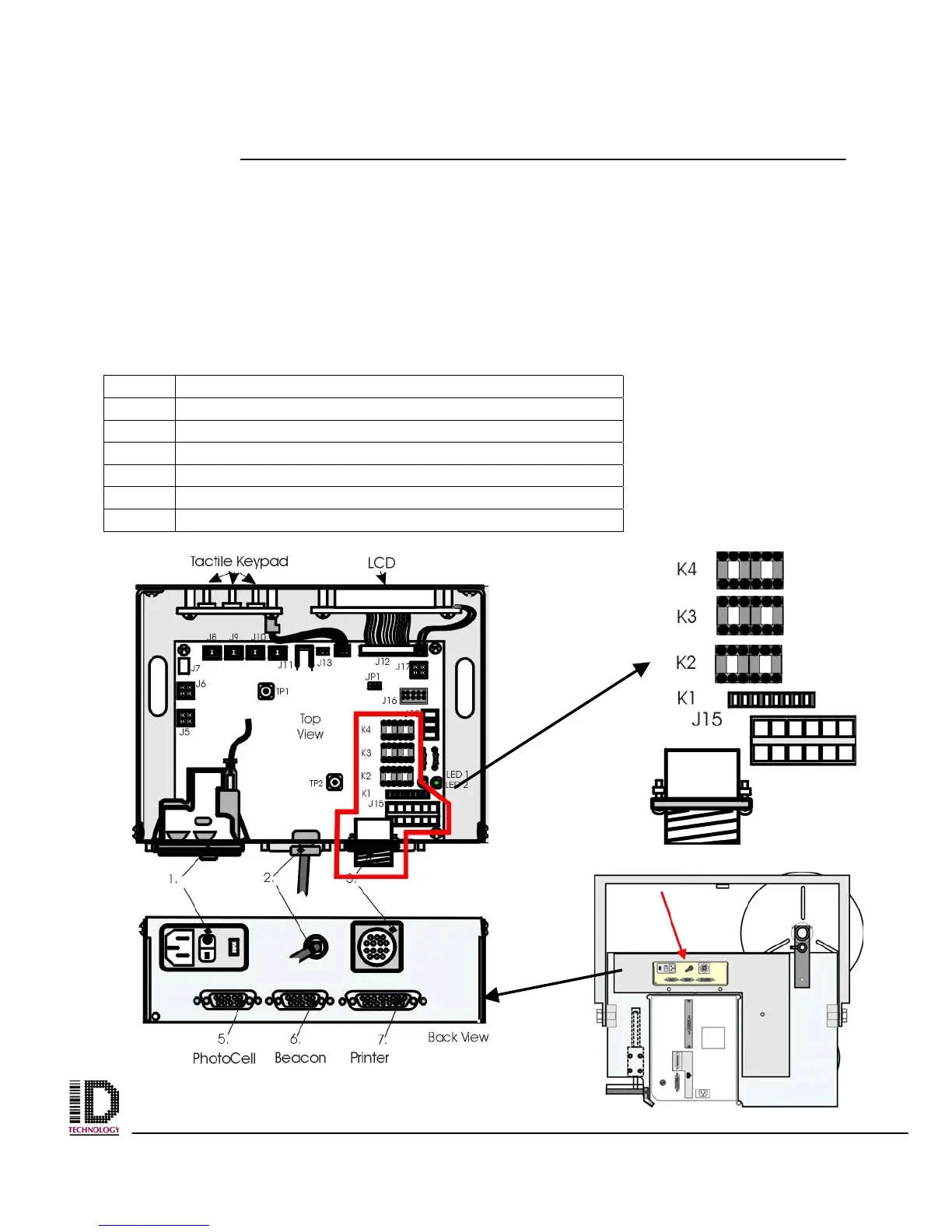
1 System Status parts and location
Installation of the System Status module should take about fifteen minutes.
Ensure power is disconnected from the unit.
Ensure plant air is disconnected from the unit.
Ensure you have received all the necessary components.
Refer to figure 3B-1 to see the components of module and Table 3B-1 to see a reference
table of the connections that will be used.
Table 3B-1 System Status Module Parts
Ref Association
K1 Mounted to board Solid State Relay Dry Contact
K2 Mounted to board Mechanical Relay Dry Contact
K3 Mounted to board Mechanical Relay Dry Contact
K4 Mounted to board Mechanical Relay Dry Contact
J 15 Connect to Male Plug on the Electronics Module
Plug Male Connector from end users connector



 To Next Page