- 18 - - 19 -
Printer driver functions table Printer driver functions table
4
1
2
3
5
4
1
2
3
5
Convenient print
functions
Appendix Index
Checking and
Changing Printer
Settings Using
the Control Panel
Network
Setup
Matching
Colors
Using Utility
Software
Convenient print
functions
Appendix Index
Checking and
Changing Printer
Settings Using
the Control Panel
Network
Setup
Matching
Colors
Using Utility
Software
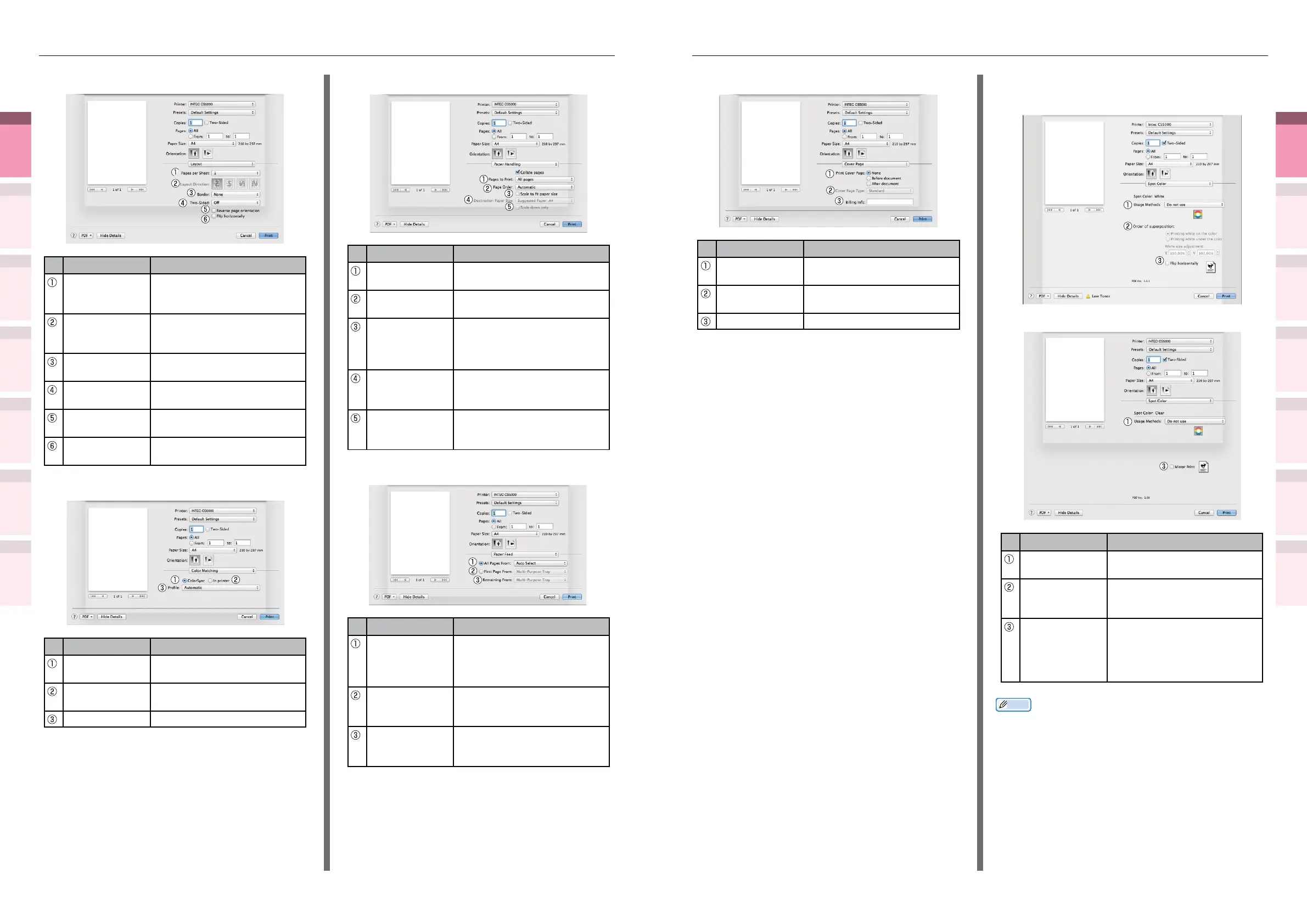
[Cover Page] panel
Item Explanation
Print Cover
Page
Species cover printing.
Cover Page
Type
Species the text during
printing.
Billing Info This function cannot be used.
[Spot Color] panel
z
In white mode
z
In clear mode
Item Explanation
Usage Methods Species the range of Spot
Color printing.
Order of
superposition
Species the order of color
and white overlay (white
mode only).
Mirror Print Sets when to print by
reversing the horizontal
orientation so that the
document is as if reected in
a mirror.
Memo
z
"Spot Color" is a function for model CS5000 only. For
details, see the "Separate Volume Spot Color Guide".
[Layout] Panel
Item Explanation
Pages per Sheet Selects the number of pages
to be printed on 1 sheet of
paper.
Layout Direction Species the layout when
printing multiple pages on a
single sheet of paper.
Border Species the boundary line
type.
Two-Sided Species to use 2-sided
printing.
Reverse page
orientation
Enable to print by reversing
the page orientation.
Flip horizontally Enable to print by reversing
left and right.
[Color Matching] panel
Item Explanation
ColorSync Species the ColorSync
function.
In printer Implements printer color
matching.
Prole Species the prole.
[Paper Handling] panel
Item Explanation
Pages to Print Species the pages to be
printed.
Page Order Species the order of the
pages to be printed.
Scale to t
Paper size
Prints by aligning to the paper
size. Some items may not be
printed correctly depending
on the setup.
Destination
Paper Size
Species to print by scaling to
match the size of the paper
to be output.
Scale down only Species to print by reducing
only to match the size of the
paper to be output.
[Paper Feed] panel
Item Explanation
All Pages From Species the tray for the
paper feed. The tray is
selected automatically when
[Auto Select] is specied.
First Page From Select to print from the tray
that species the header
page.
Remaining From Prints from the tray that
species the remaining
pages.



 To Next Page