- 219 -
Printing printer information
1
2
3
5
4
Convenient print
functions
Appendix Index
Checking and
Changing Printer
Settings Using
the Control Panel
Network
Setup
Matching
Colors
Using Utility
Software
- 218 -
Printing printer information
1
2
3
5
4
Convenient print
functions
Appendix Index
Checking and
Changing Printer
Settings Using
the Control Panel
Network
Setup
Matching
Colors
Using Utility
Software
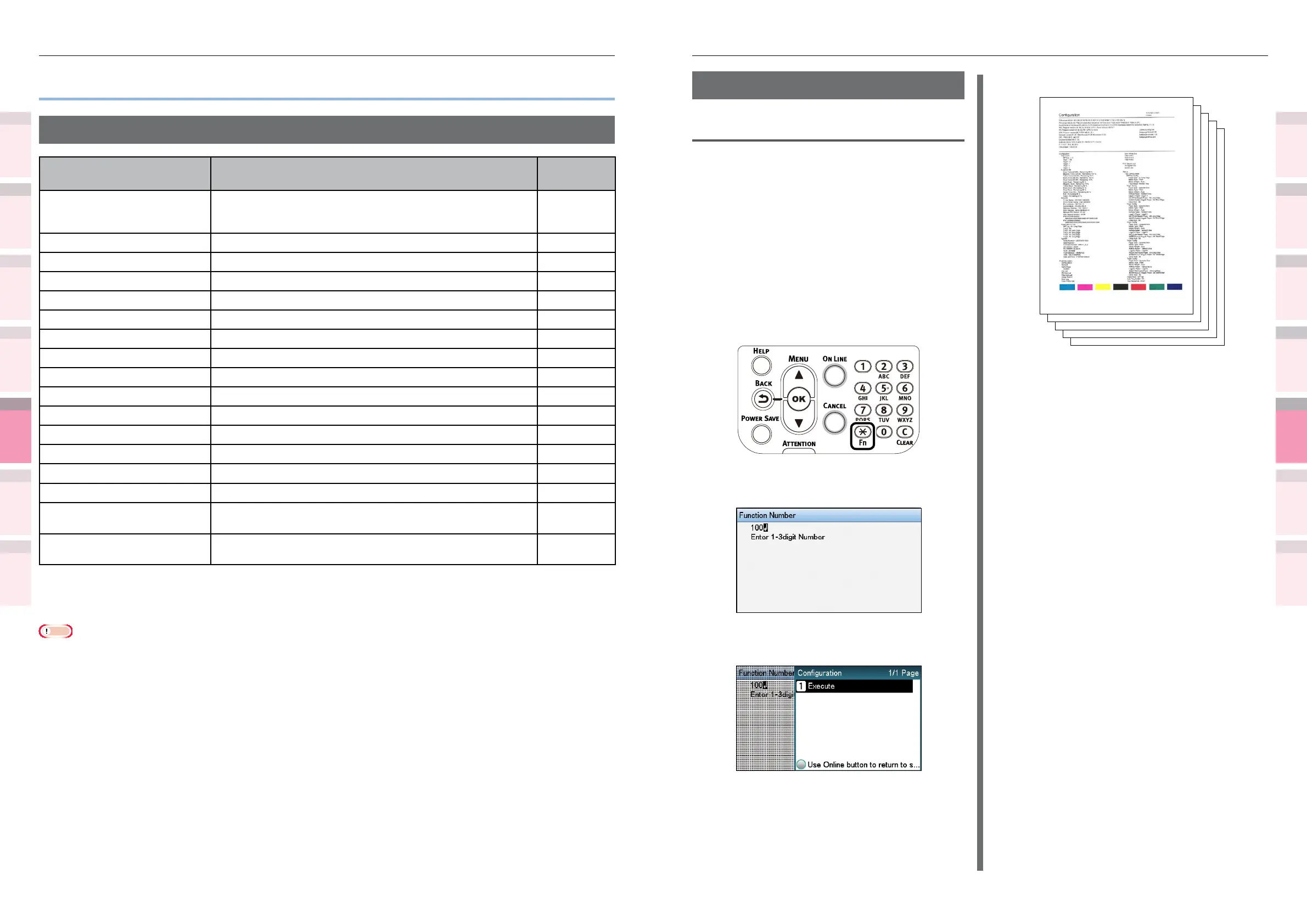
Printing printer settings lists
Settings details
Print the device information.
Print to see the remaining quantity of
consumables and other set values such as IP
addresses and MAC addresses, and to check
whether the device print unit is operating
correctly, etc.
How to print
1
Press the [Fn] key.
The numerical values input screen will
be displayed.
2
Press functions numbers [1], [0], [0],
and press the [OK] button.
3
Check that [Execute] has been selected,
and press the [OK] button.
Print results samples
z
Printing printer information
Printable report tables
List name Explanation
Reference
pages.
Settings details Prints a table of all menu category items and the current
settings. Further, the advanced printer settings are also printed
in the page header.
Page 219
Network functions Prints the network information. Page 220
Demo pages Prints the demo print data stored in the printer. Page 221
File list Prints a table of the les registered to the le system. Page 221
PS font list Prints the PS font samples. Page 223
PCL font list Prints the PCL font samples. Page 223
IBM PPR Font List Prints the IBM PPR font samples. Page 223
EPSON FX Font List Prints the EPSON FX font samples. Page 223
Total print results Prints the total print results. Page 222
Error log Prints the errors detected and saved by the printer. Page 222
Color prole list Prints the color prole list. Page 223
Color matching pattern Prints patterns to match the shading characteristics. Page 107
User media list
*1
Prints the user media list information. Page 224
Test print-1 Prints the patterns for analyzing the print quality. Page 224
Test print-2 Prints the patterns for analyzing the CYMK print quality. Page 224
Test print-3
*2
Prints the patterns for checking the media shrinkage in the case
of spot color overprint.
Page 224
Test print-4
*3
Prints the patterns for analyzing print quality of the spot colors
(white or clear).
Page 224
*1: Displayed when the user media is registered.
*2: Displayed when white toner is used in CS5000.
*3: Displayed with CS5000 only.
Note
z
When printing reports, set A4 size paper in the tray to be used before printing.



 To Next Page