- 222 - - 223 -
Printing printer information Printing printer information
1
2
3
5
4
1
2
3
5
4
Convenient print
functions
Appendix Index
Checking and
Changing Printer
Settings Using
the Control Panel
Network
Setup
Matching
Colors
Using Utility
Software
Convenient print
functions
Appendix Index
Checking and
Changing Printer
Settings Using
the Control Panel
Network
Setup
Matching
Colors
Using Utility
Software
Total print results Printing
print lists
Font list
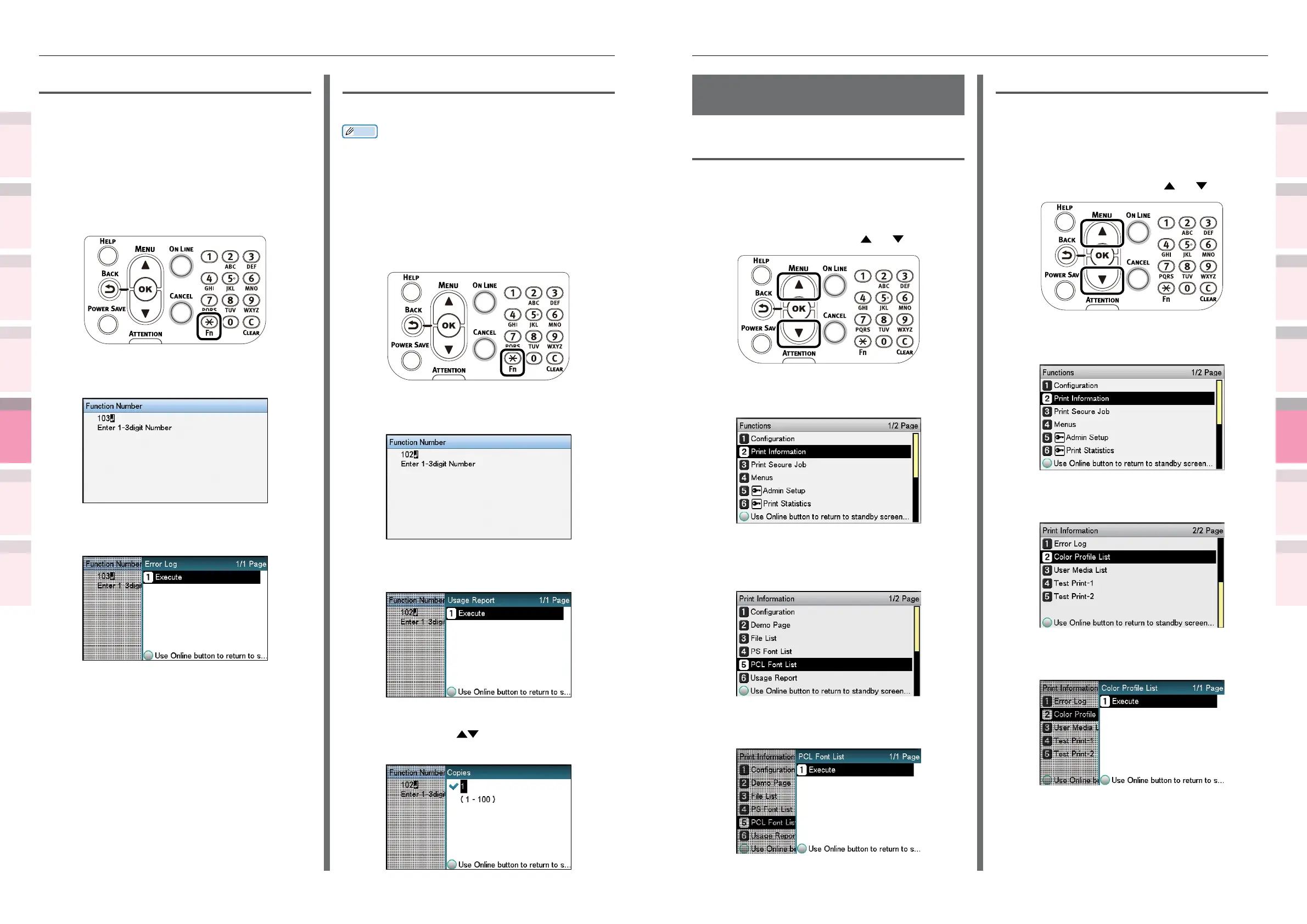
Prints the font samples stored in the device.
How to print
1
Press the scroll button or .
2
Select [Print Information], and press
the [OK] button.
3
Select [PCL Font List], [PS Font List],
[IBM PPR Font List] or [EPSON FX Font
List] and press the [OK] button.
4
Check that [Execute] has been selected,
and press the [OK] button.
Color prole list
Prints a table of the ICC proles registered to the
le system.
How to print
1
Press the scroll button or .
2
Select [Print Information], and press
the [OK] button.
3
Select [Color Prole List], and press the
[OK] button.
4
Check that [Execute] has been selected,
and press the [OK] button.
Error log
Prints a history of the errors that have occurred
in the device.
How to print
1
Press the [Fn] key.
The numerical values input screen will
be displayed.
2
Press functions numbers [1], [0], [3],
and press the [OK] button.
3
Check that [Execute] has been selected,
and press the [OK] button.
Total print results
Prints the total print results.
Memo
z
Not displayed if [Usage Report] of [Print Statistics] is set
to [Disable].
How to print
1
Press the [Fn] key.
The numerical values input screen will
be displayed.
2
Press functions numbers [1], [0], [2],
and press the [OK] button.
3
Check that [Execute] has been selected,
and press the [OK] button.
4
Specify the print quantity using the
scroll buttons
, and press the [OK]
button.



 To Next Page