- 230 - - 231 -
Checking print quantities Checking remaining consumables and maintenance unit quantities
1
2
3
5
4
1
2
3
5
4
Convenient print
functions
Appendix Index
Checking and
Changing Printer
Settings Using
the Control Panel
Network
Setup
Matching
Colors
Using Utility
Software
Convenient print
functions
Appendix Index
Checking and
Changing Printer
Settings Using
the Control Panel
Network
Setup
Matching
Colors
Using Utility
Software
z
Checking remaining consumables and
maintenance unit quantities
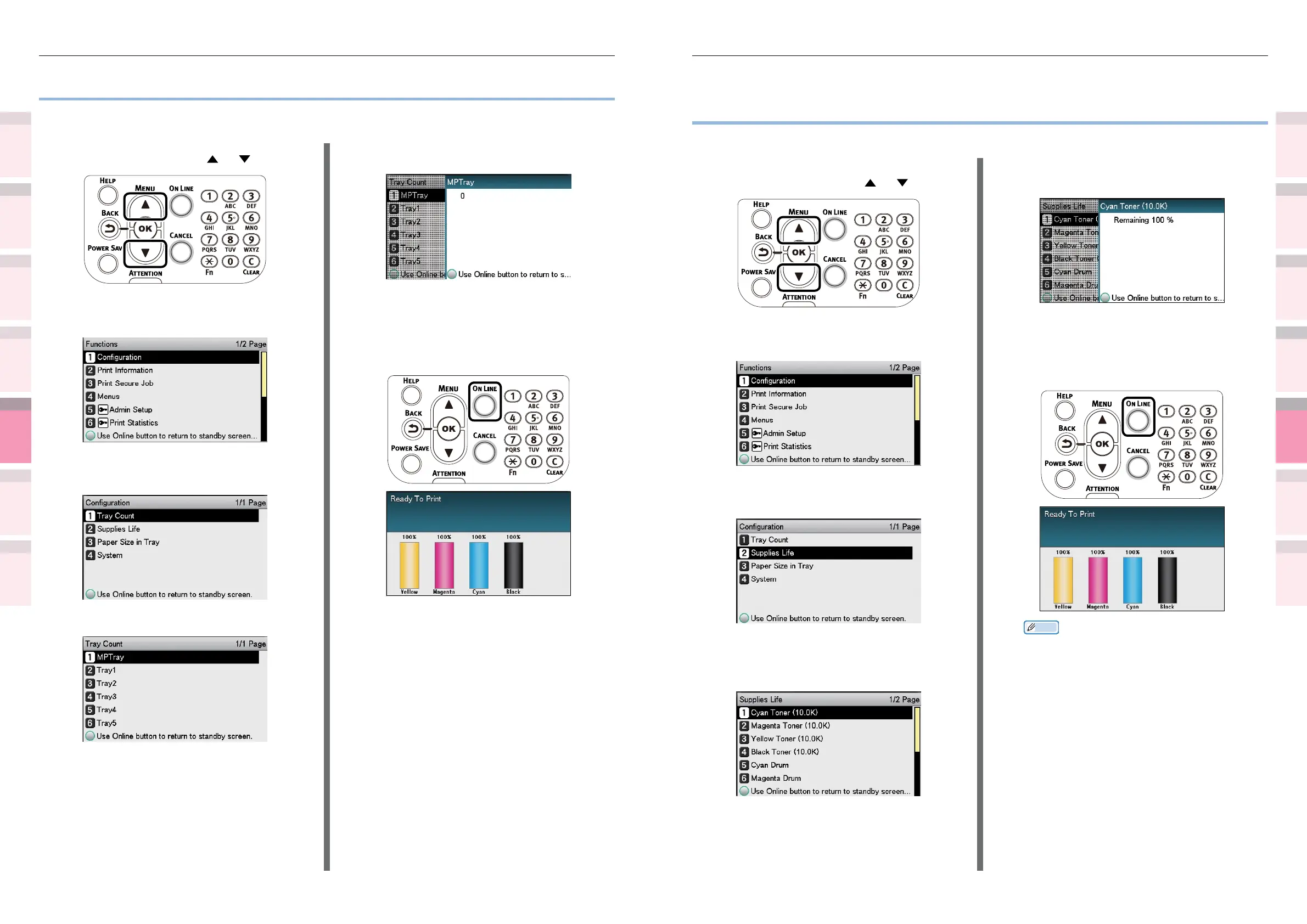
You can check the remaining quantities and service life of the toner, image drum, belt unit, fuser unit,
and waste toner box.
1
Press the scroll button or .
2
Select [Conguration], and press the
[OK] button.
3
Select [Supplies Life], and press the
[OK] button.
4
Select the consumable or maintenance
unit to be checked (Toner, image drum,
belt unit, fuser unit, or waste toner box).
5
Press the [OK] button.
To continue checking other items, press
the [BACK] button and return to 5.
6
Press the [ON LINE] button to return to
the standby screen.
Memo
z
The value to the right of the toner in the remaining
consumables quantity screen changes depending on
the type of toner cartridge installed.
“10.0K” is displayed when a standard toner
cartridge is mounted.
When the “38.0K” large-capacity toner cartridges
are mounted the ISO standard values for each toner
will be displayed as follows: Cyan, Magenta, Yellow
(33.4K) and Black (36.9K).
z
Checking print quantities
You can check the quantity of printed paper to date. You can also check the quantities printed (fed)
from each tray.
1
Press the scroll button or .
2
Select [Conguration], and press the
[OK] button.
3
Select [Tray Count], and press the [OK]
button.
4
Select the tray to be checked.
5
Press the [OK] button.
To continue checking other items, press
the [BACK] button and return to 4.
6
Press the [ON LINE] button to return to
the standby screen.



 To Next Page