- 22 - - 23 -
Printing on various papers Printing on various papers
4
1
2
3
5
4
1
2
3
5
Convenient print
functions
Appendix Index
Checking and
Changing Printer
Settings Using
the Control Panel
Network
Setup
Matching
Colors
Using Utility
Software
Convenient print
functions
Appendix Index
Checking and
Changing Printer
Settings Using
the Control Panel
Network
Setup
Matching
Colors
Using Utility
Software
(6)
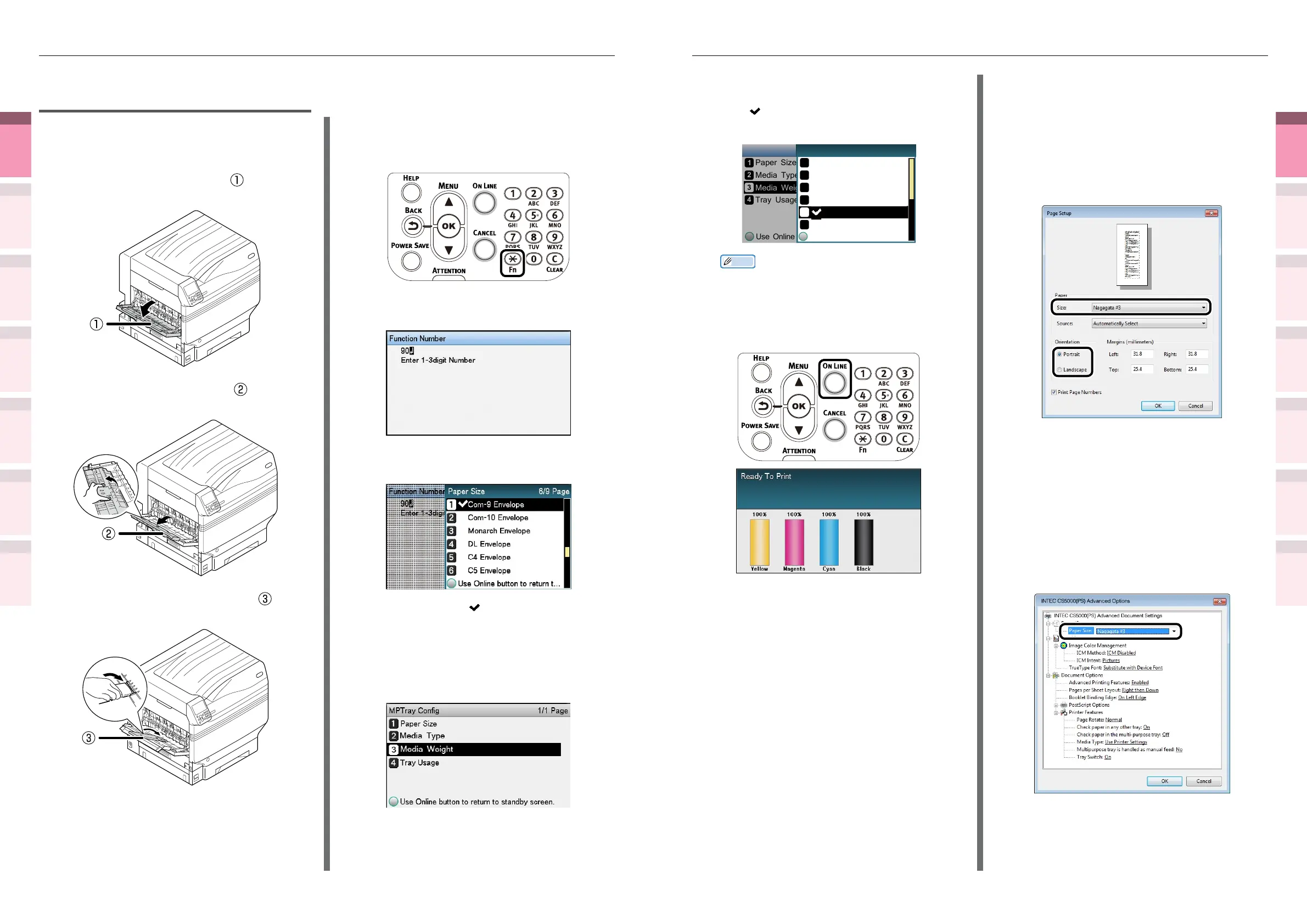
Select a suitable media weight, and
press the [OK] button. Check that
is displayed to the left of the
selected media weight.
Use Online button to return...
Paper Size
Media Type
Media Weight
Tray Usage
MPTray Config
Use Online button to return...
Auto
Ultra Light
Medium Light
Medium
Medium Heavy
Media Weight 1/2 Page
Light
Memo
z
If you want to print on a thin envelope of 24 lb, the
[Light] setting may improve the printing result.
(7)
Press the [ON LINE] button to
return to the standby screen.
6
Open the le to be printed.
7
Select [Paper Size], [Paper Source],
and [Output Bin] in the printer drivers
to print.
Using Windows PS printer drivers
1
Select [Page Setup] in the [File] menu.
2
Select [Nagagata
*
(where
*
is the
envelope type)] in [Size], and [Portrait]
or [Landscape] in [Orientation], and
click [OK].
3
Select [Print] in the [File] menu.
4
Click [Advanced] (or [Preferences]).
5
Click [Advanced] in the [Paper/Quality]
tab.
6
Select the envelope type in [Paper Size]
in the "Advanced Options" screen, and
click [OK].
Printing on standard size
envelopes
1
Setting envelopes in the Multi-Purpose
Tray.
2
Open the face-up stacker ( ) on the
left side of the machine.
3
Open the paper supporter ( ) as
shown in the following gure.
4
Rotate the auxiliary supporter ( ) in
the arrow direction to the lock position.
5
Set the paper size using the control
panel.
(1)
Press the [Fn] key.
The numerical values input screen
will be displayed.
(2)
Press [9], [0], and press the [OK]
button.
(3)
Select the envelope type, and
press the [OK] button.
(4)
Check that is displayed to the
left of the selected envelope, and
press the [BACK] button.
(5)
Select [Media Weight], and press
the [OK] button.



 To Next Page