- 240 - - 241 -
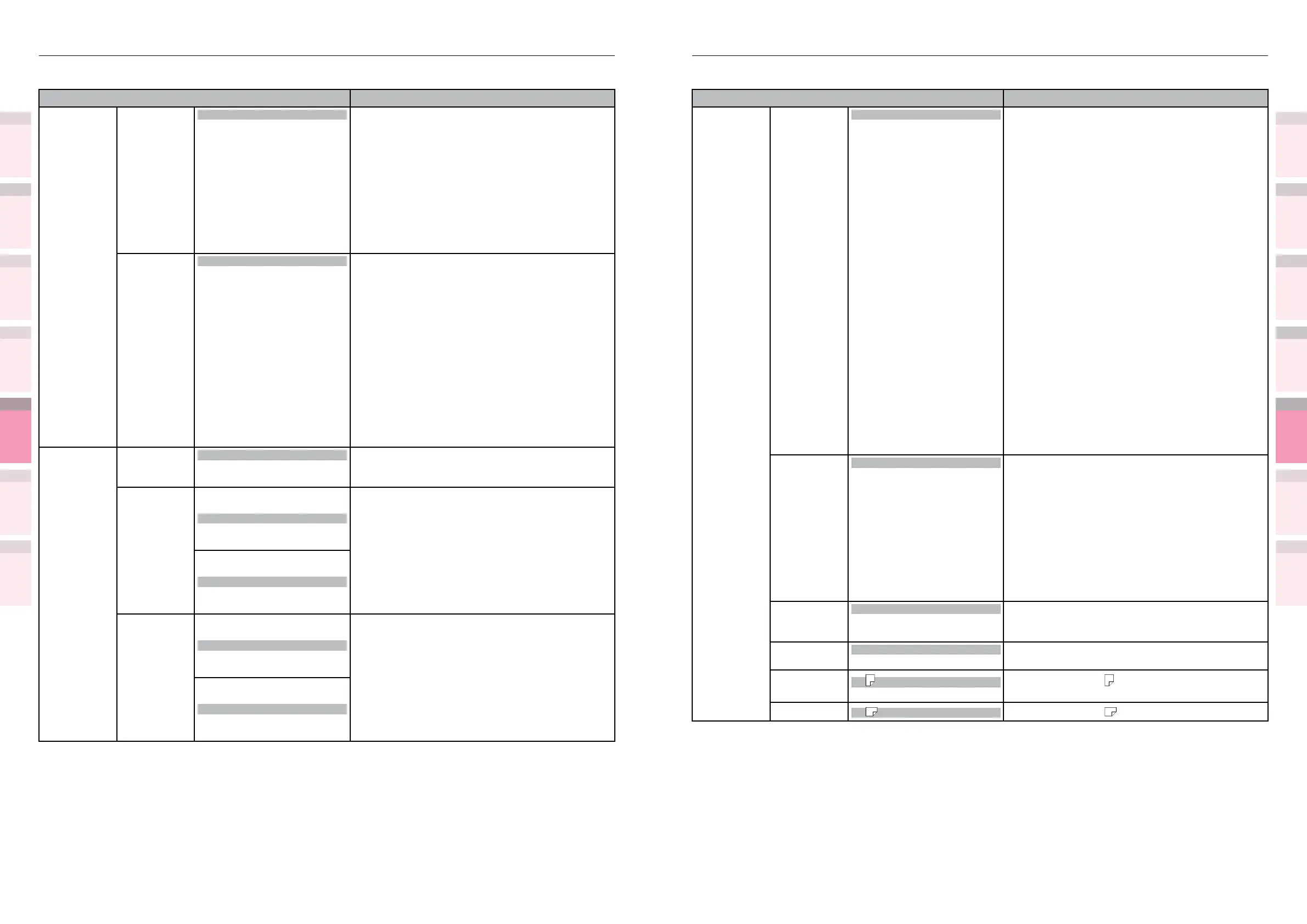
Table of setting items in the device setup screen Table of setting items in the device setup screen
1
2
3
5
4
1
2
3
5
4
Convenient print
functions
Appendix Index
Checking and
Changing Printer
Settings Using
the Control Panel
Network
Setup
Matching
Colors
Using Utility
Software
Convenient print
functions
Appendix Index
Checking and
Changing Printer
Settings Using
the Control Panel
Network
Setup
Matching
Colors
Using Utility
Software
z
Shaded areas are factory-set values.
Item Details
Tray1 Cong Media Type Plain
Letterhead
Transparency
Labels
Bond
Recycled
Card Stock
Rough
Glossy
USERTYPE1
USERTYPE2
USERTYPE3
USERTYPE4
USERTYPE5
USERTYPE6
USERTYPE7
USERTYPE8
USERTYPE9
USERTYPE10
USERTYPE11
USERTYPE12
USERTYPE13
USERTYPE14
USERTYPE15
USERTYPE16
USERTYPE17
USERTYPE18
USERTYPE19
USERTYPE20
Sets the paper type for tray 1.
Media Weight
Auto
Ultra Light
Light
Medium Light
Medium
Medium Heavy
Heavy
Ultra Heavy1
Ultra Heavy2
Ultra Heavy3
Ultra Heavy4
Ultra Heavy5
Sets the paper weight for tray 1.
A3Nobi Paper
A3Nobi
A3Wide
Tabloid Extra
Set when using A3Nobi (328 x 453mm), A3WIDE
(320 x 450mm), or tabloid extra (12 x 18") paper
size in tray 1.
Legal14
Paper
Legal14
Legal13.5
Set when using legal14 (8.5 x 14") or legal13.5 (8.5
x 13.5") paper in tray 1.
A5LEF/A6/
Paper
A5
A6
Set when using A5
and A6 paper in Tray 1.
A5SEF Paper
A5 Set when using A5 paper in Tray 1.
z
Shaded areas are factory-set values.
Item Details
MPTray Cong Media Weight Auto
Ultra Light
Light
Medium Light
Medium
Medium Heavy
Heavy
Ultra Heavy1
Ultra Heavy2
Ultra Heavy3
Ultra Heavy4
Ultra Heavy5
Sets the paper weight for the Multi-Purpose Tray.
Tray Usage
Normal Tray
When Mismatching
Do Not Use
Sets how to use the Multi-Purpose Tray.
Normal Tray: (Tray selection/switching)
Use as regular tray.
When Mismatching:
If the output tray paper size or paper type is
different from the print data, print from the
Multi-Purpose Tray.
Do Not Use:
Auto tray selection and auto tray switching are
not possible.
However, if [Menu]>[Tray conguration]>[Paper
feed tray]>[Multi-Purpose Tray] is specied in
the control panel, operations will be the same
as regular trays (Uses the Multi-Purpose Tray as
the auto tray).
Tray1 Cong Paper Size
Cassette Size
Custom
Other Size
Sets the paper size for tray 1.
X Dimension
*1
*1: Displayed
when
[Paper size]
is set to
[Custom]
on the
control
panel.
3.9"
to
8.3"
to
13.0"
Sets the custom paper width for tray 1.
99mm
to
210mm
to
330mm
Y Dimension
*1
*1: Displayed
when
[Paper size]
is set to
[Custom]
on the
control
panel.
5.8"
to
11.7"
to
18.0"
Sets the custom paper length for tray 1.
147mm
to
297mm
to
457mm



 To Next Page