A75UM3EA (Ver. E.2)
3-58
B. Function of Threshold Level in the Line/Photo Mode
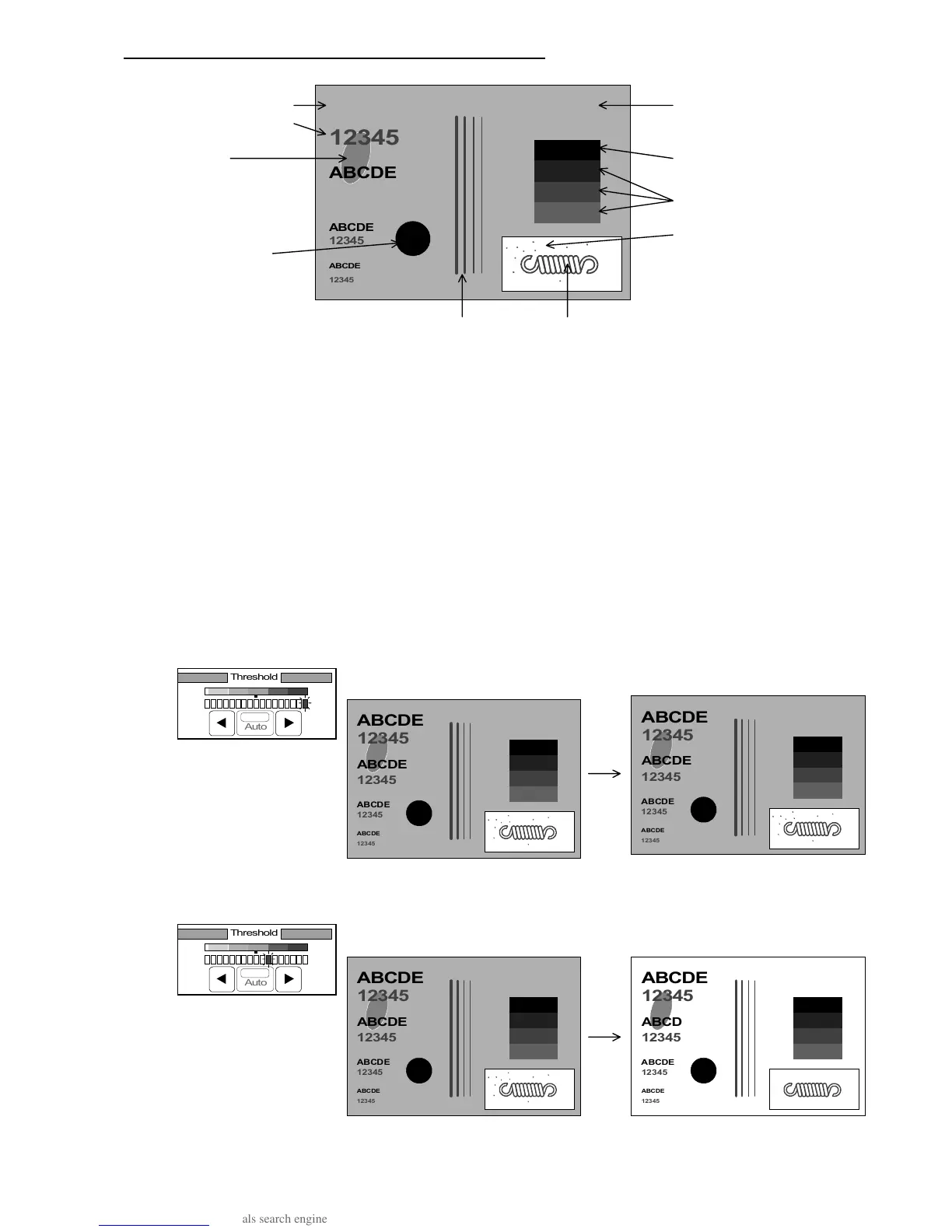
Letters (Black)
Foggy background
Letters (Gray)
(Like a newspaper)
Dirt
Solid black
Halftones
Black dots (Dirt)
Solid Black
Lines (Gray) Line image
The purpose to change the Threshold Level in the Line/Photo Mode is to remove unnecessary light
images from the copy similar to the case of the Line Mode.
When some original is scanned, densities of all its images are detected and compared with the
selected Threshold Level in order to divide images into 2 groups such as “necessary dark image” and
“unnecessary light image”.
Since “unnecessary light image” is converted to “white image”, the copy will not have such image.
Whenever you select larger Threshold Level, the scanner tends to judge light image to be
“necessary dark image”.
Whenever you select smaller Threshold Level, on the contrary, it tends to judge light image to
be “unnecessary light image”.
1. If the selected Threshold Level is large, it becomes impossible or difficult to read the copy since
such unnecessary light images as “Foggy background”, “Dirt” and “Black dots” are judged
“necessary dark image” and the copy has these images as the following examples 1 and 2.
(Example 1 : Threshold Level is too large.)
(Original) (Result of copy)
(Example 2 : Threshold Level is a little large.)
(Original) (Result of copy)
ABCDE
12345



 To Next Page