EasyManua.ls Logo

KIP 2080 - Media Size Mode (Ratio between Original Size and Media Size)

KIP 2080
252 pages
Print Icon
To Next Page IconTo Next Page
To Previous Page IconTo Previous Page
Loading...
A75UM3E6 (Ver. E.2)
3-37
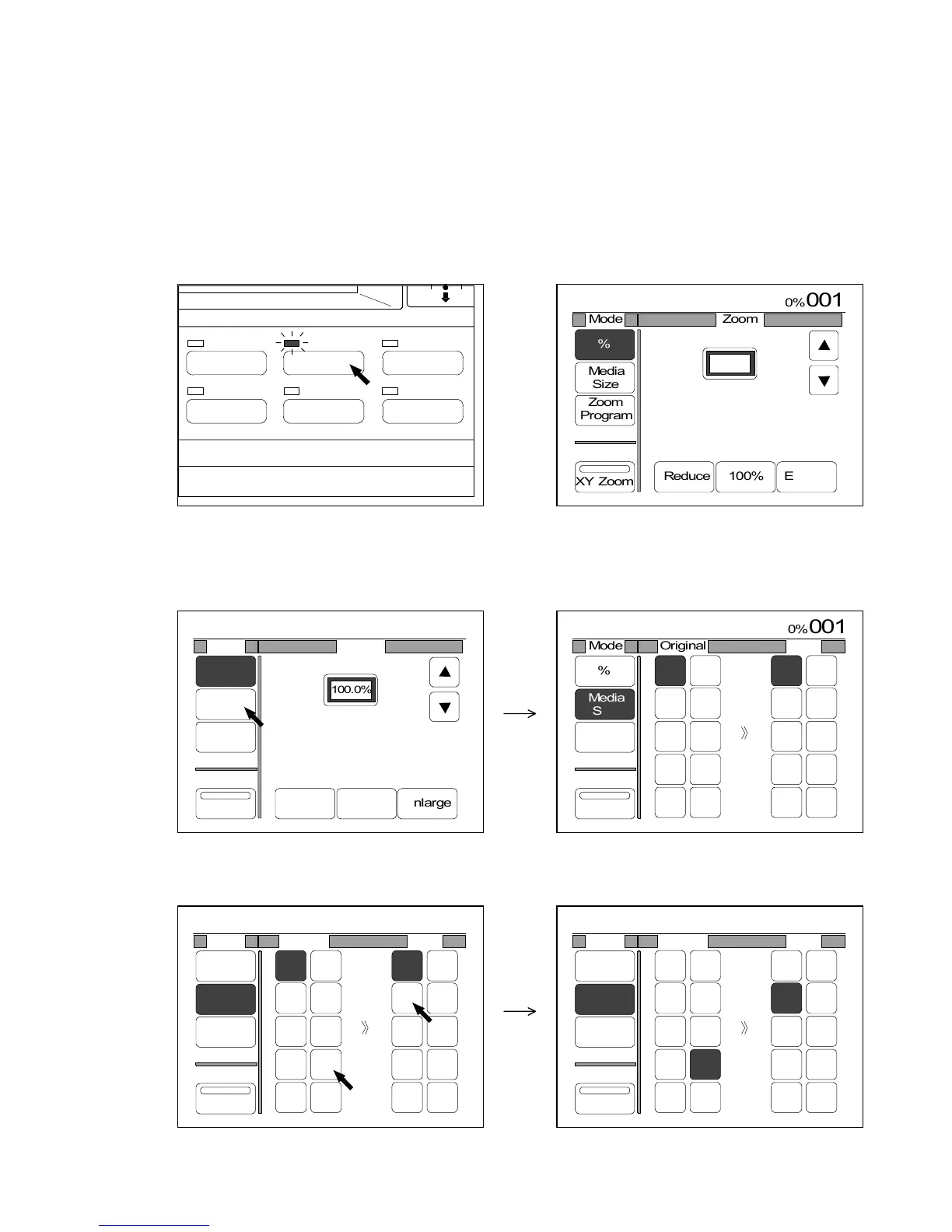
3.4.5 Media Size Mode (Ratio between original size and media size)
[Function]
If only you decide original’s size and required copy size, the Media Size Mode automatically selects
the necessary zoom ratio.
Both original size and copy size must be standard size such as “36 inches” and “12 inches”.
[Operation]
1) Push the Zoom Key to indicate the Zoom Setting Screen on the LCD.
(Zoom Key) (Zoom Setting Screen)
2) Select the Media Size Mode pressing “Media Size”.
“Media Size” is colored when selected, and the menu of standard original sizes and standard copy
sizes is indicated.
3) Select the size of original and your required copy size.
If you do so, the LCD indicates the zoom ratio that satisfies your size setting.
IMAGE QUALITY
LAYOUT/SORT
ZOOM
DATE STAMPFUNCTION
PAPER






0%
001
Mode Zoom
%
Media
Size
Zoom
Program
XY Zoom
Reduce 100% Enlarge
100.0%


0%
001
Mode Zoom
%
Media
Size
Zoom
Program
XY Zoom
Reduce 100% Enlarge
100.0%
0%
001
Mode Original
%
Media
Size
Zoom
Program
XY Zoom
100.0%
Copy
36"
34"
30"
24"
22"
18"
17"
12"
11"
8.5"
36"
34"
30"
24"
22"
18"
17"
12"
11"
8.5"
0%
001
Mode Original
%
Media
Size
Zoom
Program
XY Zoom
100.0%
Copy
36"
34"
30"
24"
22"
18"
17"
12"
11"
8.5"
36"
34"
30"
24"
22"
18"
17"
12"
11"
8.5"
0%
001
Mode Original
%
Media
Size
Zoom
Program
XY Zoom
309.0%
Copy
36"
34"
30"
24"
22"
18"
17"
12"
11"
8.5"
36"
34"
30"
24"
22"
18"
17"
12"
11"
8.5"

Table of Contents

Related product manuals