A75UM3E4 (Ver. E.2)
3-22
3.3.4 Divide Mode
[Function]
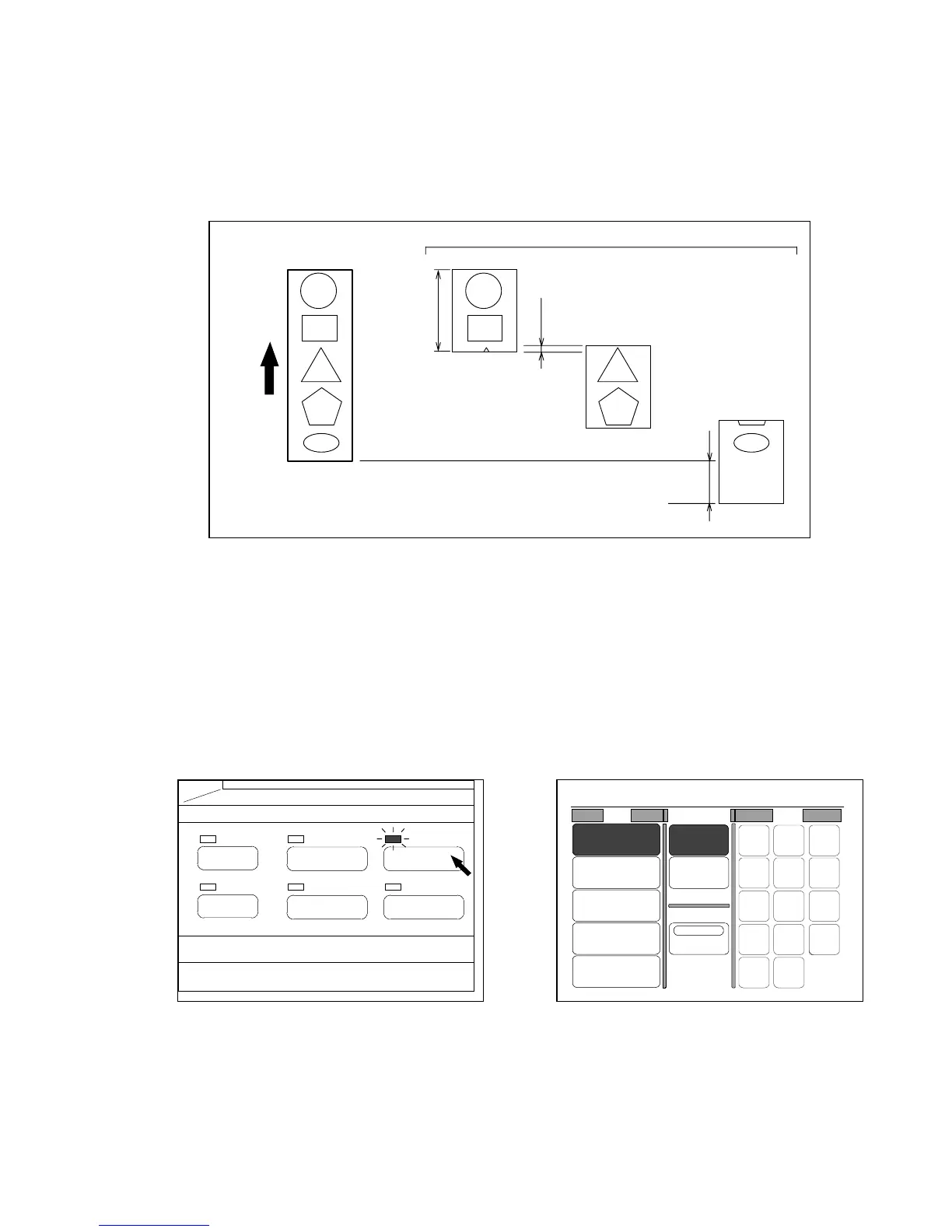
The copy image of a long original can be divided and printed on some sheets of copying media.
The roll media is cut in the length of standard size such as “22 inches” and “36 inches”.
You can not select the Synchro Cut.
Note : It is impossible to select the sheet media feeding in the Divide Mode.
(Reference)
Some part of image is shared by both former copy and latter one as “Overlap” in the above figure.
The amount of overlap is changeable.
Since the service engineer only can change the amount of overlap, call your service engineer
when you wish to change it.
[How to do copying in the Divide Mode]
1) Push the Paper Key to indicate the Paper Setting Screen on the LCD.
(Paper Key) (Paper Setting Screen)
Long original
Copies
Scanning
direction
1st copy
2nd copy
3rd copy
Standard
cut size
Overlap
(Example:30mm)
Margin
PAPER
FUNCTION
BASIC SCREEN
MODE MEMORY
MENU
REFERENCE
0%
001
Roll Cut Mode Size
2:30"
Vellum
1:36"
Plain Paper
3:24"
Film
4:18"
Plain Paper
Bypass
Synchro
Standard
Divide
48"
44"
42"
36"
34"
30"
24"
22"
18"
17"
12"
11"
9"
8.5"



 To Next Page