A75UM3EK (Ver. E.2)
3-148
C. Original Format
[Function]
If you set the original to the scanner, its size is automatically detected and displayed on the LCD as
18”, 17”, 22” and 24”.
Distinction between Engineering and Architecture is done based on the original format setting
decided here.
Engineering : 36”, 30”, 24”, 18”, 12” and 8.5”
Architecture : 36”, 34”, 22”, 17”, 11” and 8.5”
[How to change the Original Format]
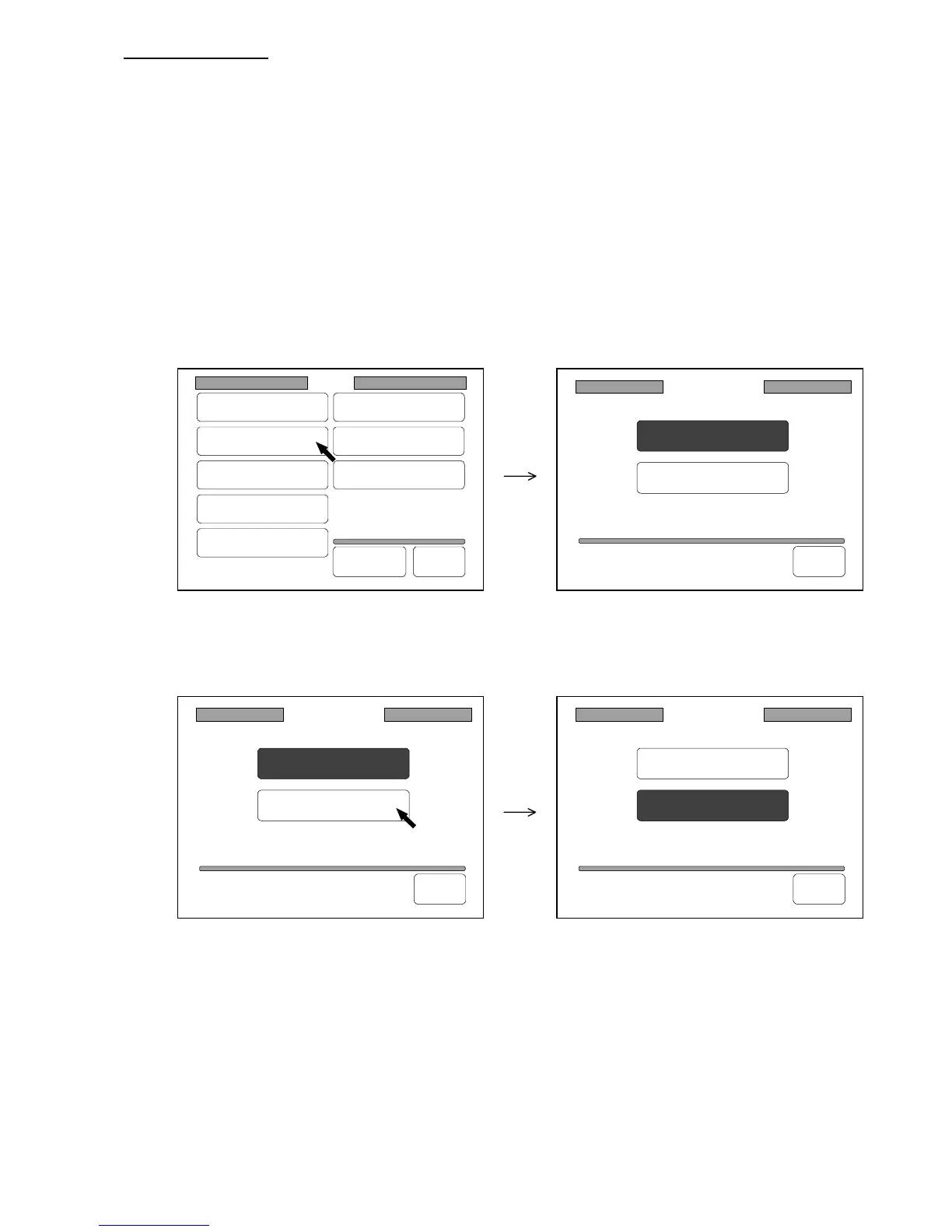
1) Press “Original Format” in the Setting Screen to indicate the Original Format Setting Screen on
the LCD.
(Original Format Setting Screen)
2) Press another original format if you wish to change.
The selected original format is colored.
3) If you wish to let the selected original format be valid later on even if you turn off the machine,
register it making reference to “How to register the setting” on the page 3-143.
Original Format
Architecture
Engineering
Back
Original Format
Architecture
Engineering
Back
Original Format
Architecture
Engineering
Back
Setting
Register
Zoom Ratio
Auto Start
Standard Mode
Mode Memory
Memory
Date/Time
SCSI
Set Back
Original
Format



 To Next Page