A75UM3EK (Ver. E.2)
3-149
D. Auto Start
[Function]
When you set the original to the scanner, it is automatically scanned without pushing the Start Key if
the Auto Start is validated.
When the Auto Start is valid, it is possible to decide how many seconds later the Auto Start function
should start scanning since you have set the original. (From 1 second to 10 seconds)
Note : If you wish to do Sample Copy when the Auto Start is valid, push the Sample Key before the
Auto Start function starts scanning.
[Operation]
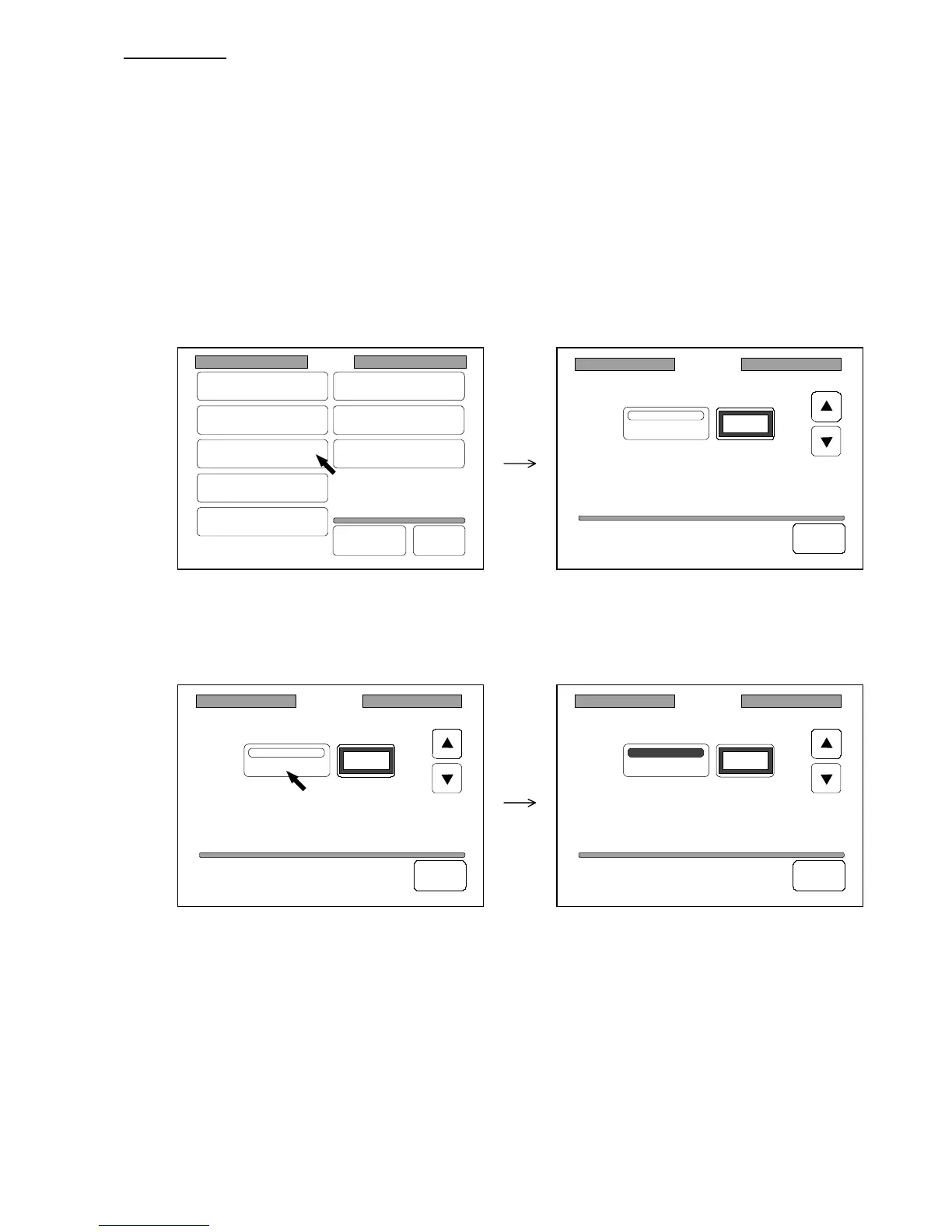
1) Press “Auto Start” in the Setting Screen to indicate the Auto Start Setting Screen on the LCD.
(Auto Start Setting Screen)
2) Press “Auto Start” to validate the Auto Start.
It is colored when validated.
Setting
Register
Zoom Ratio
Auto Start
Standard Mode
Mode Memory
Memory
Date/Time
SCSI
Set Back
Original
Format
Auto Start
Auto Start
2Sec
Back
Auto Start
Auto Start
2Sec
Back
Auto Start
Auto Start
2Sec
Back



 To Next Page