A75UM3EJ (Ver. E.2)
3-139
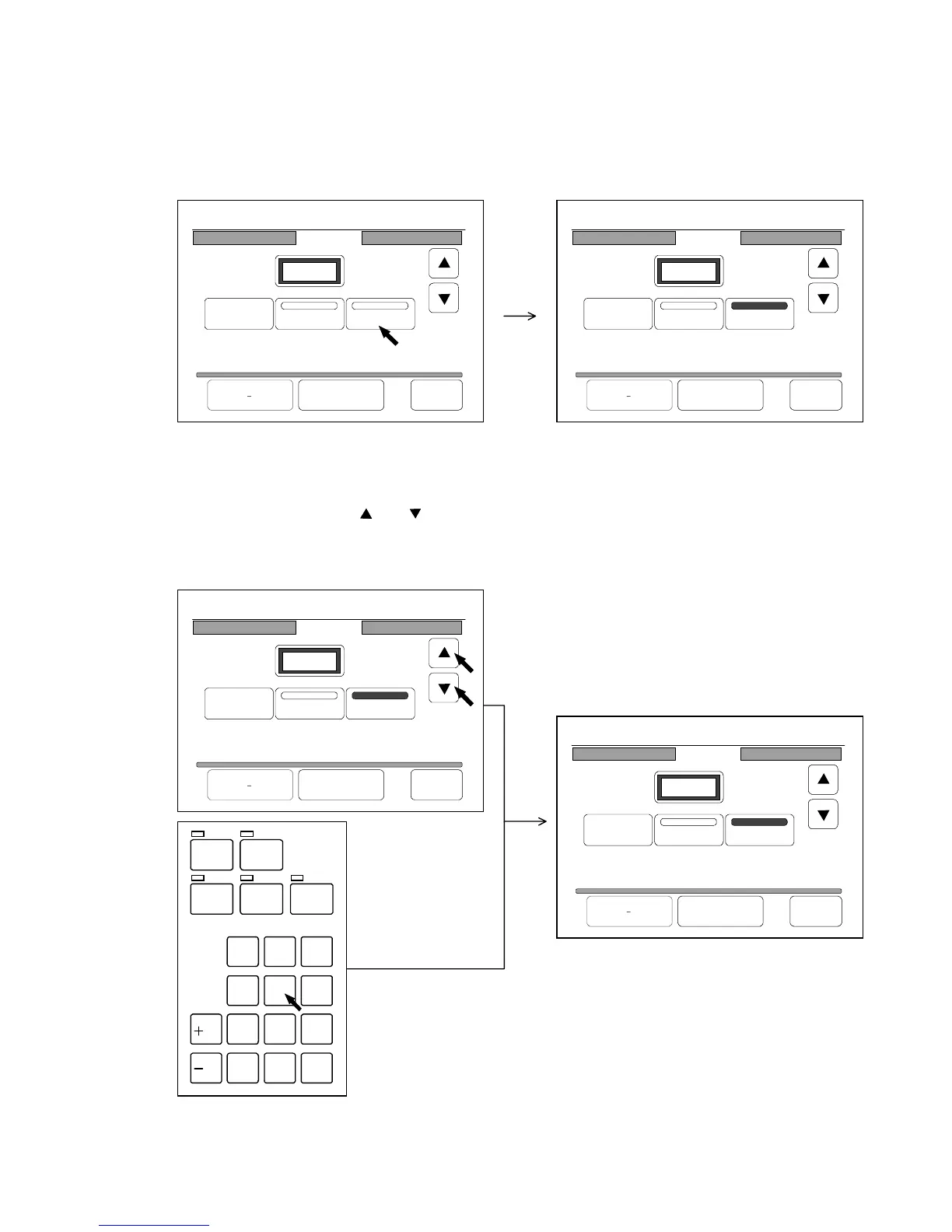
[How to replace the image data]
(Example)
You have a Set Copy Job that has image data of 10 originals.
Now you will replace the image data of 5th original with that of newly scanned original “A”.
1) Press “Replace” in the Page Edit Screen to validate the Replace Function.
“Replace” is colored when validated.
2) The Page Edit Screen indicates the contents of the Set Copy Job as “P.1/10”.
“P.1” means the 1st page and “/10” means the Set Copy Job has image data of 10 originals.
Since you will replace the image data of 5th original with that of newly scanned original “A”,
indicate “P.5/10” pressing and .
It is also possible to indicate “P.5/10” pushing the “5” of Ten Keys.
If you inputted a wrong number, clear it pushing the Clear Key.
/
L
/
R
SET COPY
ROTATE
AUTO ZOOM AUTO PAPER
CON CURRENT
PRINT
0
1
4
7
.
2
5
8
C
3
6
9
23%
001
Page Edit
P.1/10
Delete
Insert Replace
Re Edit All Cancel Back
23%
001
Page Edit
P.1/10
Delete
Insert Replace
Re Edit All Cancel Back
23%
001
Page Edit
P.1/10
Delete
Insert Replace
Re Edit All Cancel Back
23%
001
Page Edit
P.5/10
Delete
Insert Replace
Re Edit All Cancel Back



 To Next Page