Program Edit
22
Full Parameters
Theparameterslistedinthepagesthatfollowarethefull
parameters.Theycanbeeditedonlyfromtheeditor.
Basic
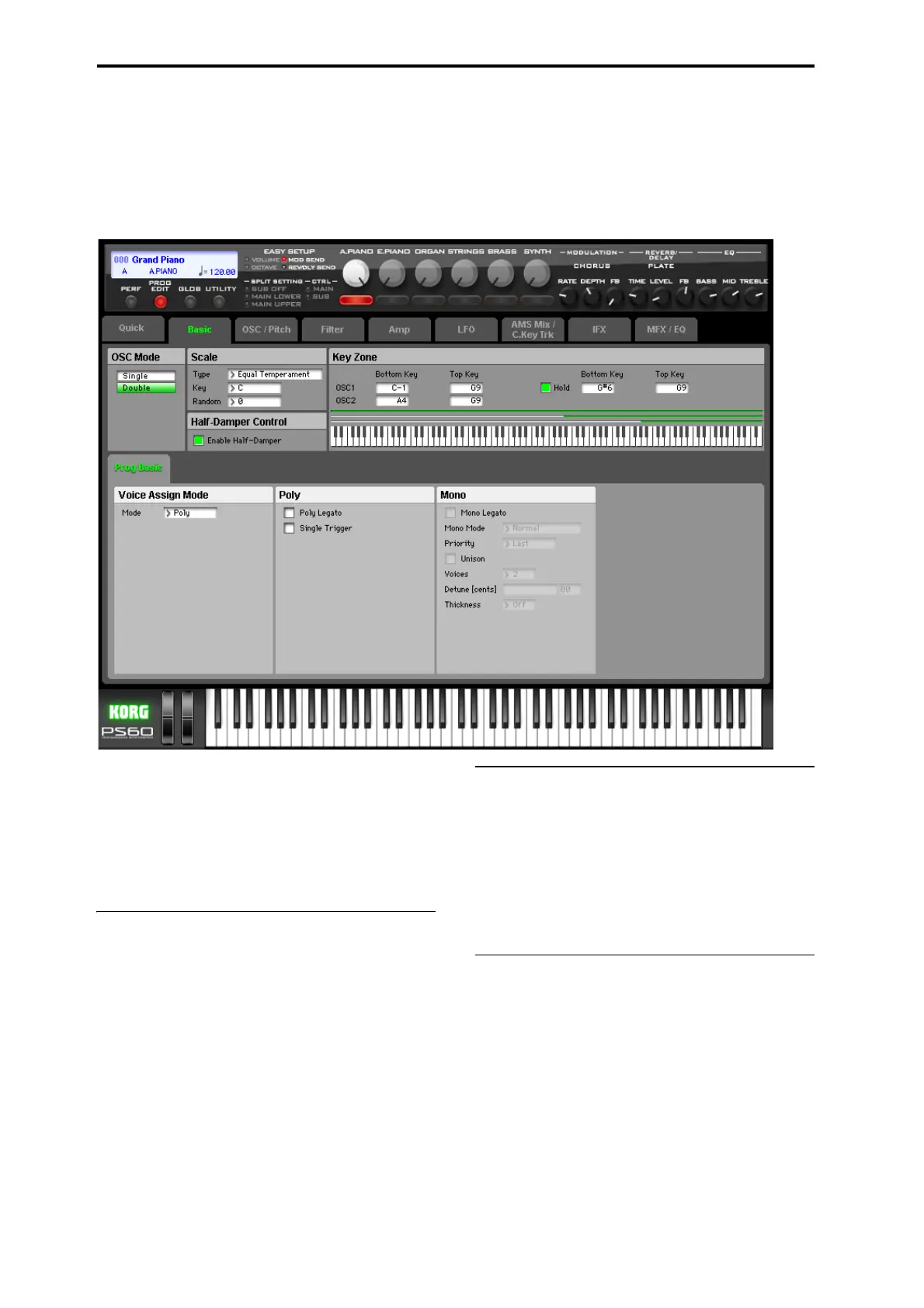
ThispagecontainsallofthebasicsettingsfortheProgram.
Amongotherthings,youcan:
•SetuptheProgramtobeaSingle,oraDouble
• Enable/disablethehalf‐damperfunction
•CreatekeyboardsplitsettingsforOSC1,OSC2,and
Hold.
• Selectthebasicscaleoftheprogram.
OSC Mode
Oscillator Mode [Single, Double]
ThisspecifiestheProgram’soscillatorassignment;whether
itwilluseoneortwooscillators.
Single:Theprogramwilluseoneoscillator(Oscillator1,Fil‐
ter1,Amplifier1).Inthiscase,theprogramwillnormally
haveamaximumof120‐notepolyphony.
Double:Theprogramwillusetwoosc illators(Oscillator1/
2,Filter1/2,Am
plifier1/2).Inthiscasetheprogramwill
normallyhaveamaximumof60‐notepolyphony.
Scale
Type [Equal Temperament...User Octave Scale03]
SelectsthebasicscalefortheProgram.()“Type”onpage 4)
Key (Scale Key) [C...B]
()“Key(ScaleKey)”onpage 6)
Random [0...7]
()“Random”onpage 6)
Half-Damper Control
Ahalf‐damperpedalisaspecialtypeofcontinuousfoot
pedal,suchastheKorgDS‐1H.Incomparisontoastandard
footswitch,half‐damperpedalsoffermoresubtlecontrolof
sustain,whichcanbeespeciallyusefulforpianosounds.
ThePS60willautomaticallysensewhenahalf‐damperis
connectedtotherear‐panelDA MPER/PEDAL/SWinput.
Forproperoperation,youwillalsoneedtocalibratethe
pedal,usingtheHalfDamperCalibrationcommandinthe
Globalcommand.()“HalfDmprCalib(HalfDamperCali‐
bration)”onpage 53oftheOwner’smanual)
Theoffandfull‐onpositionsofthehalf‐damperworkjust
likeast
andardfootswitch.InconjunctionwiththeEnable
Half‐Damperparameter,below,intermediatepositions
allowagraduatedcontrolofsustain,similartothedamper
pedalofanacousticpiano.




 To Next Page