4
LeeBoy 6150 Conveyor Paver 4-5
Operation
DPF Regeneration (REGEN)
It is important to understand DPF regeneration before
operating the paver. DPF regeneration is the term given
to the cleaning process where the exhaust tempera-
ture is raised in an attempt to safely burn off any soot
and undesired combustion gas captured in the Diesel
Particulate Filter (DPF) in the exhaust system. When the
DPF lter reaches a soot saturation level between 25 -
45 percent, the onboard engine ECU (Engine Control
Unit) will activate a regeneration cycle.
To reduce the amount of particulate
matter and maximize efciency, use API-CJ4 (or
ACEA-E9 European equivalent) engine oil. Running
the engine at 1800 RPMs will also provide more
efcient operation and allow automatic regeneration
while paving.
During normal operation, the DPF is cleaned automati-
cally. Under certain conditions, the operator may have
to instruct the control system to perform the cleaning
process.
The DPF icon on the PV480 digital controller indicates
the level of soot build-up on a scale of Level 0 - 5. The
regeneration process will occur automatically at Level
1 - 2. The engine speed will increase during regenera-
tion and there may be a noticeable sound difference.
Once regeneration is complete, the engine will return to
normal idle speed.
Once the DPF cycle has been activated, it is important
not to shut off the engine as the regeneration cycle
will fail and could possibly damage the engine. If the
regeneration cycle fails, the ECU may attempt a second
regeneration depending upon how blocked the lter has
become. If the system does not allow a second regen-
eration, this means the lter is blocked more than 80
percent and needs to be cleaned or replaced.
It is important to perform a parked,
manual regeneration BEFORE the engine reaches as
high as Level 4. If the DPF reaches Level 4 - 5, non-
warranty factory assistance from the engine manufac-
turer is required.
DO NOT idle machine any longer than
necessary as too much idling can cause soot to build
up in the DPF, requiring more frequent regeneration.
PV480 Powerview Display
Gauge Screen
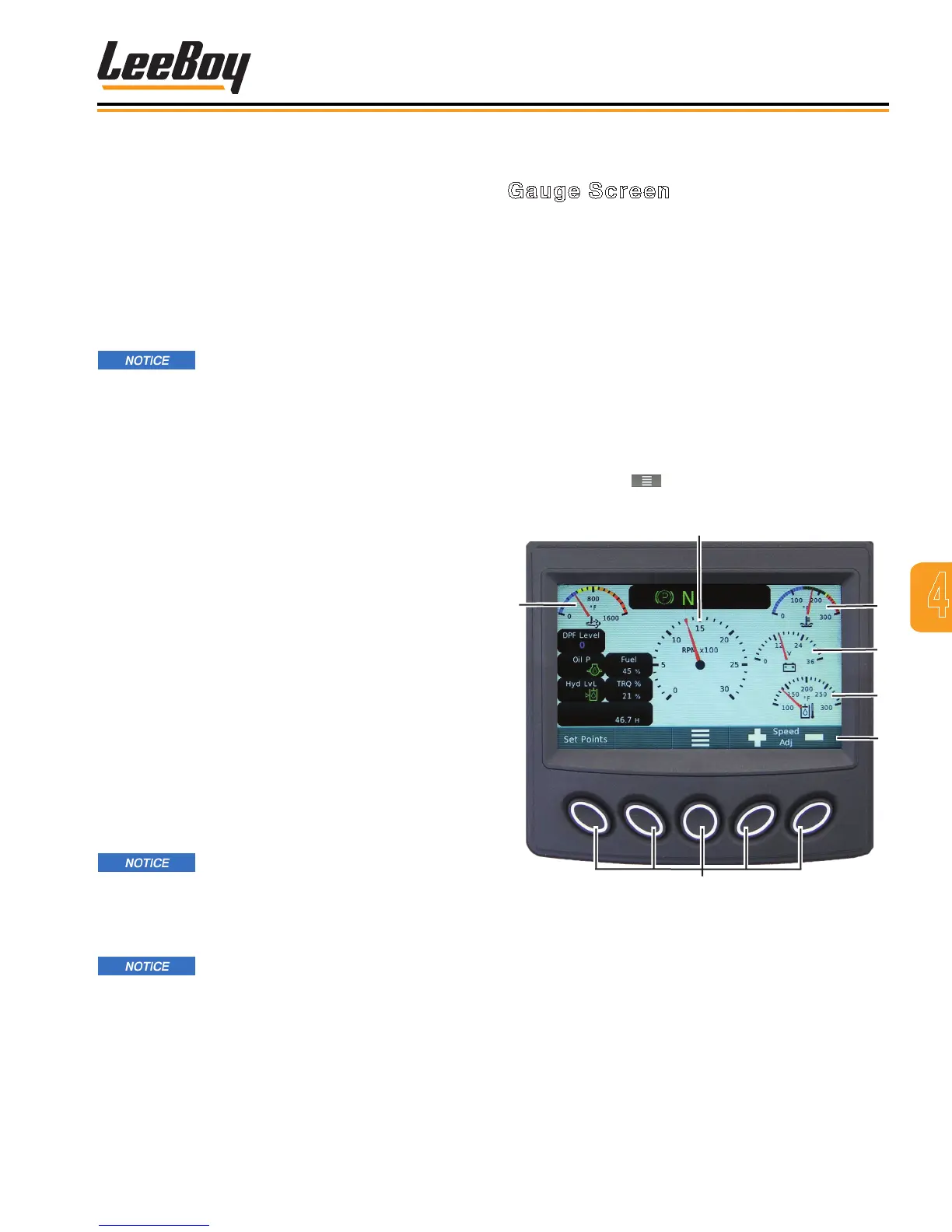
The Gauge Screen is the rst screen to appear on the
PV480 digital controller when starting the engine. This
is the default screen. (Figures 4-2)
Pressing the “soft key” buttons along the bottom of the
controller unit allows the operator to navigate to various
other screens. The banner icons along the bottom of
the screen correspond with these buttons, and change
accordingly when navigating to other screens as de-
scribed on the following pages. Table 4-2 on the next
page shows the icons that appear on the banner with
descriptions.
Pressing the Set Points button navigates to the Set
Point and Throttle Speed screen. (Page 4-7) Pressing
the center button ( ) always navigates to the Main
Menu screen. (Page 4-7)
1
2
3
Soft Keys
Figure 4-3. Gauge Screen
1 - After Treatment DPF Outlet Gas Temperature
2 - Engine Speed/RPMs
3 - Engine Coolant Temperature
4 - Electrical Potential Voltage
5 - Hydraulic Oil Temperature
6 - Soft Key Banner



 To Next Page