4
LeeBoy 6150 Conveyor Paver 4-19
Operation
Activate/Deactivate Operator
Control Station
Only one operator control station can be activated at a
time for the paver to function. While the paver is typically
operated from the left side, the operator can change the
active station at any time using the following procedure:
NOTE: The joystick on BOTH steering control panels
must be in the NEUTRAL position and the Run/
Stop switch in the STOP position to change
from one steering control box to the other.
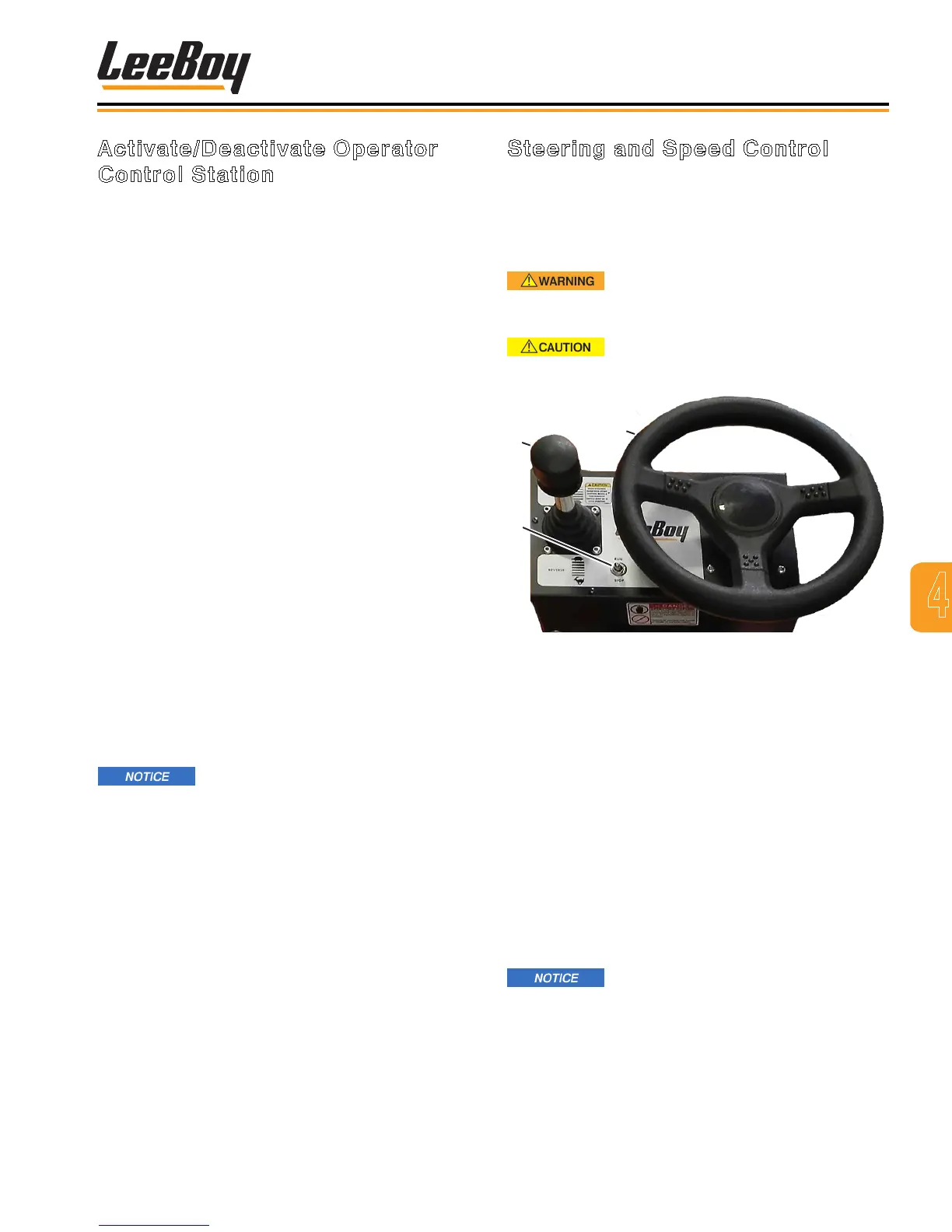
1. Place joysticks in the NEUTRAL (center) position.
(Figure 4-39)
2. The Run/Start switches on both control boxes
must be set to the STOP position to proceed with
activation.
3. Activate the steering control box being used by
setting its Run/Stop switch to the RUN position.
That operator station is now activated.
4. Start the engine and allow it to warm a few minutes.
NOTE: The engine will not start unless the E-STOP
button is disengaged and the joystick is in the
NEUTRAL (center) position.
NOTE: If the joystick remains out of neutral with the
Run/Stop switch in the STOP position for more
than 10 minutes, you will need to return the
joystick back to neutral to resume operation.
A code will display on the PV480 digitial
controller. (See Section 5, PV480 Diagnostic
Trouble Codes)
If the joystick stays in the NEUTRAL
position with the Run/Stop switch in the RUN position
for 10 minutes, the steering control box will “lock-
out” for safety purposes. The operator need only
toggle the Run/Stop switch from Run to Stop back to
Run to regain control.
Steering and Speed Control
The LeeBoy 6150 Conveyor Paver is steered by
steering wheel, with forward/reverse direction and
speed controlled via joystick. The RUN/STOP switch
applies parking brake when set to the STOP position.
(Figure 4-39)
Ensure there are no people, obstacles
or other equipment in the path of the paver before
moving in either direction.
Be aware of the terrain and driving
conditions. Adjust speed accordingly.
1
3
2
Figure 4-39. Steering and Speed Control Box
1 - Forward/Reverse Joystick
2 - Steering Wheel
3 - Run/Stop Switch
• To drive the paver forward, pull up on joystick
locking collar and push forward to reach the desired
speed.
• To move in reverse, pull up on joystick locking collar
and move backward to reach the desired speed.
A back-up alarm will automatically turn on when in
reverse.
• To slow the paver, move joystick closer to the
neutral position.
• Return joystick to the neutral position to stop paver.
Before leaving the operator platform,
return both joysticks to the neutral position, and both
Run/Stop switches to the STOP position.



 To Next Page