4
LeeBoy 6150 Conveyor Paver 4-7
Operation
Main Menu Screen
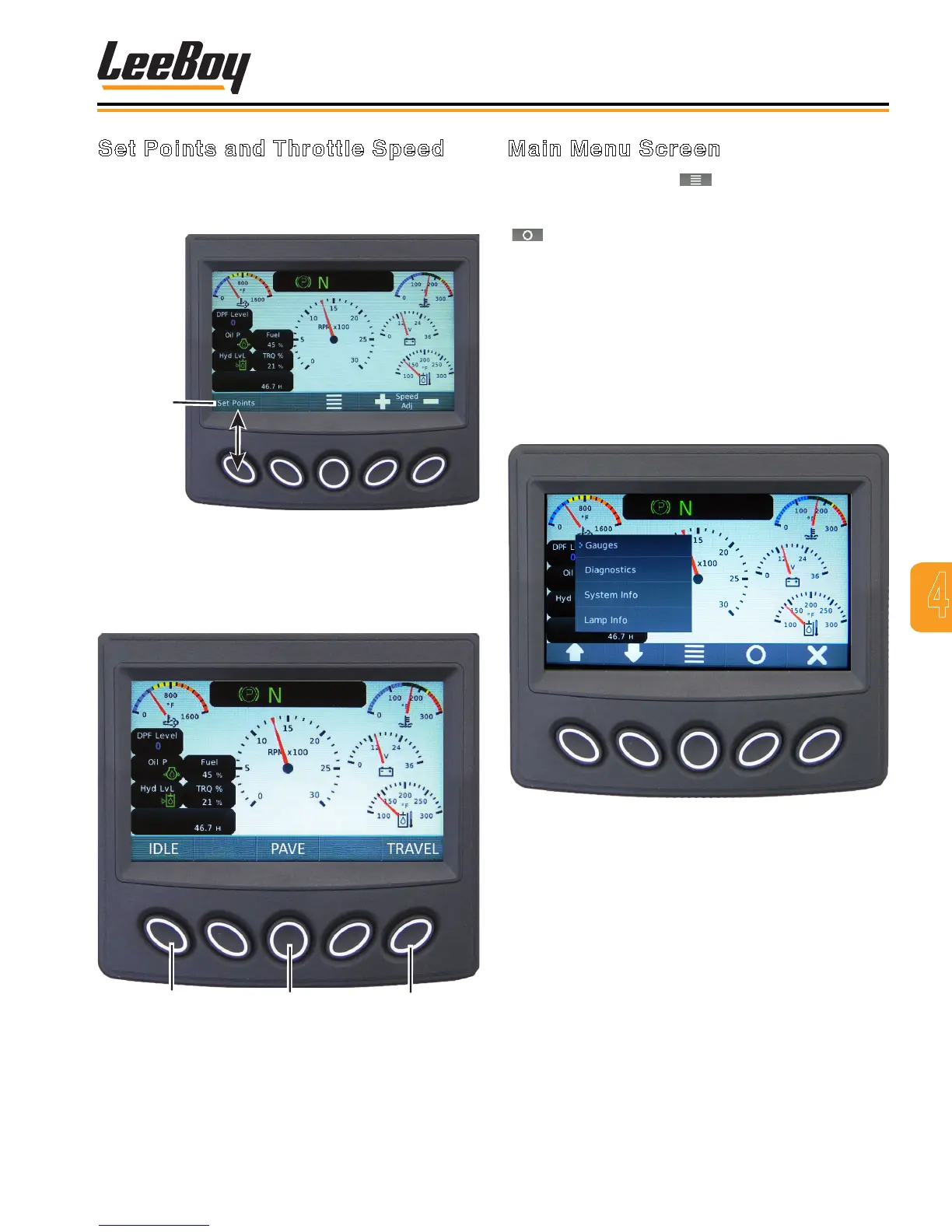
Pressing the Main Menu ( ) soft key navigates to the
Main Menu action items. (Figure 4-7) Scroll through
the list using the UP/DOWN arrow keys, then press the
( ) key when the cursor (>) points to screen you wish
to view to select that screen mode. The Main Menu
choices are listed below and described on the following
pages:
• Gauge (default screen)
• Diagnostics
• System Info
• Lamp Info
• User Settings
Figure 4-7. Main Menu Screen
Set Points and Throttle Speed
Pressing the Set Points button on the gauge screen
navigates to the Set Points and Throttle Speed screen.
(Figure 4-5)
Set Points
Button
Figure 4-5. Navigation to Set Points
Select the desired throttle speed using the keypad
buttons. The throttle speed selections are: IDLE (1300
RPMs), PAVE (1800 RPMs), and TRAVEL (2200 RPMs).
(Figure 4-6)
1
2
3
Figure 4-6. Engine Throttle Speeds Screen
1 - IDLE (1300 RPMs)
2 - PAVE (1800 RPMs)
3 - TRAVEL (2200 RPMs)



 To Next Page