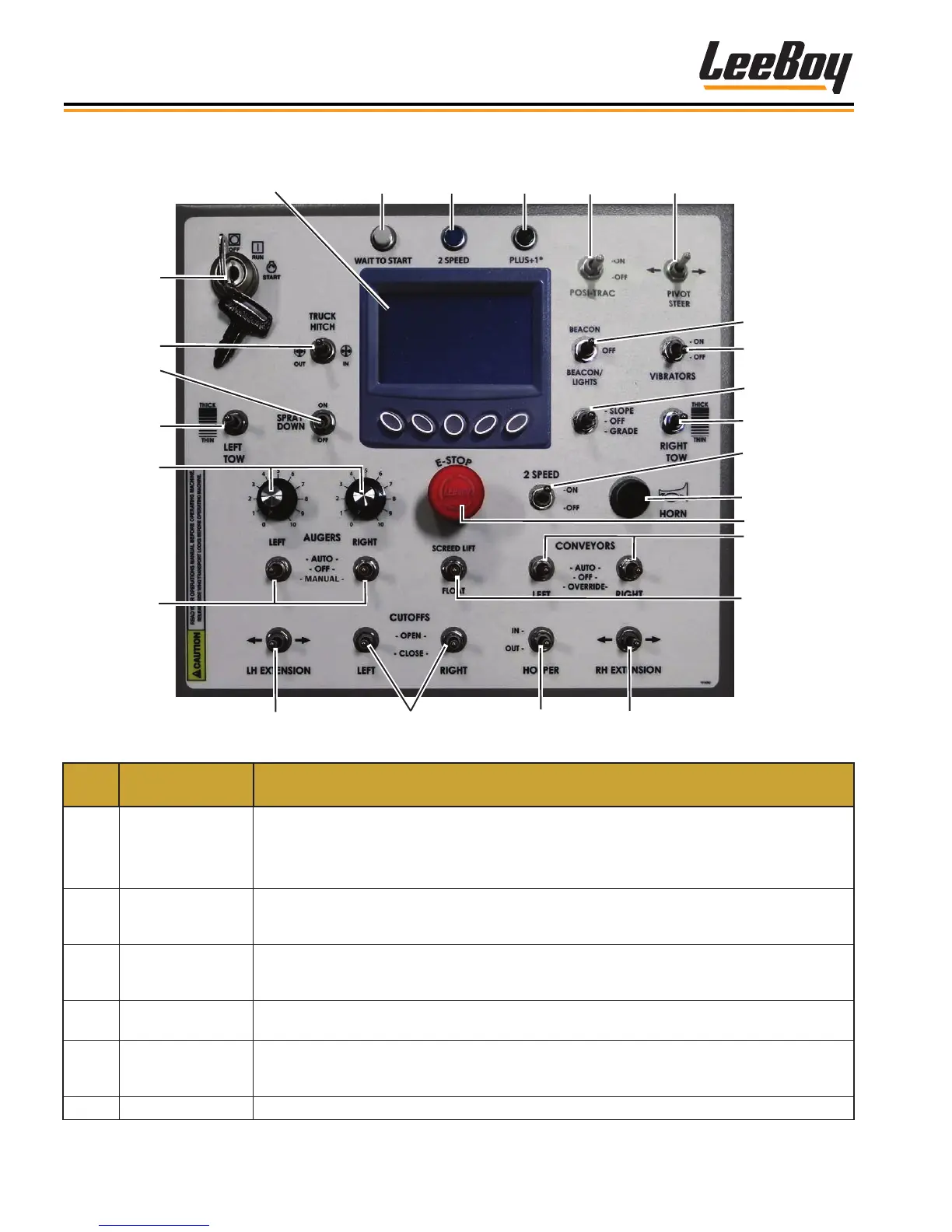
3-6 Leeboy 6150 Conveyor Paver
Component Location
Main Operator Controls
1
2
3
4
5
6
7
8 9
10
11
12
13
14
15
16
17
18
19
20
21
22 23
24
25
Figure 3-2. Operator Control Panel
ITEM
NO.
CONTROL
NAME
FUNCTION
1
Left and Right
Auger Switches
Selects ON or OFF for automatic operation of right and left augers. Center position is OFF.
Selecting the MANUAL position allows the augers to run continuously.
NOTE: The auger switches must be set to the ON position (automatic mode) on the main
control panel AND both remote screed control boxes when using the sonic auger sensor.
2
Right and Left
Auger Dials
Controls left and right auger speeds. Turning clockwise increases auger speed while turning
counterclockwise reduces auger speed. The auger switch(es) must be turned on for the auger
dials to function. Adjust dial to desired auger speed.
3
Left Tow Thicker/
Thinner Switch
Sets the thickness of the asphalt and controls the electric ight screws. Operator can select
either THICKER or THINNER as needed. The Grade Control switch must be set to GRADE on
the control panel to turn power on for this feature.
4 Spraydown Switch
Turns on the spraydown system for spraying release agent to lubricate and prevent asphalt from
hardening on machine surfaces.
5
Truck Hitch
(Option)
Optional Component: Engages truck hitch function. Engages the truck hitch to the material truck
wheels. Set switch to the IN position to engage the hitch. The OUT position disengages hitch
from the material truck wheels.
6 Ignition Starts and stops engine.



 To Next Page