Publication date: June, 2015
Revision A1
2-5.1.5.6 Views
The function is used to configure SNMPv3 view. The Entry index keys are OID Subtree and View
Name. To create a new view account, please check <Add new view> button, and enter the view
information then check <Save>. Max Group Number: 28.
Configure SNMPv3 view table on this page. The entry index keys are View Name and OID
Subtree.
Web Interface
To display the configure SNMP views in the web interface:
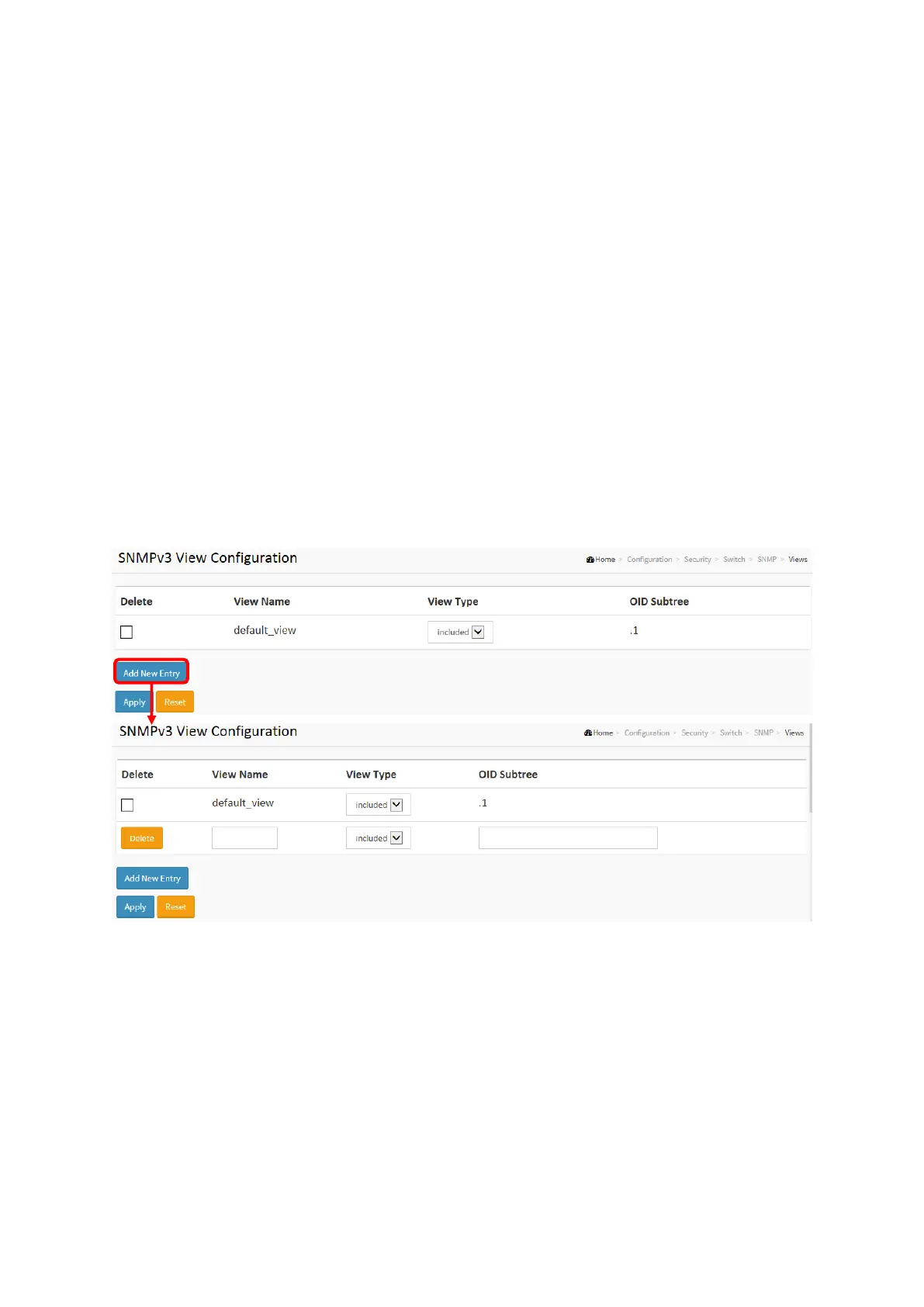
1. Click SNMP, Views.
2. Click Add new View.
3. Specify the SNMP View parameters.
4. Click Apply.
5. If you want to modify or clear the setting then click Reset.
Figure 2-5.1.5.6: The SNMP Views Configuration
Parameter description:
Delete
Check to delete the entry. It will be deleted during the next save.
View Name
A string identifying the view name that this entry should belong to. The allowed string
length is 1 to 32, and the allowed content is ASCII characters from 33 to 126.
View Type
Indicates the view type that this entry should belong to. Possible view types are:
included: An optional flag to indicate that this view subtree should be included.
excluded: An optional flag to indicate that this view subtree should be excluded.














 To Next Page